• Home
  • News
  • Software
  • Knowledge
  • MMO
  • Tips
  • Security
  • Network
  • Office
AnonyViet - English Version
  • Home
  • News
  • Software
  • Knowledge
  • MMO
  • Tips
  • Security
  • Network
  • Office
No Result
View All Result
  • Home
  • News
  • Software
  • Knowledge
  • MMO
  • Tips
  • Security
  • Network
  • Office
No Result
View All Result
AnonyViet - English Version
No Result
View All Result

Reviews of the visited locations are secretly saved on the phone

AnonyViet by AnonyViet
February 1, 2023
in Software
0

Did you know that on Android phones and iPhones, there is a feature to save the locations you have passed. Through GPS and gyroscope, even if you don’t have Wifi or a sim with no signal, the phone also knows where you are, what location on the map. This feature is quite good for those who want to review where they went, at what time. But it is also quite dangerous if someone takes advantage of location saving to control you. You can turn on or off the feature of reviewing the places you have visited stored on your phone using the instructions below.

Join the channel Telegram of the AnonyViet 👉 Link 👈

Beside locate your lover by Zenlyyou can track your lover via GPS using Google Maps or Iphone’s Important Location feature.

View location history using Google Maps

Above Google Maps of the Iphone and Android all have a “Your Timeline” feature. This feature will record your journey day by day. The route log shows clearly by what means of transport, departure and ending times. Especially on the map, the details are clearly displayed through the navigation line. If you want to check where your wife, husband, lover went at what time on your phone, this is a very suitable feature. To enable Location History, do the following:

You download and install the Google Maps application on the App Store or CHPlay. Then sign in with your Google (Gmail) account.

Step 1: Grant location permission to Google Maps

  1. In the map interface, you select the icon Menu -> Setting
  2. Select Personal contentscroll down select to “Location Settings”.
  3. Check place Location settings, choose Location service select always.

Reviews of passed locations are secretly saved on the phone 7

Step 2: Enable Location History on Google Maps

  1. In the map interface, you select the icon Menu -> Setting
  2. Select icon Your timeline Timeline-> Select the sign … in the upper right corner -> Setting Reviews of passed locations are secretly saved on the phone 8
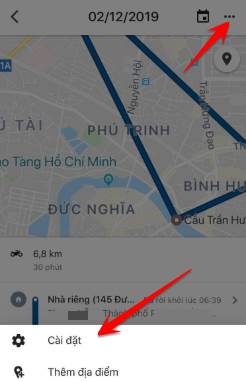
  3. Select Location History Settings Reviews of passed locations are secretly saved on the phone 9
  4. Move place Location history from pause to ON. Reviews of passed locations are secretly saved on the phone 10
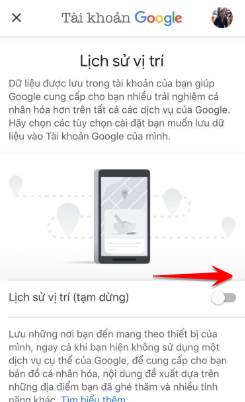
Step 3: Review Location History on Google Maps

  1. In the map interface, you select the icon Menu -> Setting
  2. Select icon Your timeline Timeline -> Select the calendar icon Show calendar -> Select date to review location history.

Select a date to review the history of the location the location has passed

On the map will clearly show the places you have passed, the time, the distance.

Now every time you go anywhere with your phone, your location will be recorded by Google Maps, even though there is no Internet. Consider using this feature if the phone does not set a Password, you will easily be controlled by a bear or wife.

Turn on the “Important Location” function on Iphone

What is important wallet on Iphone?

Your iPhone’s Important Locations is a feature that tracks and saves the locations you visit most often. Apple uses these locations to send you specific alerts in the Calendar, Maps, and Photos apps. Although your iPhone saves these Important Locations, Apple cannot see or read them because the data is encrypted.

This is the least known feature on iPhone. For privacy reasons, Important Locations is not enabled. This feature is different from Find (Find my Phone) real-time view, Important Values ​​will save the places you have passed. You can review it at any time.

How to enable Important Locations

Proceed as follows:

Step 1: Go to Settings

Setting

Step 2: Go to Privacy

Privacy

Step 3: Location service

Location service

Step 4: System Service

System Service

Step 5: Turn on Important Location mode

turn on key location mode

Now when you go anywhere or visit a certain place, the iPhone will record the address. If you want to see the history of the location you have passed, repeat again from step 1 to step 5will see the place appear History. This place will save all the locations you go to.

location address passed

Select a specific address

location history passed

You will see your destination appear on the map

Show the passed location on the map

If you set the language to English, follow the menu below to turn on Important Locations:

Settings -> Privacy -> Location Services -> System -> Services -> Significant Locations

Watch a video on how to turn on important locations on iPhone:

The article achieved: 5/5 – (100 votes)

Tags: locationsphoneReviewssavedsecretlyvisited
Previous Post

Instructions for inserting photos into the Hot Trend Facebook column frame

Next Post

Instructions to block POPUP ads with HOSTS . file

AnonyViet

AnonyViet

Related Posts

Instructions on how to get Norton 360 Deluxe for 1 year for free
Software

Instructions on how to get Norton 360 Deluxe for 1 year for free

July 19, 2026
Is Xiaomi Redmi A7 a valuable choice in the popular smartphone segment?
Software

Is Xiaomi Redmi A7 a valuable choice in the popular smartphone segment?

July 14, 2026
Compact design, durable battery, excellent camera: Review of OPPO Reno 16 Pro 5G
Software

Compact design, durable battery, excellent camera: Review of OPPO Reno 16 Pro 5G

July 12, 2026
Download the free 3D Pinball Space Cadet game on the App Store now
Software

Download the free 3D Pinball Space Cadet game on the App Store now

July 12, 2026
Learn new skills with iPad 11 (A16) 128GB: when is enough, when should you upgrade to a higher level?
Software

Learn new skills with iPad 11 (A16) 128GB: when is enough, when should you upgrade to a higher level?

July 10, 2026
Instructions for taking free buses in Ho Chi Minh City from July 2026
Software

Instructions for taking free buses in Ho Chi Minh City from July 2026

July 9, 2026
Next Post
Instructions to block POPUP ads with HOSTS . file

Instructions to block POPUP ads with HOSTS . file

0 0 votes
Article Rating
Subscribe
Login
Notify of
guest

guest

0 Comments
Oldest
Newest Most Voted

Recent News

How to download documents on 123doc for free

How to download documents on 123doc for free

July 21, 2026
Instructions for Logo Design in just a few clicks with Logaster

Instructions for Logo Design in just a few clicks with Logaster

July 20, 2026
Clean Tam – Accompanying the green space of every Vietnamese family

Clean Tam – Accompanying the green space of every Vietnamese family

July 20, 2026
3 coolest ways to turn off your computer

3 coolest ways to turn off your computer

July 19, 2026
How to download documents on 123doc for free

How to download documents on 123doc for free

July 21, 2026
Instructions for Logo Design in just a few clicks with Logaster

Instructions for Logo Design in just a few clicks with Logaster

July 20, 2026
Clean Tam – Accompanying the green space of every Vietnamese family

Clean Tam – Accompanying the green space of every Vietnamese family

July 20, 2026
AnonyViet - English Version

AnonyViet

AnonyViet is a website share knowledge that you have never learned in school!

We are ready to welcome your comments, as well as your articles sent to AnonyViet.

Follow Us

Contact:

Email: anonyviet.com[@]gmail.com

Main Website: https://anonyviet.com

Recent News

How to download documents on 123doc for free

How to download documents on 123doc for free

July 21, 2026
Instructions for Logo Design in just a few clicks with Logaster

Instructions for Logo Design in just a few clicks with Logaster

July 20, 2026
  • Home
  • Home 2
  • Home 3
  • Home 4
  • Home 5
  • Home 6
  • Next Dest Page
  • Sample Page

say88 tỷ lệ kèo nhà cái kèo nhà cái 5 febet

No Result
View All Result
  • Home
  • News
  • Software
  • Knowledge
  • MMO
  • Tips
  • Security
  • Network
  • Office

say88 tỷ lệ kèo nhà cái kèo nhà cái 5 febet

wpDiscuz
0
0
Would love your thoughts, please comment.x
()
x
| Reply