• Home
  • News
  • Software
  • Knowledge
  • MMO
  • Tips
  • Security
  • Network
  • Office
AnonyViet - English Version
  • Home
  • News
  • Software
  • Knowledge
  • MMO
  • Tips
  • Security
  • Network
  • Office
No Result
View All Result
  • Home
  • News
  • Software
  • Knowledge
  • MMO
  • Tips
  • Security
  • Network
  • Office
No Result
View All Result
AnonyViet - English Version
No Result
View All Result

Quickly register for Email Proton.me (until April 30, it’s free)

AnonyViet by AnonyViet
January 25, 2023
in Tips
0

Prontonmail is famous for encrypting users’ Emails, recently they launched Proton.me Email for a fee, but currently for free registration until April 30, 2022. When they founded ProtonMail in 2014, they realized one of the best ways to help people protect their privacy was to make sending encrypted email as convenient as possible. This includes giving you an email address that’s easy to share with friends and family.

Join the channel Telegram of the AnonyViet 👉 Link 👈

Quickly register for Email Proton.me (until April 30, it’s free)

In this article, I will introduce you to proton.me, an additional email domain that you can use to securely send and receive email. Shorter email domains were one of the most requested features from the Proton 2022 survey.

If you have a ProtonMail account, you will be able to activate the @proton.me address for free in the coming days. That means if your current email address is [email protected], you can activate it at [email protected]. Until April 30, the @proton.me address associated with your username can be activated for free. After April 30, you can still activate your @proton.me address if you’re a paid ProtonMail subscriber. In any event, your @proton.me address will be reserved indefinitely as long as you keep your account active.

Enable @proton.me . address

You can still continue to send mail from your existing ProtonMail address. Your new @proton.me address will not count towards your address limit.

What is Proton.me?

As more people turn to ProtonMail to protect their privacy, they also know that ProtonMail wants to empower users to take control of their data. ProtonMail has added proton.me as an additional domain so you can have multiple secure ProtonMail addresses, allowing you to share with anyone.

ProtonMail wants to navigate @proton.me like a piece of security code. You can chat with friends and family by text or file comfortably because whatever they send is encrypted on the Proton network and can only be read by one person.

You can use your new @proton.me address to sign up for online accounts, subscribe to news, and send private messages to friends and family. All emails sent to your @proton.me address will arrive in your inbox as usual.

If you want an even shorter email address, the domain @pm.me is also available to paid subscribers.

How to register Email Proton.me
Quickly register for Email Proton.me (until April 30, it's free) 5

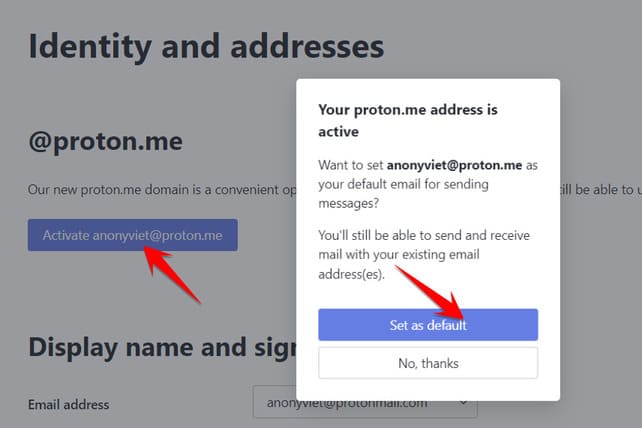
You can activate your @proton.me address by Log in to your ProtonMail account on your web browser. Once you have successfully logged in, follow these steps:

1. Click Settings → Go to Settings at the top right and select Identity and addresses in the menu on the left.

2. Enable your @proton.me address in the @proton.me section.

3. You can set the @proton.me address as the default address for sending and receiving emails.

If you are a paid ProtonMail subscriber, you can also create an additional @proton.me address.

If you’re new to ProtonMail and you want your own @proton.me address, sign up for a free ProtonMail account.

In addition, you can also see how to sign up for DuckDuckGo’s @duck.com Secure Mail @duckGo here.


The article achieved: 5/5 – (100 votes)

Tags: AprilemailfreeProton.meQuicklyRegister
Previous Post

Lesson 260: Quick analysis in Excel

Next Post

Lesson 259: Table Styles in Excel

AnonyViet

AnonyViet

Related Posts

How to change the default font on Windows 10
Tips

How to change the default font on Windows 10

April 13, 2026
5 tips for using a Browser to replace an App (helps save RAM, time and money)
Tips

5 tips for using a Browser to replace an App (helps save RAM, time and money)

April 13, 2026
How to make funny MeMe photos without Photoshop within 10 seconds
Tips

How to make funny MeMe photos without Photoshop within 10 seconds

April 11, 2026
How to quickly design your own Logo without Photoshop
Tips

How to quickly design your own Logo without Photoshop

April 10, 2026
How to convert Website into App on Windows
Tips

How to convert Website into App on Windows

April 9, 2026
Instructions for getting 3 months of Adobe Express Pro for free
Tips

Instructions for getting 3 months of Adobe Express Pro for free

April 9, 2026
Next Post
Lesson 259: Table Styles in Excel

Lesson 259: Table Styles in Excel

0 0 votes
Article Rating
Subscribe
Login
Notify of
guest

guest

0 Comments
Oldest
Newest Most Voted
Inline Feedbacks
View all comments

Recent News

4K Video Downloader Plus – Tool to download YouTube videos on macOS

4K Video Downloader Plus – Tool to download YouTube videos on macOS

April 20, 2026
How to add Watermark to Google Docs to protect copyright

How to add Watermark to Google Docs to protect copyright

April 19, 2026
How to intercept traffic using Burp Suite to analyze HTTP/HTTPS

How to intercept traffic using Burp Suite to analyze HTTP/HTTPS

April 18, 2026
How to avoid Adblock detection on Youtube with 4 good tips

How to avoid Adblock detection on Youtube with 4 good tips

April 17, 2026
4K Video Downloader Plus – Tool to download YouTube videos on macOS

4K Video Downloader Plus – Tool to download YouTube videos on macOS

April 20, 2026
How to add Watermark to Google Docs to protect copyright

How to add Watermark to Google Docs to protect copyright

April 19, 2026
How to intercept traffic using Burp Suite to analyze HTTP/HTTPS

How to intercept traffic using Burp Suite to analyze HTTP/HTTPS

April 18, 2026
AnonyViet - English Version

AnonyViet

AnonyViet is a website share knowledge that you have never learned in school!

We are ready to welcome your comments, as well as your articles sent to AnonyViet.

Follow Us

Contact:

Email: anonyviet.com[@]gmail.com

Main Website: https://anonyviet.com

Recent News

4K Video Downloader Plus – Tool to download YouTube videos on macOS

4K Video Downloader Plus – Tool to download YouTube videos on macOS

April 20, 2026
How to add Watermark to Google Docs to protect copyright

How to add Watermark to Google Docs to protect copyright

April 19, 2026
No Result
View All Result
  • Home
  • News
  • Software
  • Knowledge
  • MMO
  • Tips
  • Security
  • Network
  • Office

wpDiscuz
0
0
Would love your thoughts, please comment.x
()
x
| Reply