

Continue lesson 1, after we have written the function to change the MAC address on the terminal. We need to check whether the current MAC is correct according to the MAC address specified by the user or not.
| Join the channel Telegram of the AnonyViet 👉 Link 👈 |
To do that, we must first get the result of the “ifconfig” command and assign it to a string variable. Then we will find the MAC in that data pile.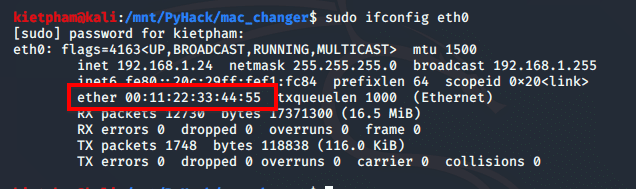
Get the result of the ifconfig . command
In the module subprocess there is a function called check_outputthis function checks your command and can assign that result to another variable.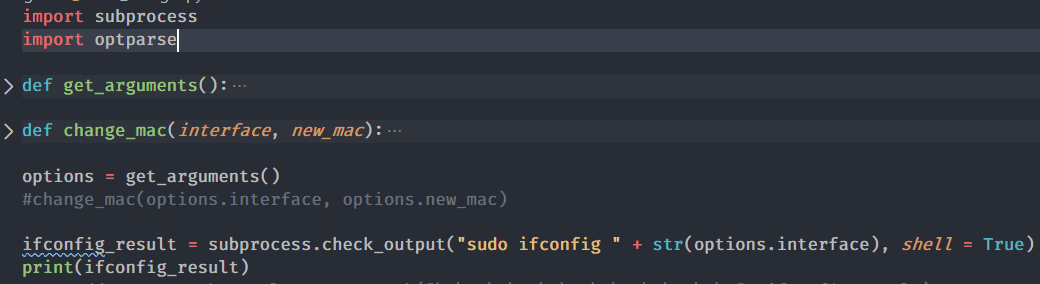
![[PyHack] Lesson 2: Check if the MAC that the user has changed is correct 14](https://anonyviet.com/wp-content/uploads/2020/05/21-1.png "[PyHack] Lesson 2: Check if the MAC that the user has changed is correct 24")
decode('utf-8')![[PyHack] Lesson 2: Check if the MAC that the user has changed is correct 15](https://anonyviet.com/wp-content/uploads/2020/05/21b-1.png "[PyHack] Lesson 2: Check if the MAC that the user has changed is correct 25")
![[PyHack] Lesson 2: Check if the MAC that the user has changed is correct 16](https://anonyviet.com/wp-content/uploads/2020/05/21c.png "[PyHack] Lesson 2: Check the MAC that the user has changed to see if it is correct 26")
After we have obtained the results of the ifconfig command successfully, we will find the MAC in this data pile.
FIND MAC
In programming, there is an algorithm called Regular Expression aka RegEx for short. RegEX is a regular expression used for advanced string processing through its own expressions, these expressions will have their own rules and you must follow them for your expressions to work. .
You guys come in Pythex so you can test this algorithm online. Click on the word Regular expression cheatsheet to learn more expressions included in Pythex.
You copy the text that the ifconfig command returns and paste it in place Your test string. On the section Your regular expression then enter \w\w:\w\w:\w\w:\w\w:\w\w:\w\w![[PyHack] Lesson 2: Check if the MAC that the user has changed is correct 17](https://anonyviet.com/wp-content/uploads/2020/05/23.png "[PyHack] Lesson 2: Check if the MAC that the user has changed is correct 28")
Ta da! We have found the location of the MAC already, easy?
Using RegEx in python
RegEx’s algorithm is included in the module re of python. We use the function re.search("cú pháp", biến)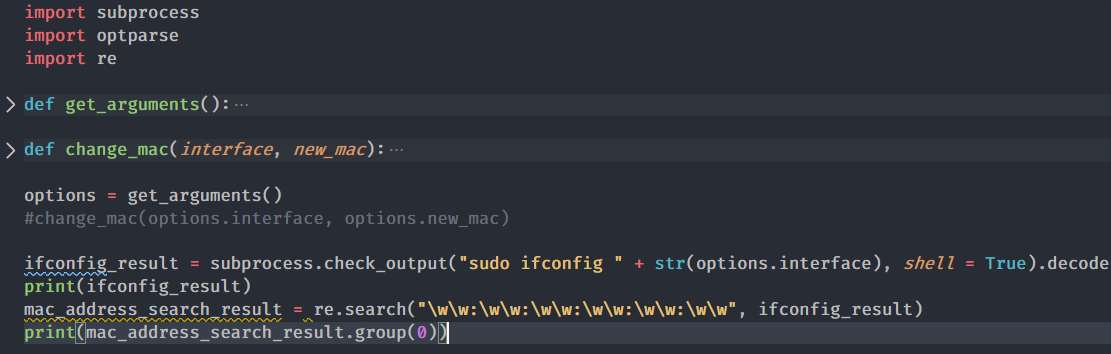
![[PyHack] Lesson 2: Check if the MAC that the user has changed is correct 18](https://anonyviet.com/wp-content/uploads/2020/05/25.png "[PyHack] Lesson 2: Check if the MAC that the user has changed is correct 30")
Now we add the if statement to check if the interface’s MAC can be read or not.
![[PyHack] Lesson 2: Check if the MAC that the user has changed is correct 19](https://anonyviet.com/wp-content/uploads/2020/05/26.png "[PyHack] Lesson 2: Check if the MAC that the user has changed is correct 31")
When the program cannot read the MAC of the interface.
![[PyHack] Lesson 2: Check the MAC that the user has changed to see if it is correct 20](https://anonyviet.com/wp-content/uploads/2020/05/27-1.png "[PyHack] Lesson 2: Check if the MAC that the user has changed is correct 32")
Compact code
We will put the code just now hàm get_current_mac()and return the result to the current_mac variable, then print it out. Since curret_mac is a Non-type, I just forced it to string.![[PyHack] Lesson 2: Check if the MAC that the user has changed is correct 21](https://anonyviet.com/wp-content/uploads/2020/05/28-1.png "[PyHack] Lesson 2: Check if the MAC that the user has changed is correct 33")
![[PyHack] Lesson 2: Check if the MAC that the user has changed is correct 22](https://anonyviet.com/wp-content/uploads/2020/05/29.png "[PyHack] Lesson 2: Check if the MAC that the user has changed is correct 34")
Check MAC
After getting the current MAC address, we will compare it with the new MAC address specified by the user. To see if when changing the MAC, the current MAC address is the same as the MAC address the user entered. If they are the same, they will succeed; if they are different, they will fail.
![[PyHack] Lesson 2: Check if the MAC that the user has changed is correct](https://anonyviet.com/wp-content/uploads/2020/05/30-1.png "[PyHack] Lesson 2: Check if the MAC that the user has changed is correct")
![[PyHack] Lesson 2: Check if the MAC that the user has changed is correct 23](https://anonyviet.com/wp-content/uploads/2020/05/31-1.png "[PyHack] Lesson 2: Check if the MAC that the user has changed is correct 36")
And this is when you enter the wrong interface.![[PyHack] Lesson 2: Check if the MAC that the user has changed is correct 24](https://anonyviet.com/wp-content/uploads/2020/05/32.png "[PyHack] Lesson 2: Check if the MAC that the user has changed is correct 37")
Remember the error of not changing the MAC when the first pair of numbers was odd? There was an error last time, but this time it’s gone.![[PyHack] Lesson 2: Check if the MAC that the user has changed is correct 25](https://anonyviet.com/wp-content/uploads/2020/05/33.png "[PyHack] Lesson 2: Check if the MAC that the user has changed is correct 38")









