At the beginning of this Pyhack series, we will go to learn what MAC is and how to change MAC in Python. Mac is unique address There are 6 pairs of 2 digits specified by the manufacturer for each network hardware (wireless card or Ethernet card). Mac stands for Media Access Control, and each address (code) is unique to a device. I will use Linux environment to do this series, more specifically Kali Linux. In this article we will learn how to change MAC using python.
| Join the channel Telegram of the AnonyViet 👉 Link 👈 |
PyHack is a series of hacks in python. Where you will learn python programming and ethical hacking at the same time. To understand the article better, please study through the course basic python prior to.
Why do we have to change the MAC?
- Increase count incognito.
- Impersonation Other devices.
- Overcome filters.
Simulate how a Mac works
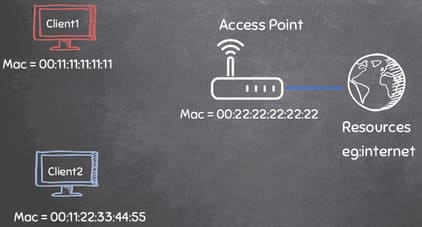
As mentioned above MAC addresses are unique. As a matter of fact, when manufacturers want to update the firmware, it will be easier to update specific devices thanks to the MAC. Packages will also know where they are waiting to be sent thanks to the specified MAC addresses.
![[PyHack] Lesson 1: What is MAC? How to change MAC using python](https://anonyviet.com/wp-content/uploads/2020/05/5.jpg "[PyHack] Lesson 1: What is MAC? How to change MAC using python")
How to change MAC using python
On Windows, it’s easy to change MAC using TMAC . software .
In Linux, we can completely change the MAC with python in a very simple way. In this article, I will change the MAC of eth0 (network card) and wlan0 (wifi card). We follow these steps:
- First, we will disable that MAC device:
sudo ifconfig wlan0 down - Next, we will change the MAC:
sudo ifconfig wlan0 hw ether 00:11:22:33:44:55
Place 00:11:22:33:44:55 is the new MAC address, and wlan0 is the device name, specifically here is the wifi card - Finally, turn on that MAC device again:
sudo ifconfig wlan0 up
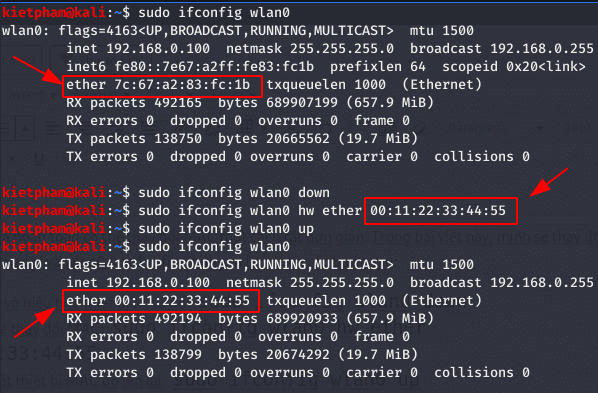
To change the MAC, we have to access the command on the shell. Python supports us to run commands on the system using module subprocess. The commands will depend on the operating system you are using.
Syntax:
import subprocesssubprocess.call(“COMMAND”, Shell=True)
Based on the above syntax and adding a few basic python lines, we will have code like this.
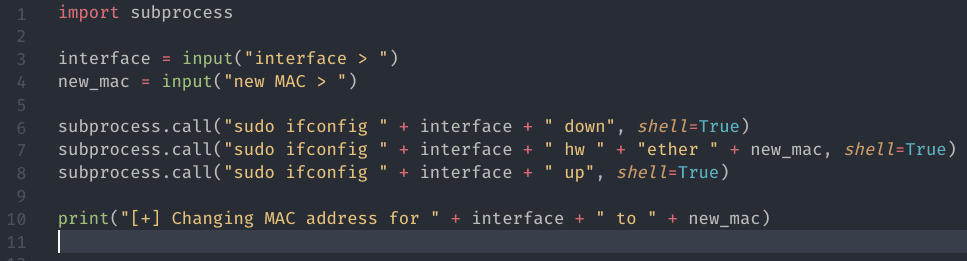
When running it will look like this.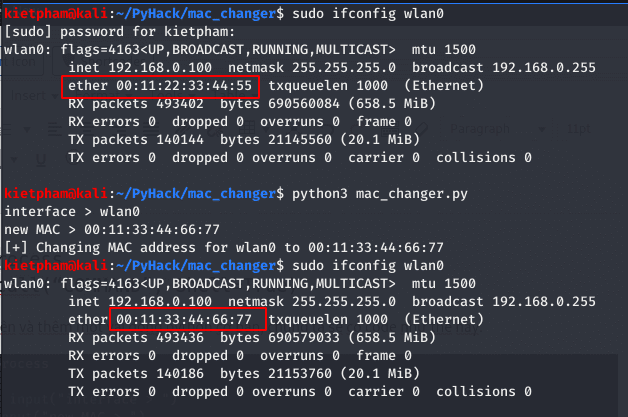
Next, we will add the parser to the program. Parser are arguments that help the user when using our program.
For example, when we type sudo ifconfig --help then it will return the arguments of that command.![[PyHack] Lesson 1: What is MAC? How to change MAC using python 11](https://anonyviet.com/wp-content/uploads/2020/05/9-1.png "[PyHack] Lesson 1: What is MAC? How to change MAC using python 24")
To use the parser, we use module optparse.![[PyHack] Lesson 1: What is MAC? How to change MAC using python 12](https://anonyviet.com/wp-content/uploads/2020/05/10-1.png "[PyHack] Lesson 1: What is MAC? How to change MAC using python 25")
![[PyHack] Lesson 1: What is MAC? How to change MAC using python 13](https://anonyviet.com/wp-content/uploads/2020/05/11.png "[PyHack] Lesson 1: What is MAC? How to change MAC using python 26")
So that the user can enter the interface and new MAC when running the file, we add the variable options and argurments is equal to parser.parse_args(). The options variable now contains two values, interface and new_mac. To call those two values t use the command options.interface or options.new_mac.
![[PyHack] Lesson 1: What is MAC? How to change MAC using python 14](https://anonyviet.com/wp-content/uploads/2020/05/12.png "[PyHack] Lesson 1: What is MAC? How to change MAC using python 27")
We will enter the interface and new MAC when running the program file.![[PyHack] Lesson 1: What is MAC? How to change MAC using python 15](https://anonyviet.com/wp-content/uploads/2020/05/14.png "[PyHack] Lesson 1: What is MAC? How to change MAC using python 28")
Oops, mistake. Note, you can only set the address unicast yes octet The first is an even number. The MAC address that I set has the first 2 numbers being odd, 99. So it will cause an error. To solve this, you just need to change the first 2 numbers of the new MAC address to be even.
![[PyHack] Lesson 1: What is MAC? How to change MAC using python 16](https://anonyviet.com/wp-content/uploads/2020/05/15.png "[PyHack] Lesson 1: What is MAC? How to change MAC using python 29")
But here we have another problem. When the user enters the wrong syntax or the system command error, the program still prints the print statement. So how to check for errors, and if there is an error, how do we print out what it is?
The optparse module already knows this case, so it allows us to use the if statement to check for system command errors.![[PyHack] Lesson 1: What is MAC? How to change MAC using python 17](https://anonyviet.com/wp-content/uploads/2020/05/16.png "[PyHack] Lesson 1: What is MAC? How to change MAC using python 30")
We put the optparse code in the function get_arguments() and the subprocess code into the function change_mac() ![[PyHack] Lesson 1: What is MAC? How to change MAC using python 18](https://anonyviet.com/wp-content/uploads/2020/05/17.png "[PyHack] Lesson 1: What is MAC? How to change MAC using python 31")
![[PyHack] Lesson 1: What is MAC? How to change MAC using python 19](https://anonyviet.com/wp-content/uploads/2020/05/18.png "[PyHack] Lesson 1: What is MAC? How to change MAC using python 32")
Completing the first post of the PyHack series, how do you feel? You guys join the group Anonyviet to see my PyNight series and see the latest information about this PyHack series.