• Home
  • News
  • Software
  • Knowledge
  • MMO
  • Tips
  • Security
  • Network
  • Office
AnonyViet - English Version
  • Home
  • News
  • Software
  • Knowledge
  • MMO
  • Tips
  • Security
  • Network
  • Office
No Result
View All Result
  • Home
  • News
  • Software
  • Knowledge
  • MMO
  • Tips
  • Security
  • Network
  • Office
No Result
View All Result
AnonyViet - English Version
No Result
View All Result

Photoshop website version: Online photo editing tool integrating AI

AnonyViet by AnonyViet
October 5, 2023
in News
0

Photoshop website version What is that? It is the online version of the famous photo editing software Photoshop, developed and provided to users by Adobe. With this tool, you can perform basic or advanced photo editing operations easily and quickly, without having to download or install anything.

Join the channel Telegram belong to AnonyViet ???? Link ????

Outstanding features of Photoshop website version

Adobe has officially launched the website version of Photoshop, an online photo editing tool that is more streamlined and user-friendly than the traditional application version. Photoshop website version has many outstanding features such as:

Simple and easy to use interface

Photoshop website version has a simple and easy-to-use interface, with tools grouped according to workflow. You can easily select objects in photos, edit portraits, add effects, etc. You can also switch smoothly between the website version and the desktop application version.
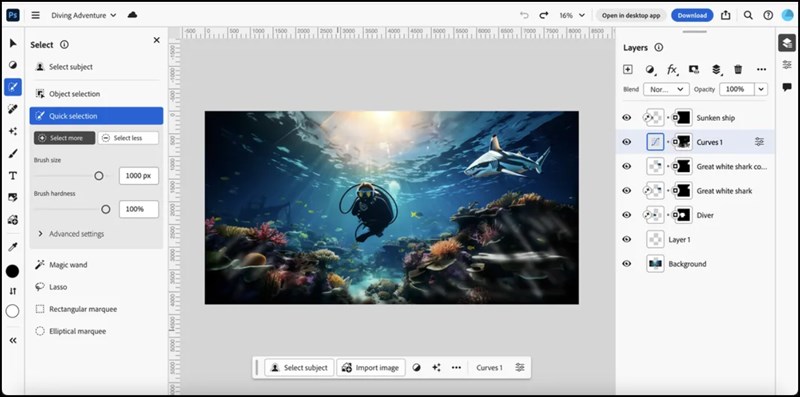
Photoshop website version
Interface of Photoshop website version

Integrates Adobe Firefly’s artificial intelligence features

Photoshop website version integrates artificial intelligence features of Adobe Firefly, a platform that supports graphic design. Some prominent AI features are Generative Fill and Generative Expand, which help you add, expand, or remove content from images in a smart and natural way.

In addition, you can also use text prompts to create images as you like. Text prompt is supported in over 100 languages.

Photoshop website version
Integrates artificial intelligence features such as Generative Fill

Collaborate and share easily

Photoshop website version helps you collaborate and share easily with others. You can invite others to view and comment on your projects. Invitees do not need to purchase the Photoshop package to view and comment. You can also export image files to many different formats.

Price and usage

Photoshop website version allows you to use a free 7-day trial. After that, if you want to use all the features of this tool, you have to pay $20.99/month (more than 500 thousand VND/month).

You can access the link The following To use Photoshop website version:

Epilogue

Photoshop website version is a convenient and modern online photo editing tool, giving you many creative and professional options. Try it now to experience its great features!


Rate this post

Tags: editingintegratingonlinephotoPhotoshoptoolversionWebsite
Previous Post

Sound of Text | How to add Google’s voice to TikTok videos

Next Post

How to automatically scale data size in Excel

AnonyViet

AnonyViet

Related Posts

MacBook Air M2 review: 2026 price hits rock bottom, what else?
News

MacBook Air M2 review: 2026 price hits rock bottom, what else?

March 14, 2026
Ứng dụng cầu nguyện của Iran bị hack, gửi thông điệp kêu gọi đầu hàng
News

Ứng dụng cầu nguyện của Iran bị hack, gửi thông điệp kêu gọi đầu hàng

March 1, 2026
How many colors does the Samsung Galaxy S26 Series come in and what are the shades that will cause a stir in 2026?
News

How many colors does the Samsung Galaxy S26 Series come in and what are the shades that will cause a stir in 2026?

February 26, 2026
Key Features of a Good Online Quiz Software
News

Key Features of a Good Online Quiz Software

February 12, 2026
Criteria for Choosing the Best Online Quiz Creation Software 2026
News

Criteria for Choosing the Best Online Quiz Creation Software 2026

February 12, 2026
Dell SE2426: A “lifesaver” solution for office workers’ eyes.
News

Dell SE2426: A “lifesaver” solution for office workers’ eyes.

February 9, 2026
Next Post
How to automatically scale data size in Excel

How to automatically scale data size in Excel

0 0 votes
Article Rating
Subscribe
Login
Notify of
guest

guest

0 Comments
Oldest
Newest Most Voted
Inline Feedbacks
View all comments

Recent News

How to add Watermark to Google Docs to protect copyright

How to add Watermark to Google Docs to protect copyright

April 19, 2026
How to intercept traffic using Burp Suite to analyze HTTP/HTTPS

How to intercept traffic using Burp Suite to analyze HTTP/HTTPS

April 18, 2026
How to avoid Adblock detection on Youtube with 4 good tips

How to avoid Adblock detection on Youtube with 4 good tips

April 17, 2026
How to transfer ChatGPT data to Claude is extremely simple

How to transfer ChatGPT data to Claude is extremely simple

April 16, 2026
How to add Watermark to Google Docs to protect copyright

How to add Watermark to Google Docs to protect copyright

April 19, 2026
How to intercept traffic using Burp Suite to analyze HTTP/HTTPS

How to intercept traffic using Burp Suite to analyze HTTP/HTTPS

April 18, 2026
How to avoid Adblock detection on Youtube with 4 good tips

How to avoid Adblock detection on Youtube with 4 good tips

April 17, 2026
AnonyViet - English Version

AnonyViet

AnonyViet is a website share knowledge that you have never learned in school!

We are ready to welcome your comments, as well as your articles sent to AnonyViet.

Follow Us

Contact:

Email: anonyviet.com[@]gmail.com

Main Website: https://anonyviet.com

Recent News

How to add Watermark to Google Docs to protect copyright

How to add Watermark to Google Docs to protect copyright

April 19, 2026
How to intercept traffic using Burp Suite to analyze HTTP/HTTPS

How to intercept traffic using Burp Suite to analyze HTTP/HTTPS

April 18, 2026
No Result
View All Result
  • Home
  • News
  • Software
  • Knowledge
  • MMO
  • Tips
  • Security
  • Network
  • Office

wpDiscuz
0
0
Would love your thoughts, please comment.x
()
x
| Reply