Hello friends! Welcome back to the basic Excel series for beginners. And today I will show you how to comment in Excel
| Join the channel Telegram of the AnonyViet 👉 Link 👈 |
Comment is to make a note for a certain cell, or row, or column. When the user hovers the mouse will see a message about the content of the value you want to pass the message to. For example, if you are a teacher who wants to edit the content of an excel file for students at the value A2, then when you hover your mouse at position A2, students will see that the teacher left a message. Comments do not affect cell values.
Step 1: Select 1 cell
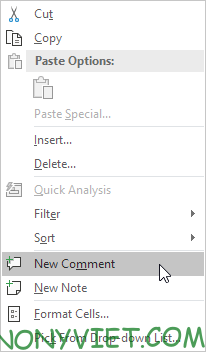
Step 2: Right-click and select New Comment
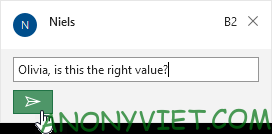
Step 3: Enter your comment and click on the plane picture
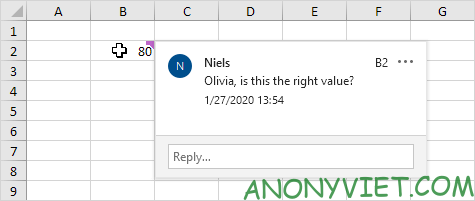
Your comment will show up if you hover over the cell where you just created the comment
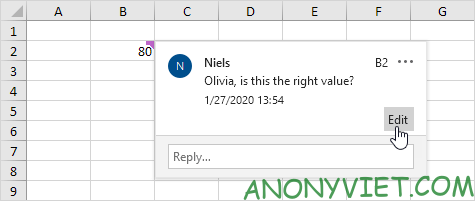
If you need to edit the comment, click edit on the comment section
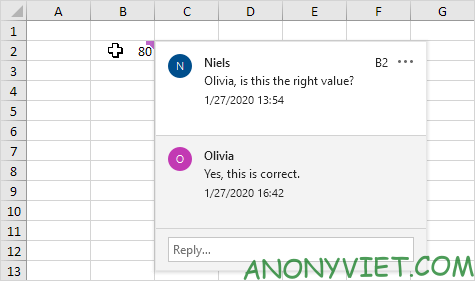
Step 1: Hover over the cell with the comment
Step 2: Write below reply and press enter
Delete comments
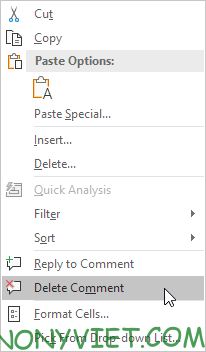
Step 1: Select the cell with the comment
Step 2: Right-click and select Delete Comment
Show all comments
Step 1: Go to Review on the toolbar
Step 2: Select Show comment

And the comments in the Worksheet will be displayed
So I have guided the comment section in Excel. If you have any questions, please leave a comment to let me know