• Home
  • News
  • Software
  • Knowledge
  • MMO
  • Tips
  • Security
  • Network
  • Office
AnonyViet - English Version
  • Home
  • News
  • Software
  • Knowledge
  • MMO
  • Tips
  • Security
  • Network
  • Office
No Result
View All Result
  • Home
  • News
  • Software
  • Knowledge
  • MMO
  • Tips
  • Security
  • Network
  • Office
No Result
View All Result
AnonyViet - English Version
No Result
View All Result

Lesson 170: How to calculate compound interest in Excel

AnonyViet by AnonyViet
January 24, 2023
in Office
0

In this article, I will show you how to calculate compound interest in Excel.

Join the channel Telegram of the AnonyViet 👉 Link 👈

How to calculate compound interest in Excel

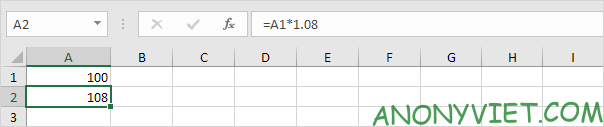
1. Suppose you deposit $100 in the bank. How much will your investment be worth after 1 year with an annual interest rate of 8%? The answer is $108.
Lesson 170: How to calculate compound interest in Excel 13

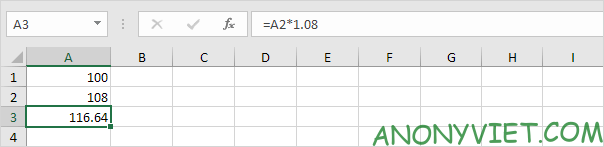
2. Now this interest ($8) will also be profitable (compound interest) next year. How much will your investment be worth in 2 years with an annual interest rate of 8%? The answer is $116.64.
Lesson 170: How to calculate compound interest in Excel 14

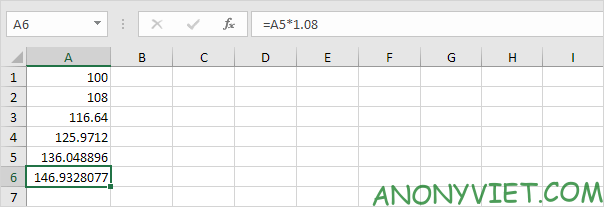
3. How much will your investment be worth in 5 years? Just drag the formula down to cell A6.
Lesson 170: How to calculate compound interest in Excel 15

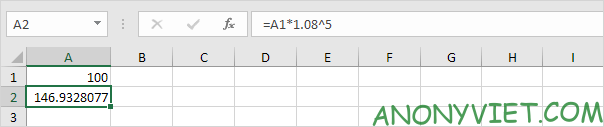
The answer is $146.93.

4. All we did was multiply 100 by 1.08 5 times. So we can also directly calculate the value of the investment after 5 years.

Lesson 170: How to calculate compound interest in Excel 16

Or you can also do like this.

Lesson 170: How to calculate compound interest in Excel 17

5. Suppose you deposit $100 in the bank. How much will your investment be worth in 5 years with an annual interest rate of 8%?

Lesson 170: How to calculate compound interest in Excel 18

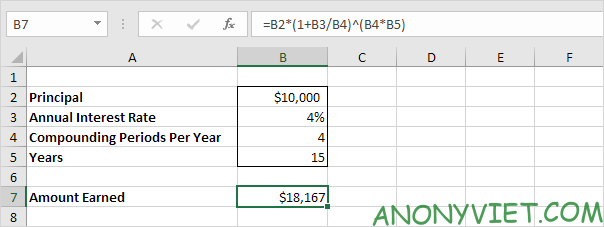
6. Let’s say you put $10,000 in the bank. How much will your investment be worth in 15 years at a compound interest rate[4%quarterly?Theansweris$18167[hàngnămlà4%hàngquý?Câutrảlờilà$18167
Lesson 170: How to calculate compound interest in Excel 19

7. Suppose you put $10,000 in the bank. How much will your investment be worth after 10 years at 5% annualized interest compounded monthly? The answer is $16,470.

Lesson 170: How to calculate compound interest in Excel 20

In addition, you can also view many other excel articles here.

The article achieved: 5/5 – (100 votes)

Tags: CalculatecompoundExcelinterestLesson
Previous Post

How to load single files from a Github repository

Next Post

Lesson 182: Create a candlestick chart in Excel

AnonyViet

AnonyViet

Related Posts

Top who creates the most beautiful presentation slide today
Office

Top who creates the most beautiful presentation slide today

September 23, 2025
Automatically check and correct spelling errors on Google Docs
Office

Automatically check and correct spelling errors on Google Docs

February 23, 2025
Instructions for downloading Google Docs files easily on any device
Office

Instructions for downloading Google Docs files easily on any device

December 18, 2024
Launching AI image creation feature on Google Docs
Office

Launching AI image creation feature on Google Docs

November 20, 2024
Instructions for using Google Docs without internet
Office

Instructions for using Google Docs without internet

November 2, 2024
Share the link to the sample file to create QR codes in Google Sheets
Office

Share the link to the sample file to create QR codes in Google Sheets

September 30, 2024
Next Post
Lesson 182: Create a candlestick chart in Excel

Lesson 182: Create a candlestick chart in Excel

0 0 votes
Article Rating
Subscribe
Login
Notify of
guest

guest

0 Comments
Oldest
Newest Most Voted
Inline Feedbacks
View all comments

Recent News

How to use automatic verification bot to register for ChatGPT K12, Spotify Student,…

How to use automatic verification bot to register for ChatGPT K12, Spotify Student,…

January 18, 2026
Instructions on how to create head-grabbing photos – New trend causing TikTok storm

Instructions on how to create head-grabbing photos – New trend causing TikTok storm

January 18, 2026
How to use CMD environment variables in Windows

How to use CMD environment variables in Windows

January 18, 2026
Instructions for installing the application “Are you dead yet” – Demumu

Instructions for installing the application “Are you dead yet” – Demumu

January 17, 2026
How to use automatic verification bot to register for ChatGPT K12, Spotify Student,…

How to use automatic verification bot to register for ChatGPT K12, Spotify Student,…

January 18, 2026
Instructions on how to create head-grabbing photos – New trend causing TikTok storm

Instructions on how to create head-grabbing photos – New trend causing TikTok storm

January 18, 2026
How to use CMD environment variables in Windows

How to use CMD environment variables in Windows

January 18, 2026
AnonyViet - English Version

AnonyViet

AnonyViet is a website share knowledge that you have never learned in school!

We are ready to welcome your comments, as well as your articles sent to AnonyViet.

Follow Us

Contact:

Email: anonyviet.com[@]gmail.com

Main Website: https://anonyviet.com

Recent News

How to use automatic verification bot to register for ChatGPT K12, Spotify Student,…

How to use automatic verification bot to register for ChatGPT K12, Spotify Student,…

January 18, 2026
Instructions on how to create head-grabbing photos – New trend causing TikTok storm

Instructions on how to create head-grabbing photos – New trend causing TikTok storm

January 18, 2026
  • Home
  • Home 2
  • Home 3
  • Home 4
  • Home 5
  • Home 6
  • Next Dest Page
  • Sample Page

https://sun52.network

No Result
View All Result
  • Home
  • News
  • Software
  • Knowledge
  • MMO
  • Tips
  • Security
  • Network
  • Office

https://sun52.network

wpDiscuz
0
0
Would love your thoughts, please comment.x
()
x
| Reply