While Github is most commonly used for hosting large code projects, it also acts as a pretty good FIle host and sometimes you just want to download a file or two without having to download the whole thing. what about the repo? Fortunately, Github supports this by web and command line.
| Join the channel Telegram of the AnonyViet 👉 Link 👈 |

Download a Single File from Github
If you prefer to use a web browser, you can download any file pretty easily. Go to the File you want to download and click “Raw:”
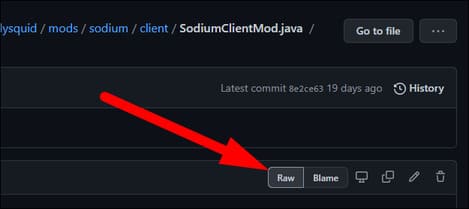
This will open a page with a direct link to File. You can copy, but in most browsers, you can right-click and select “Save As” to download the File directly.
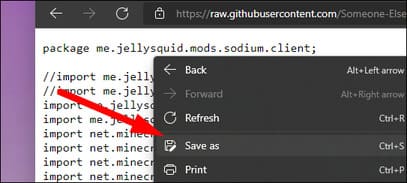
For cpde files, the downloaded file can be saved as a .txt, you will need to manually edit the file extension before or after downloading.
Download Single File from Command Line
Files are provided from raw.githubusercontent.com, can be downloaded directly via wget or curl. They are stored in accessible locations, so if you know the username, repository and File path, you can download any File on any branch like this:
wget https://raw.githubusercontent.com/username/repository/branch/path/filename.md
If you want to use Git’s API, you can interact with it more directly and download files when you are unsure of the exact File location. You will need to generate a personal access token to use the API and replace “ACCESS_TOKEN” in this script.
curl -H 'Authorization: token ACCESS_TOKEN ' -H \
'Accept: application/vnd.github.v3.raw' -O -L \
https://api.github.com/repos/username/repository/contents/path/filename.md
/repos/{user}/{repo}/contents endpoint will do different things depending on whether the path points to a directory or a File. If it’s a File, it will return that File’s metadata:
{
  "type": "file",
  "encoding": "base64",
  "size": 5362,
  "name": "README.md",
  "path": "README.md",
  "content": "encoded content ...",
  "sha": "3d21ec53a331a6f037a91c368710b99387d012c1",
  "url": "https://api.github.com/repos/octokit/octokit.rb/contents/README.md",
  "git_url": "https://api.github.com/repos/octokit/octokit.rb/git/blobs/3d21ec53a331a6f037a91c368710b99387d012c1",
  "html_url": "https://github.com/octokit/octokit.rb/blob/master/README.md",
  "download_url": "https://raw.githubusercontent.com/octokit/octokit.rb/master/README.md",
  "_links": {
    "git": "https://api.github.com/repos/octokit/octokit.rb/git/blobs/3d21ec53a331a6f037a91c368710b99387d012c1",
    "self": "https://api.github.com/repos/octokit/octokit.rb/contents/README.md",
    "html": "https://github.com/octokit/octokit.rb/blob/master/README.md"
  }
}
If it’s a directory, it will return all files and subdirectories in an array:
[
  {
    "type": "file",
    "size": 625,
    "name": "octokit.rb",
    "path": "lib/octokit.rb",
    "sha": "fff6fe3a23bf1c8ea0692b4a883af99bee26fd3b",
    "url": "https://api.github.com/repos/octokit/octokit.rb/contents/lib/octokit.rb",
    "git_url": "https://api.github.com/repos/octokit/octokit.rb/git/blobs/fff6fe3a23bf1c8ea0692b4a883af99bee26fd3b",
    "html_url": "https://github.com/octokit/octokit.rb/blob/master/lib/octokit.rb",
    "download_url": "https://raw.githubusercontent.com/octokit/octokit.rb/master/lib/octokit.rb",
    "_links": {
      "self": "https://api.github.com/repos/octokit/octokit.rb/contents/lib/octokit.rb",
      "git": "https://api.github.com/repos/octokit/octokit.rb/git/blobs/fff6fe3a23bf1c8ea0692b4a883af99bee26fd3b",
      "html": "https://github.com/octokit/octokit.rb/blob/master/lib/octokit.rb"
    }
  },
  {
    "type": "dir",
    "size": 0,
    "name": "octokit",
    "path": "lib/octokit",
    "sha": "a84d88e7554fc1fa21bcbc4efae3c782a70d2b9d",
    "url": "https://api.github.com/repos/octokit/octokit.rb/contents/lib/octokit",
    "git_url": "https://api.github.com/repos/octokit/octokit.rb/git/trees/a84d88e7554fc1fa21bcbc4efae3c782a70d2b9d",
    "html_url": "https://github.com/octokit/octokit.rb/tree/master/lib/octokit",
    "download_url": null,
    "_links": {
      "self": "https://api.github.com/repos/octokit/octokit.rb/contents/lib/octokit",
      "git": "https://api.github.com/repos/octokit/octokit.rb/git/trees/a84d88e7554fc1fa21bcbc4efae3c782a70d2b9d",
      "html": "https://github.com/octokit/octokit.rb/tree/master/lib/octokit"
    }
  }
]
Then you can use a JSON parser like jq to split the URL and download it. To get the list of repo files recursively, you need to fetch root tree. You can also use github to create a simple website in 15 minutes here.