Hello friends. Welcome back to the Basic Excel Series for Beginners. Today I will guide you about division in Excel.
| Join the channel Telegram of the AnonyViet 👉 Link 👈 |
Ordinary division
Step 1: Write the = sign to let Excel know it’s a calculation
Step 2: write the division calculation there

Can use calculation for 2 cells

With division by 0 there will be an error

Use the QUOTIEN function to round numbers
Step 1: Write the QUOTIEN . function
Step 2: Select the cell that is the divisor and the divisor

Use the MOD function to display the balance
Step 1: Write the MOD function
Step 2: Select the cell that is the divisor and the divisor. The result will be the remainder of that division

Using AutoFill allows division
Step 1: Record the division of 2 cells
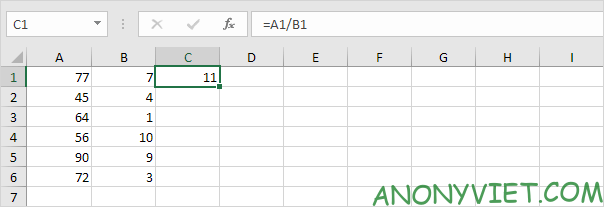
Step 2: Use AutoFill for the remaining cells

Use the $ sign to keep the divisor unchanged
Step 1: Record the division calculation
Step 2: Put $ in front and after the word in the box with divisor
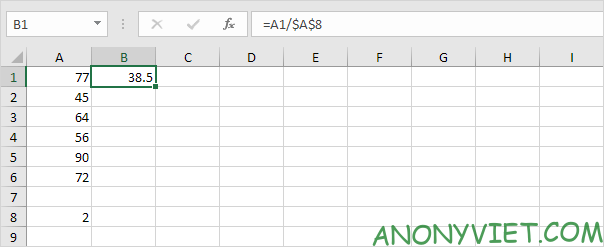
Step 3: using AutoFill
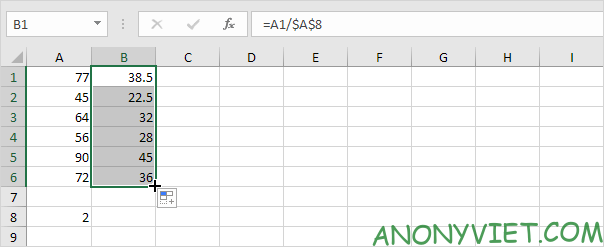
Using Paste Special
Step 1: Select the cell as the divisor
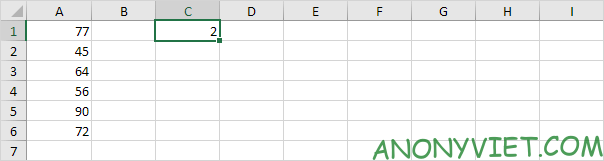
Step 2: Right-click and select Copy
Step 3: Choose the interval as the number to be divided
Step 4: Right click and select Paste special
Step 5: Select Divide
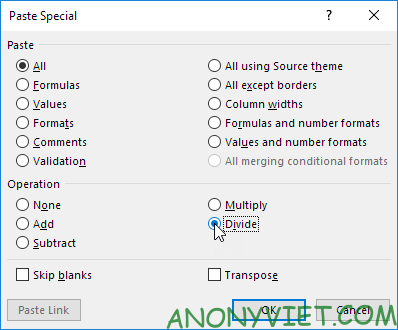
Step 6: Press OK
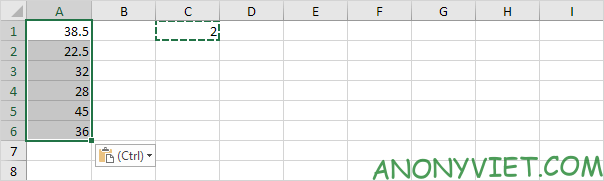
So I just finished the instructions for division in Excel. If you have any questions, please leave a comment to let me know