• Home
  • News
  • Software
  • Knowledge
  • MMO
  • Tips
  • Security
  • Network
  • Office
AnonyViet - English Version
  • Home
  • News
  • Software
  • Knowledge
  • MMO
  • Tips
  • Security
  • Network
  • Office
No Result
View All Result
  • Home
  • News
  • Software
  • Knowledge
  • MMO
  • Tips
  • Security
  • Network
  • Office
No Result
View All Result
AnonyViet - English Version
No Result
View All Result

Instructions to upgrade Telegram Premium only 15,000 VND

AnonyViet by AnonyViet
January 24, 2023
in Tips
0

As in the previous post, I introduced Telegram Premium With some outstanding features such as increasing Download speed, Pin 10 messages or send 4GB files… Before launching Telegram Premium costs quite high $ 9 / month, but I will show you how to buy Telegram Premium for 15,000 VND. .

Join the channel Telegram of the AnonyViet 👉 Link 👈

Telegram Premium upgrade is only 15,000 VND

You are not mistaken, with only 15K instead of 119K like before, you can upgrade to use Telegram Premium with full features for only 1/10 of the original price. To do this, we need a few tips as follows:

Request:

  • Android phone
  • VISA/MasterCard with at least 2$ ~ 40K

How to buy Telegram Premium for 15k

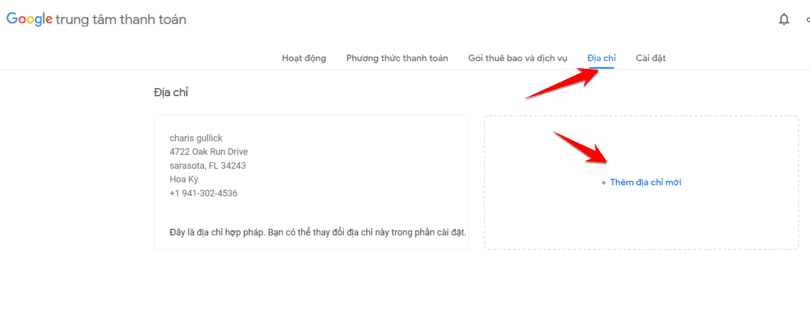
Step 1: You can use the old or new Google Acc, go to the page https://pay.google.com/

Step 2: You go to Address -> Add address
Instructions to upgrade Telegram Premium only 15,000 VND 6

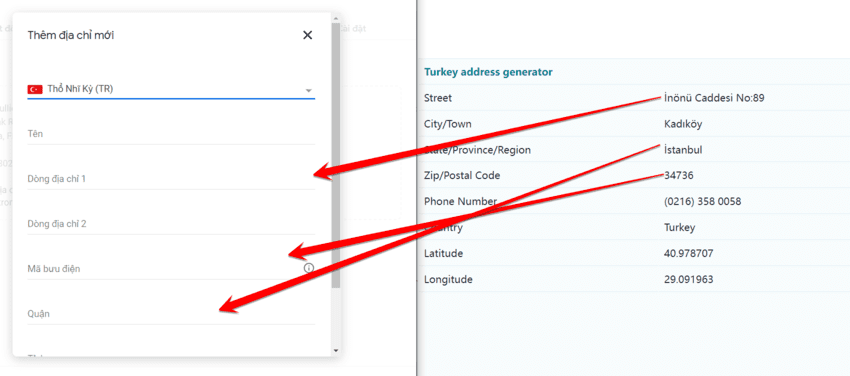
Step 3: Find any address of Turkey (Turkey), fill in the information. To get the Turkish address you go to this page: https://www.fakexy.com/fake-address-generator-tr

  • Name: You can enter anything
  • The information you just copy over

This step to Fake Address Turkey, then you will buy Telegram Premium at a cheaper rate than VND or USD.
telegram premium package 16k

Step 4: Also at Google Pay, you choose payment methods “Credit or debit card” and enter your VISA/Master card information.

Step 5: Now use your Android phone, temporarily log out of your Google accounts on your phone and log in with the Google account you just Faked with the Turkish address. Sign in CH Play or Settings of your phone.

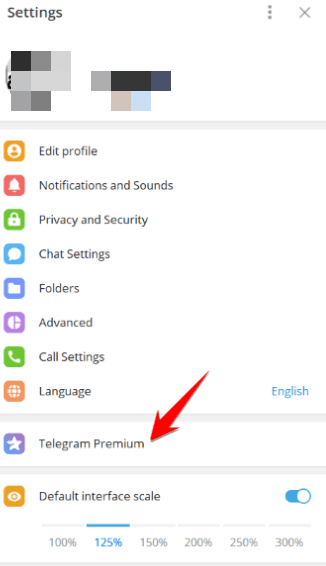
Step 6: On your Android phone, open Telegram and select Settings -> Telegram Premium.
telegram premium gia re anonyviet 1

Step 7: At this point you will still see the upgrade price of $ 4.99 or VND 49,000 or VND 99,000. Never mind, do not care about this price because it is still high. You just dare to let in Subscribe for ….. for myself.

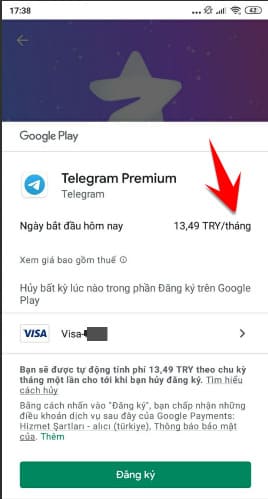
Step 8: Now on the phone will switch to the payment with Google Pay account, you will see the conversion from USD / VND to Try (Turkish currency).

As shown in the picture is 13.49TRY/month, if converted into Vietnamese currency, it is only 150000VND, just equal to 1 cup of sidewalk coffee. Too turn!
telegram premium 16000vnd

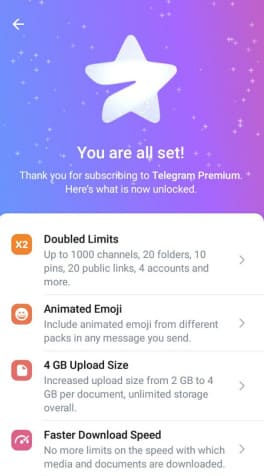
Step 9: Click the Register button to complete, if successful you will see Telegram Premium appear with a blue star next to your Nick and the message You are all set!

Now you can use the full features of Telegram Premium for 15K equivalent to 119K price.
telegram premium Gia 17k fake tho Nhi ky

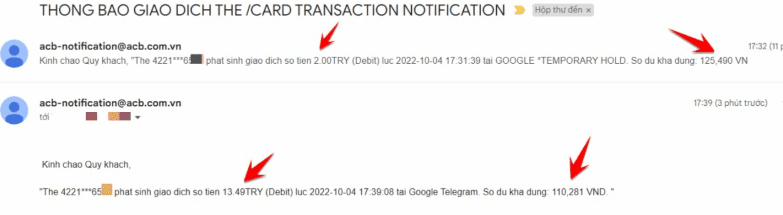
I took a picture of the price when Add Visa card will deduct 2TRY (2000VND) to verify the card (then it will be refunded), then my account is still available. 125,490VND After the purchase is complete, the account remains 110,281VND. It only costs me 15K CZK to upgrade to Telegram Premium for 10 times the original price.

The reason I ask you to pre-load 2$ Entering VISA is so that if Google has not refunded the card verification, you still have enough money to pay 15K CZK that.

Instructions to upgrade Telegram Premium only 15,000 VND 7

The article achieved: 5/5 – (101 votes)

Tags: InstructionsPremiumTelegramupgradeVND
Previous Post

How to Run Java Programs in Ubuntu

Next Post

Some of the best homework apps for students

AnonyViet

AnonyViet

Related Posts

How to add sliders to Facebook Stories to easily rewind videos
Tips

How to add sliders to Facebook Stories to easily rewind videos

April 21, 2026
How to change the default font on Windows 10
Tips

How to change the default font on Windows 10

April 13, 2026
5 tips for using a Browser to replace an App (helps save RAM, time and money)
Tips

5 tips for using a Browser to replace an App (helps save RAM, time and money)

April 13, 2026
How to make funny MeMe photos without Photoshop within 10 seconds
Tips

How to make funny MeMe photos without Photoshop within 10 seconds

April 11, 2026
How to quickly design your own Logo without Photoshop
Tips

How to quickly design your own Logo without Photoshop

April 10, 2026
How to convert Website into App on Windows
Tips

How to convert Website into App on Windows

April 9, 2026
Next Post
Some of the best homework apps for students

Some of the best homework apps for students

0 0 votes
Article Rating
Subscribe
Login
Notify of
guest

guest

0 Comments
Oldest
Newest Most Voted
Inline Feedbacks
View all comments

Recent News

How to create a Face Sticker Collection using ChatGPT

How to create a Face Sticker Collection using ChatGPT

April 29, 2026
How to install the cute Bongo Cat mouse pointer for Windows

How to install the cute Bongo Cat mouse pointer for Windows

April 29, 2026
Tips for pinning the step counter to the iPhone screen to monitor your health

Tips for pinning the step counter to the iPhone screen to monitor your health

April 28, 2026
How to turn off password suggestions on iPhone: Prevent Safari from auto-filling passwords

How to turn off password suggestions on iPhone: Prevent Safari from auto-filling passwords

April 27, 2026
How to create a Face Sticker Collection using ChatGPT

How to create a Face Sticker Collection using ChatGPT

April 29, 2026
How to install the cute Bongo Cat mouse pointer for Windows

How to install the cute Bongo Cat mouse pointer for Windows

April 29, 2026
Tips for pinning the step counter to the iPhone screen to monitor your health

Tips for pinning the step counter to the iPhone screen to monitor your health

April 28, 2026
AnonyViet - English Version

AnonyViet

AnonyViet is a website share knowledge that you have never learned in school!

We are ready to welcome your comments, as well as your articles sent to AnonyViet.

Follow Us

Contact:

Email: anonyviet.com[@]gmail.com

Main Website: https://anonyviet.com

Recent News

How to create a Face Sticker Collection using ChatGPT

How to create a Face Sticker Collection using ChatGPT

April 29, 2026
How to install the cute Bongo Cat mouse pointer for Windows

How to install the cute Bongo Cat mouse pointer for Windows

April 29, 2026
No Result
View All Result
  • Home
  • News
  • Software
  • Knowledge
  • MMO
  • Tips
  • Security
  • Network
  • Office

wpDiscuz
0
0
Would love your thoughts, please comment.x
()
x
| Reply