• Home
  • News
  • Software
  • Knowledge
  • MMO
  • Tips
  • Security
  • Network
  • Office
AnonyViet - English Version
  • Home
  • News
  • Software
  • Knowledge
  • MMO
  • Tips
  • Security
  • Network
  • Office
No Result
View All Result
  • Home
  • News
  • Software
  • Knowledge
  • MMO
  • Tips
  • Security
  • Network
  • Office
No Result
View All Result
AnonyViet - English Version
No Result
View All Result

How to Run Java Programs in Ubuntu

AnonyViet by AnonyViet
January 24, 2023
in Network
0

In this article, I will show you how to run java programs in Ubuntu in the simplest and easiest way.

Join the channel Telegram of the AnonyViet 👉 Link 👈

How to Run Java Programs in Ubuntu

How to Run Java Programs in Ubuntu

Step 1: Install Java Compiler

To run a Java program, you first need to compile the program. The Java compiler is part of the JDK (Java Development Kit). You need to install the JDK to compile and run Java programs.

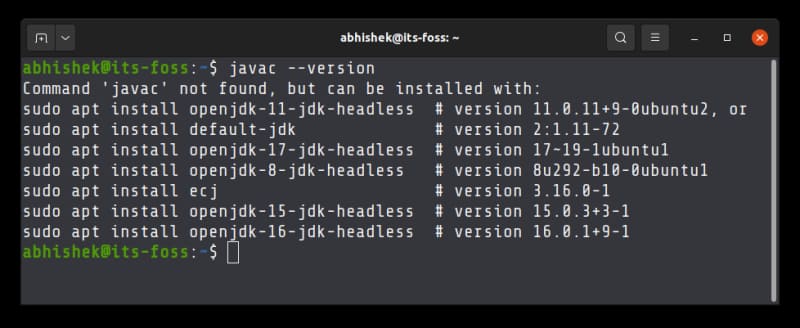
First, check if you have Java compiler installed on your system with the following command:

javac --version

If you get an error like “Command ‘javac’ not found, but can be installed with” it means you need to install the ava Development Kit.
How to Run Java Programs in Ubuntu 6

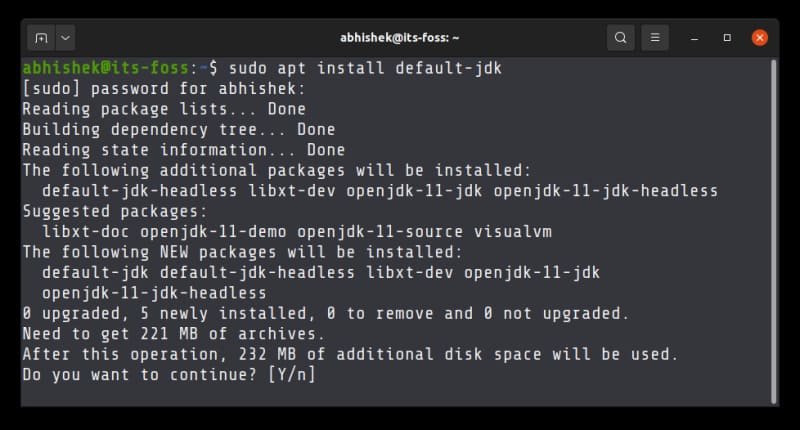
The simplest way to install the JDK on Ubuntu is to use the default package manager from Ubuntu:

sudo apt install default-jdk

You will be asked to enter your account password. When you enter your password, nothing will show up on Terminal. That is completely normal. Just enter your password. When asked, press the enter key or the Y key.
How to Run Java Programs in Ubuntu 7

The above command should work for other Debian and Ubuntu based distributions like Linux Mint, elementary OS, etc. For other distributions, use your distribution’s package manager. The package name may also be different.

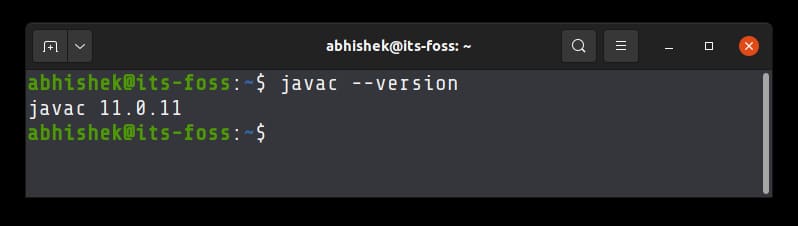
Once installed, verify the version of javac.
How to Run Java Programs in Ubuntu 8

Step 2: Compile Java Programs in Linux

You need a Java program file. Suppose you create a new Java program file named HelloWorld.java and it has the following content:

class HelloWorld{  
    public static void main(String args[]){  
     System.out.println("Hello World");  
    }  
}

You can use the Nano editor in Terminal or the Gedit graphical text editor to code your Java programs.

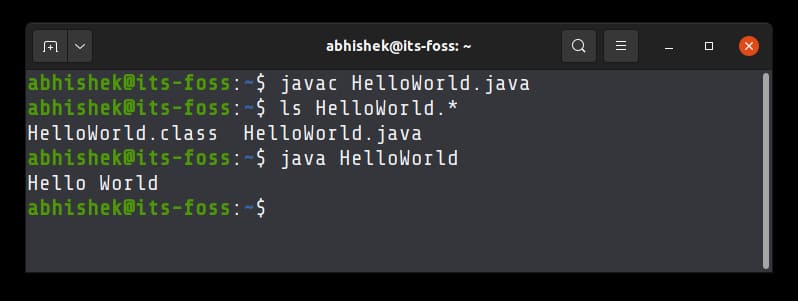
javac HelloWorld.java

If there are no errors, the above command will produce no output.

When you compile a Java program, it generates a .class file with the class name that you used in your program. You must run this .class file.

Step 3: Run the file .class

You do not need to specify the .class file extension here. Just enter the name of the class. And this time, you use the java command, not javac.

java HelloWorld

The program will print Hello World on the Terminal screen.
How to Run Java Programs in Ubuntu 9

And that’s how you can run a Java program in Terminal Linux.

This is the simplest example. The sample program has only one class. The Java compiler creates a .class file for each class in your program. Things will get complicated for larger programs and projects.

That’s why I recommend installing Eclipse on Ubuntu for Java programming. Alternatively, you can also create a Minecraft Server on Linux here.


The article achieved: 5/5 – (100 votes)

Tags: JavaProgramsRunUbuntu
Previous Post

Lesson 214: Soft function in Excel

Next Post

Instructions to upgrade Telegram Premium only 15,000 VND

AnonyViet

AnonyViet

Related Posts

Save image as Type contains malicious code: Remove immediately before losing money unfairly!
Network

Save image as Type contains malicious code: Remove immediately before losing money unfairly!

March 19, 2026
Instructions on how to register a .co.uk domain name for free for 1 year
Network

Instructions on how to register a .co.uk domain name for free for 1 year

March 12, 2026
How to Setup Paperclip AI: Create a Company for AI Agent
Network

How to Setup Paperclip AI: Create a Company for AI Agent

March 12, 2026
Compilation of free and cheap APIs to run OpenClaw stably
Network

Compilation of free and cheap APIs to run OpenClaw stably

March 10, 2026
3 Services to Determine IP Location for Website (IP Geolocation API)
Network

3 Services to Determine IP Location for Website (IP Geolocation API)

March 10, 2026
How to buy a .STORE domain name for 1 USD (2026): Detailed instructions from A–Z
Network

How to buy a .STORE domain name for 1 USD (2026): Detailed instructions from A–Z

March 3, 2026
Next Post
Instructions to upgrade Telegram Premium only 15,000 VND

Instructions to upgrade Telegram Premium only 15,000 VND

0 0 votes
Article Rating
Subscribe
Login
Notify of
guest

guest

0 Comments
Oldest
Newest Most Voted
Inline Feedbacks
View all comments

Recent News

Create an avatar to celebrate April 30 with a beautiful red flag shirt with yellow stars

Create an avatar to celebrate April 30 with a beautiful red flag shirt with yellow stars

April 30, 2026
How to get 2 months of Super Duolingo for free worth 300k

How to get 2 months of Super Duolingo for free worth 300k

April 30, 2026
How to create a Face Sticker Collection using ChatGPT

How to create a Face Sticker Collection using ChatGPT

April 29, 2026
How to install the cute Bongo Cat mouse pointer for Windows

How to install the cute Bongo Cat mouse pointer for Windows

April 29, 2026
Create an avatar to celebrate April 30 with a beautiful red flag shirt with yellow stars

Create an avatar to celebrate April 30 with a beautiful red flag shirt with yellow stars

April 30, 2026
How to get 2 months of Super Duolingo for free worth 300k

How to get 2 months of Super Duolingo for free worth 300k

April 30, 2026
How to create a Face Sticker Collection using ChatGPT

How to create a Face Sticker Collection using ChatGPT

April 29, 2026
AnonyViet - English Version

AnonyViet

AnonyViet is a website share knowledge that you have never learned in school!

We are ready to welcome your comments, as well as your articles sent to AnonyViet.

Follow Us

Contact:

Email: anonyviet.com[@]gmail.com

Main Website: https://anonyviet.com

Recent News

Create an avatar to celebrate April 30 with a beautiful red flag shirt with yellow stars

Create an avatar to celebrate April 30 with a beautiful red flag shirt with yellow stars

April 30, 2026
How to get 2 months of Super Duolingo for free worth 300k

How to get 2 months of Super Duolingo for free worth 300k

April 30, 2026
No Result
View All Result
  • Home
  • News
  • Software
  • Knowledge
  • MMO
  • Tips
  • Security
  • Network
  • Office

wpDiscuz
0
0
Would love your thoughts, please comment.x
()
x
| Reply