In the past few days, Facebook suddenly locked a very large number of accounts for unknown reasons with the message: “We have suspended your account.” and Facebook also captioned “We will permanently lock the account after 30 days”. Let’s find out why and how to solve it
| Join the channel Telegram of the AnonyViet 👉 Link 👈 |
The incident on August 16, 2021
On the evening of August 16, 2021, many users received notifications that their accounts were locked due to “community standards violations”. They will have 30 days to appeal the decision before Facebook completely locks down their Facebook accounts. Some of the luckier ones have only had a 3 to 7 day fiscal lockout and it’s only a temporary lockdown.
People after being locked out of their accounts, their friends will not be able to see their personal information, personal pages or even messages between you and them. Such users can only appeal and create a new Facebook account for temporary use
According to Anonyviet’s understanding, Facebook did so because there was a “sensitive” video about children spread on the online community.
Specifically, on the evening of August 16, there was a video recording the “sensitive” actions of a boy about 10 years old that was distributed and shared on social networks. At that time, Facebook decided to lock the accounts of those who shared videos in any form (from video links, direct videos, posting to personal pages, Share as Story or even sharing it via messages). lock account).
Instructions to unlock Facebook when locked
Common way
Step 1: Go to acc and perform the normal steps
Step 2: The image upload section, if there is a photo of the owner, upload it (clear picture, not Blx or cmnd)
Step 3: wait for 72h is ok. The other one is cp72h, then upload cmnd/blx but this one can’t upload
1 note before implementation
Recently, the Online Community has a way to unlock Facebook, but you will have to pay an extra fee for them. Today Anonyviet will guide you how to unlock Facebook without spending 1 cent.
Note: Facebook account needs to be the official Facebook Account, use real name, not use Nickname. If you use NickName, the below method will not work!
Normally this type of lock will be Facebook 282 key! For those of you who are locked with code 030, you can’t unlock it!
Please use Fake IP software like VPN to Fake IP to Singapore
Details how to Unlock Facebook
Step 1: Log in to your Facebook account as usual
Step 2: Go to the appeal link here
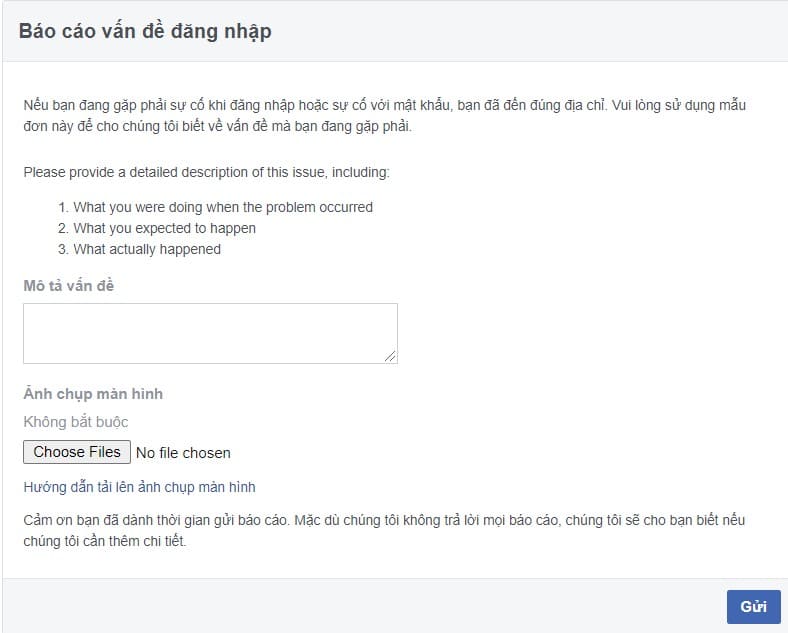
Step 3: In the problem description enter:
Hi facebook, I can’t log in to my account due to facebook security issues. I understand this is a mistake. I hope facebook will check and unlock it for me so I can continue using facebook. Thank you facebook support team.
Step 4: In the Upload file section, upload a photo of yourself (note that the photo is a sharp, clear photo and remember to pay attention to the size of the photo. Facebook does not accept a driver’s license or an ID card)
Step 5: You continue to enter this link

Step 6: In the problem description, you write:
Hi facebook, I can’t log in to my account due to facebook security issues. I understand this is a mistake. I hope facebook will check and unlock it for me so I can continue using facebook. Thank you facebook support team.
Step 7: In the Upload file section, upload a photo of yourself (note that the photo is a sharp, clear photo and remember to pay attention to the size of the photo. Facebook does not accept a driver’s license or an ID card)
Step 8: You go back to your Mail. When Facebook Sends Mail Later, wait about 72H for Facebook to process! (Please turn off all Facebook tabs!)
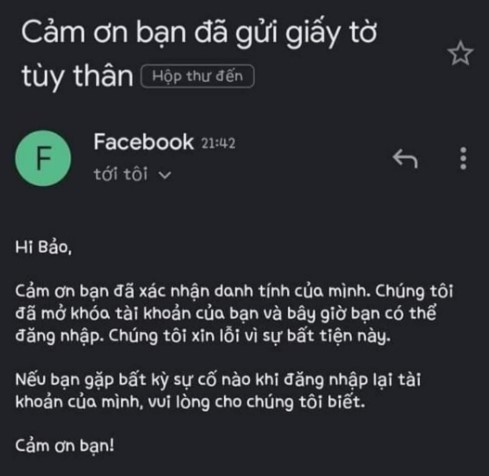
After you have completed the operations, please note that within the next 72 hours you are NOT ALLOWED to log in to your Facebook account, You can only Check Mail!
In case Facebook cannot recognize you, please Resend your ID card by Replying to Facebook’s message! Within 72 hours you will get your account back
This is also a lesson learned for you guys. Remember that Facebook is so wide, but it also has eyes and ears everywhere, so don’t go against their terms!
So I just finished the tutorial on how to unlock Facebook when locked for the latest 30 days. Are you one of those who have been locked out of their accounts or have failed to unlock them? Please leave a comment below in the Comments section. See also: The latest way to bypass 2-Factor Authentication for Facebook here.