
• Home
  • News
  • Software
  • Knowledge
  • MMO
  • Tips
  • Security
  • Network
  • Office
AnonyViet - English Version
  • Home
  • News
  • Software
  • Knowledge
  • MMO
  • Tips
  • Security
  • Network
  • Office
No Result
View All Result
  • Home
  • News
  • Software
  • Knowledge
  • MMO
  • Tips
  • Security
  • Network
  • Office
No Result
View All Result
AnonyViet - English Version
No Result
View All Result

Instructions on how to fix Screen Time Limited Reached on RoBlox

AnonyViet by AnonyViet
August 13, 2025
in Software
0

Being passionate about exploring the colorful world of RoLlox, suddenly you receive the notice “Screen Time Limited Reached”? Do not let this error interrupt the fun! This is a common problem when the account is limited to the time of playing by parent control or rules from RoLox VNG. With the detailed instructions below, you will quickly Fix Screen Time Limited Reached And continue the creative journey without worrying about being interrupted.

Join the channel Telegram belong to Anonyviet 👉 Link 👈

Why does Screen Time Limited error appear?

The notice of “Screen Time Limited Reached” appears when your play time reaches the set limit. There are two main reasons:

  • Parent control: Turn on to manage usage time Roblox of children.
  • Roblox VNG rules: User under 18 years old In Vietnam, there are a maximum of 3 hours to play every day on all devices.

Understanding the cause will help you easily find ways to fix it. Let’s explore the following specific steps!
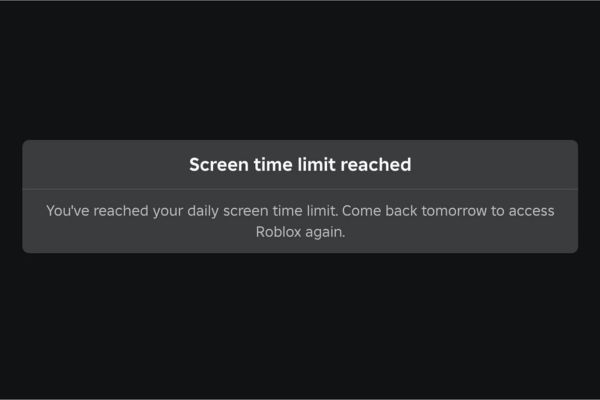
Why does Screen Time Limited error appear?

Instructions for fixing Screen Time Limited Reached on RoBlox

Here are the simple steps to adjust or remove the play time limit, helping you return to the game quickly.

Step 1: First, you need to access the settings:

  • On the computer: click on the icon gear In the upper right corner and choose Settings (Setting).
  • On the phone: Select More (Add) in the lower right corner, then press the icon gear in Settings.
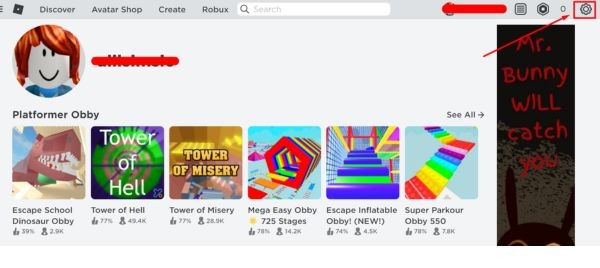
Access the settings
Access the settings

Step 2: In the Settings menu, come to Parental Controls (Parent control). If you manage multiple accounts (like your child’s account), choose the right account to be edited.
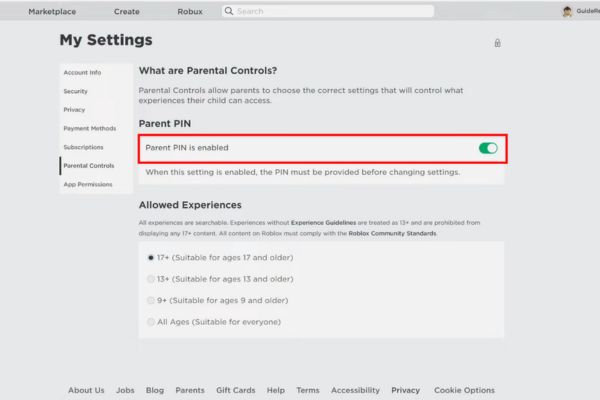
Select Parental Controls

Step 3: Next, at the section Screen Time (Screen time)> press Manage (Management) In addition to the statistical chart of play time in 7 days> Select Screen Time Limited (Screen time limit) to view the current settings.

Now you can:

  • Place the playing time every day, from 15 minutes to maximum 23 hours 45 minutes.
  • Completely remove the limit if not needed.

Step 4: After adjustment, press Save To apply. So you have escaped the notice “Screen Time Limited Reached” and can play the game comfortably!

Stipulating time limit from RORLOX VNG

Roblox VNG applies strict rules to protect young players in Vietnam. Here are the things to note:

  • 3 hours/day limit: Players under 18 years of age can only play up to 180 minutes a day on all platforms (PC, phone).
  • Calculate the background time: If you let the game run background, this time is still included in the limit.
  • Not applicable to people over 18 years old: Make sure the account has updated at the right age to avoid limited.

These provisions are official policies, not systematic errors, so you need to comply or adjust appropriately.

Stipulating time limit from RORLOX VNG

Additional treatments if the error still occurs

If you have tried the above steps and still encounter the “Screen Time Limited” notice, try the following solutions:

1. Check the age verification of age

If you are over 18 years old but still limited, go to Account Info (account information) in Roblox settings to verify the age.

2. Review the parent account link

Sometimes your account is accidentally linked to a parent account. Check in Parental Controls to ensure no links.

How to fix Screen Time Limited

3. Contact ROBLOX Support

If you do not find any control settings, please contact the support team Roblox Through the official website. Send details about accounts and problems for help.

4. Check settings on iOS

If you use iPhone or iPad, check the System’s Screen Time: in Settings> Screen Time> App Limited.

Make sure RoLlox is not limited or enabled at end of limit to apply the rules properly.

Conclude

Error notifications will not be an obstacle when you know how to handle it. With just a few simple steps such as checking parents’ control settings, adjusting time limit, or verifying age, you will quickly Fix Screen Time Limited Reached Easy and continue to conquer the world of Roblox.


Tags: fixInstructionsLimitedReachedRobloxscreentime
Previous Post

How to install GPT-suns on who do not need the Internet

Next Post

Wowhay.com – The door opens the world of modern knowledge and network culture

AnonyViet

AnonyViet

Related Posts

Instructions for looking up prescriptions on VNeID instead of paper medical books
Software

Instructions for looking up prescriptions on VNeID instead of paper medical books

April 26, 2026
Compare Poco X8 Pro and Poco X7 Pro: A new step for the “king” of mid-range performance
Software

Compare Poco X8 Pro and Poco X7 Pro: A new step for the “king” of mid-range performance

April 24, 2026
Top 5 apps to view good days 2026 for free on iOS and Android
Software

Top 5 apps to view good days 2026 for free on iOS and Android

April 23, 2026
Top 5+ utilities to install for Gmail to speed up work processing
Software

Top 5+ utilities to install for Gmail to speed up work processing

April 22, 2026
Decoding the problem of 4GB RAM and processing performance
Software

Decoding the problem of 4GB RAM and processing performance

April 21, 2026
4K Video Downloader Plus – Tool to download YouTube videos on macOS
Software

4K Video Downloader Plus – Tool to download YouTube videos on macOS

April 20, 2026
Next Post
Wowhay.com – The door opens the world of modern knowledge and network culture

Wowhay.com - The door opens the world of modern knowledge and network culture

0 0 votes
Article Rating
Subscribe
Login
Notify of
guest

guest

0 Comments
Oldest
Newest Most Voted
Inline Feedbacks
View all comments

Recent News

Instructions for looking up prescriptions on VNeID instead of paper medical books

Instructions for looking up prescriptions on VNeID instead of paper medical books

April 26, 2026
Tips to completely turn off CAPTCHA codes on iPhone and Mac are super simple

Tips to completely turn off CAPTCHA codes on iPhone and Mac are super simple

April 25, 2026
Compare Poco X8 Pro and Poco X7 Pro: A new step for the “king” of mid-range performance

Compare Poco X8 Pro and Poco X7 Pro: A new step for the “king” of mid-range performance

April 24, 2026
How to compress online videos for free without losing quality

How to compress online videos for free without losing quality

April 24, 2026
Instructions for looking up prescriptions on VNeID instead of paper medical books

Instructions for looking up prescriptions on VNeID instead of paper medical books

April 26, 2026
Tips to completely turn off CAPTCHA codes on iPhone and Mac are super simple

Tips to completely turn off CAPTCHA codes on iPhone and Mac are super simple

April 25, 2026
Compare Poco X8 Pro and Poco X7 Pro: A new step for the “king” of mid-range performance

Compare Poco X8 Pro and Poco X7 Pro: A new step for the “king” of mid-range performance

April 24, 2026
AnonyViet - English Version

AnonyViet

AnonyViet is a website share knowledge that you have never learned in school!

We are ready to welcome your comments, as well as your articles sent to AnonyViet.

Follow Us

Contact:

Email: anonyviet.com[@]gmail.com

Main Website: https://anonyviet.com

Recent News

Instructions for looking up prescriptions on VNeID instead of paper medical books

Instructions for looking up prescriptions on VNeID instead of paper medical books

April 26, 2026
Tips to completely turn off CAPTCHA codes on iPhone and Mac are super simple

Tips to completely turn off CAPTCHA codes on iPhone and Mac are super simple

April 25, 2026
No Result
View All Result
  • Home
  • News
  • Software
  • Knowledge
  • MMO
  • Tips
  • Security
  • Network
  • Office

wpDiscuz
0
0
Would love your thoughts, please comment.x
()
x
| Reply




