What is Seedance is the most popular question today when a series of AI videos identical to blockbuster movies appear on social networks. This is the latest artificial intelligence product from ByteDance, the father of TikTok, with the ability to reproduce incredibly realistic images. Let’s explore the power of this tool with AnonyViet right here.
📢 Join the channel Telegram belong to AnonyViet
Update new articles, cool tools and IT tips fastest
What is Seedance and its special mechanism of action?
If you are wondering What is Seedance?this is an artificial intelligence tool specifically used to create videos by ByteDance – parent company of TikTok develop. Completely different from old AI models that only rely on text-to-video to create content, Seedance operates as a true “digital director” with flexible multi-modal processing capabilities.
This tool allows users to import data from many different sources such as descriptive text, still images or even transform from an original video to a completely new video. The core strength that helps Seedance outperform its competitors is capabilities Merge faces into videos completely. The physical effects, lighting and movement are simulated in such detail that it is difficult for viewers to distinguish what is real and what is virtual.

Breakthrough features of Seedance 2.0
Although the first version launched in June 2025 did not make a big splash, the arrival of the Seedance 2.0 upgrade in mid-February has completely changed the game. Here are the impressive capabilities this tool offers:
- Seedance 2.0 supports the creation of videos up to 60 seconds with resolution 4K Sharp, far beyond the limits of many current AI tools.
- The sound system is created and closely synchronized with the character’s actions, providing a unified audio-visual experience.
- Users can upload max 12 data files at the same time, including 9 images, 3 short videos or 3 audio clips as input material.
- This tool synthesizes data to create a character from a photo, determines the camera angle from a sample video, and adjusts the tempo based on the attached audio.
Understanding what Seedance is helps content creators take full advantage of its power to produce high-quality videos without spending money on actors or real-life settings.
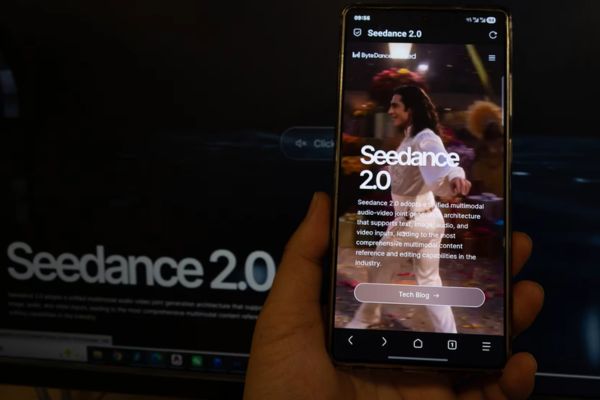
Instructions for using Seedance 2.0
Seedance 2.0 is currently an AI model that creates stormy videos thanks to its ability to simulate extremely accurate actions, especially martial arts and fast fighting scenes without distortion or slow motion errors. Currently, this model is open for testing on the Jimeng platform (Chinese domestic version of CapCut/Dreamina). Below are detailed steps for you to master this tool:
Step 1: Access the Jimeng AI platform
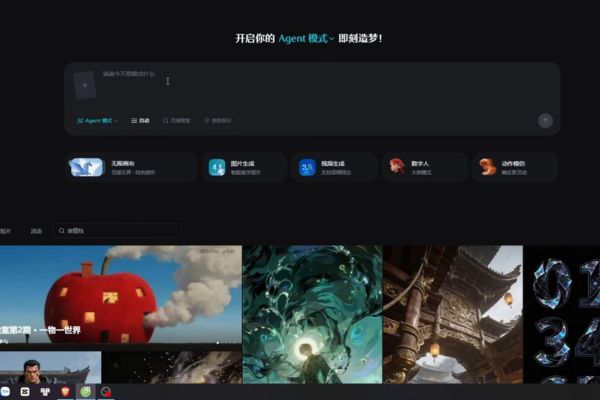
You access the platform’s homepage at: https://jimeng.jianying.com/ai-tool/home
This is ByteDance’s ecosystem, where today’s most advanced video AI models are updated.
Step 2: Register and log in to your account
The system requires logging in with a Douyin (Chinese TikTok) account. Open the Douyin application on your phone, scan the QR code on the computer screen to confirm login.
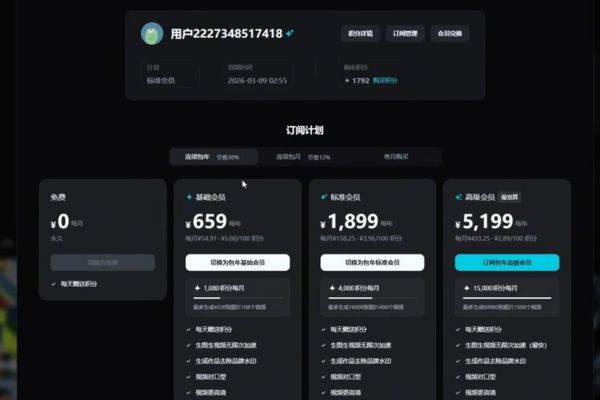
Step 3: Deposit points (Credits) and register for VIP package
To experience Seedance 2.0, you are required to have a VIP account.
Payment method: Use Alipay. You can register for Alipay with your Vietnamese phone number and Visa/Mastercard link.
Packages:
- Trial package: New accounts usually have a discount of 1 currency (about 3,500 VND) for 7 days with 1080 credits.
- Retail package: 79 yuan (Basic), 239 yuan (Pro+), 649 yuan (Ultimate).
- Automatic renewal package: Price will be cheaper, for example Basic package is 69 yuan, Pro+ package is 199 yuan (about 770,000 VND for 4000 credits).
Expense: A 4-second video costs 24 credits, a 5-second video costs 30 credits, and a 15-second video costs 90 credits.
Step 4: Access the video creation tool
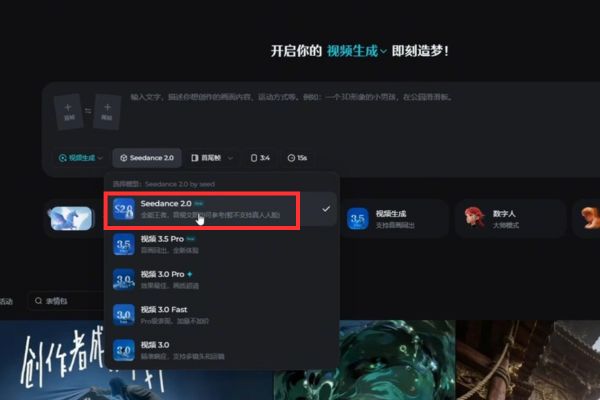
At the home page interface, select the Agent tab or the plus icon. In the Model selection section, click the drop-down menu and select Seedance 2.0.
Step 5: Upload reference images or videos
You can upload 1 to 5 files (images or videos). The system allows combining characters, props, backgrounds and defining interactions between them (for example, image 1 is the first frame, image 2 is the last frame).
Step 6: Use @ syntax to reference the file
After successfully uploading the files, you need to mention them in the command (Prompt) so that the AI understands your intentions correctly. Use the @ symbol followed by the file identifier like this:
- Use @Image1 as the first frame.
- Reference @Video1 for camera movement.
- Use @Audio1 as background music or sound.
For example: “Imitate the moves in @Video1 to dance.”
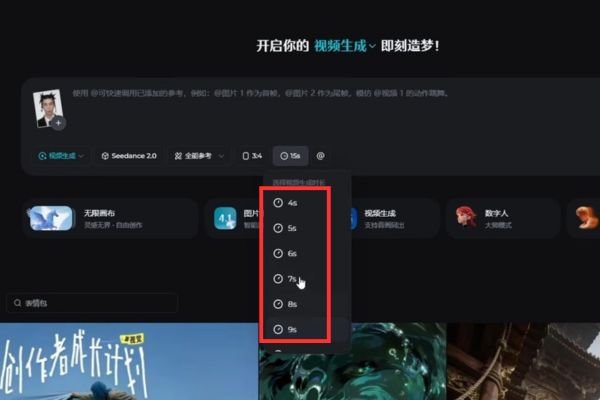
Step 7: Set up specifications
Customize the parameters in the toolbar below:
- Time: Choose from 4 seconds to up to 15 seconds.
- Aspect ratio: Choose 16:9, 9:16, 4:3… depending on your needs.
Step 8: Write optimal commands
- Language: Prioritize Chinese (use ChatGPT or Google Translate to convert).
- Rules: Do not use strange characters such as []() or file extension .png, .jpg in Prompt.
- Audio tips: To have a video with only sound effects (SFX) without background music (BGM), add a Chinese command line at the end that reads: “Video has no background music, only realistic and dynamic sound effects.”
Step 9: Create video and wait
Press the button Generate. Processing time usually takes about 3 minutes depending on the number of users on the server.
Step 10: Post-production and finalizing the video
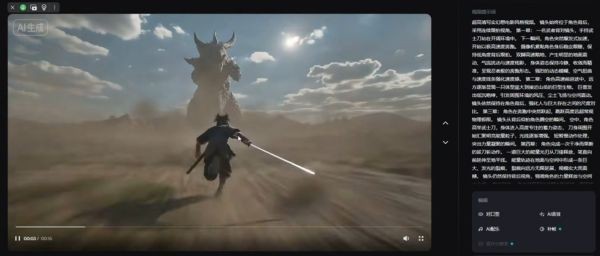
After you get the results, you can use the tools right below the video:
- Upscale HD: Upgrade sharp resolution.
- Increase FPS: Raise to 60 FPS for smoother movement and reduced vibration.
- Lip Sync: Use OmiHuman (version 1.5 or 2.0) to match the character’s mouth.
- Creating music/SFX: Features automatically generate audio based on video content.
Compare Seedance to traditional video creation tools
To clearly see the superiority of Seedance, let’s look at the comparison table below:
| Criteria | Old AI video creation tool | Seedance (ByteDance) |
| Data input | Mainly text (Text prompt) | Diversity: Text, Image, Video, Audio |
| Video length | Usually very short (a few seconds) | Up to 60 seconds |
| Image quality | Low resolution, motion is stiff | 4K resolution, smooth movements, real physics |
| Sound | Often absent or mismatched | Create your own sounds in sync with the action |
| Customization capabilities | Limited, difficult to control the character | Tall, retains character characteristics from original photo |
Mixed reactions from Hollywood and the online community
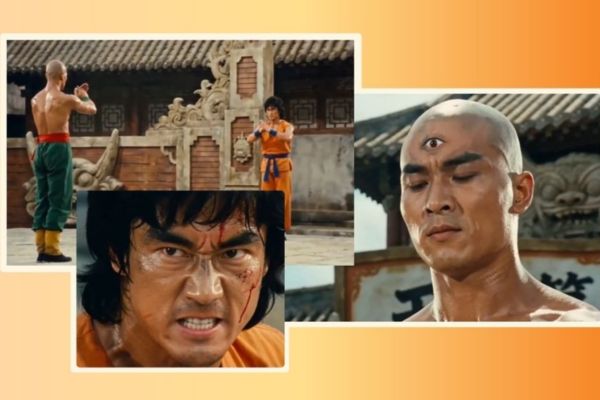
Seedance’s popularity has created two distinctly opposing opinions. For the user community and small businesses, this is a great tool to satisfy creativity. Independent filmmakers can significantly cut budgets and post-production time, while marketers easily create impressive advertising campaigns.
However, the Motion Picture Association of America (MPA) was extremely angry. They are concerned that when everyone knows what Seedance is and how to use it, the situation copyright infringement will take place widely. The practice of inserting the faces of stars like Brad Pitt or Tom Cruise into video clips without permission is raising deep concerns about ethical and legal. The MPA said that the lack of strong protections could lead to an explosion of fake news and content deepfakeharming the creative industry.
Although ByteDance has not officially commented on these criticisms, it cannot be denied that Seedance is opening a new era full of promise but also many challenges for the global video production sector.

Q&A: Frequently asked questions about Seedance
1. How many minutes long can Seedance create videos?
The current Seedance 2.0 version allows the creation of videos with a maximum length of up to 60 seconds with resolution 4K and synchronized sound.
2. What do I need to create videos with Seedance?
You can offer max 12 data files includes headshots to create characters, sample videos to reference camera angles, and audio files to set the pace for new videos.
3. Why is Seedance opposed by the Motion Picture Association of America (MPA)?
MPA is concerned that Seedance violates the copyright of images of famous actors and is at risk of being abused to create fake videos (deepfake) or spread false information.
Conclude
Hopefully through this article, you have understood clearly What is Seedance? and its huge impacts on today’s technology world. In short, Seedance is a giant leap forward in generative AI technology, making cinematic quality video production available to everyone.