• Home
  • News
  • Software
  • Knowledge
  • MMO
  • Tips
  • Security
  • Network
  • Office
AnonyViet - English Version
  • Home
  • News
  • Software
  • Knowledge
  • MMO
  • Tips
  • Security
  • Network
  • Office
No Result
View All Result
  • Home
  • News
  • Software
  • Knowledge
  • MMO
  • Tips
  • Security
  • Network
  • Office
No Result
View All Result
AnonyViet - English Version
No Result
View All Result

Instructions for turning on/off the lock to protect your Facebook personal page

AnonyViet by AnonyViet
June 30, 2024
in Tips
0

Are you worried about your privacy on Facebook when too many strangers view your personal page? Don't worry, Facebook has provided a 'Profile Protection Lock' feature that helps you strictly control who can see your personal information, posts, photos and stories. This article will guide you in detail on how to enable/disable Facebook profile protection lock in the simplest way.

Join the channel Telegram belong to AnonyViet 👉 Link 👈

Steps to turn on Facebook personal page protection lock

Step 1: Go to your personal page > Click on the 3 dots icon in the right corner of the screen >
Click on 'Protect your profile' section.
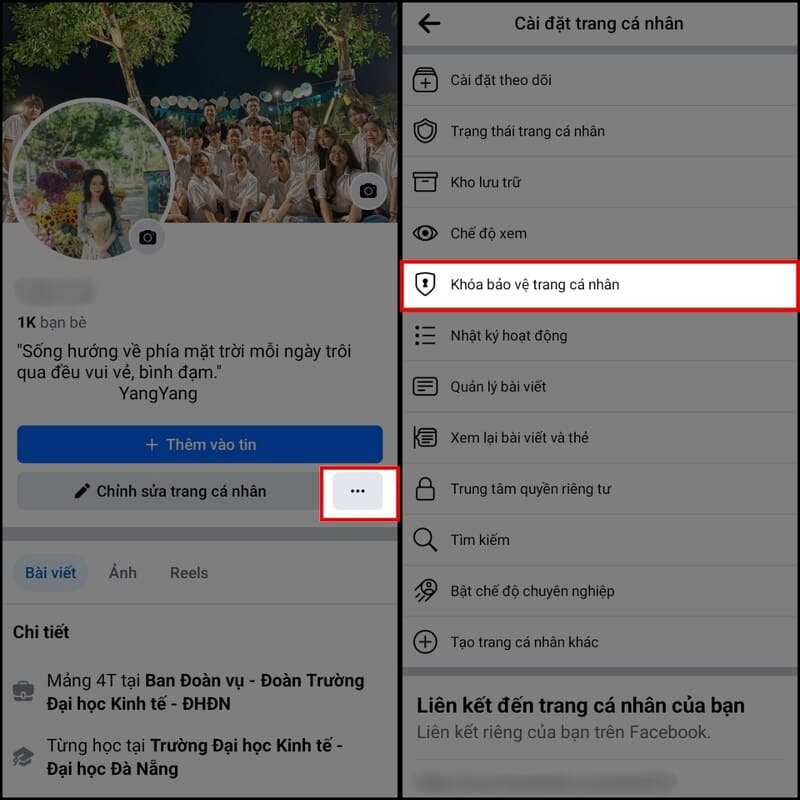
Click on 'Protect your profile'

Step 2: Read the information about this feature carefully > Click 'Lock profile protection'.
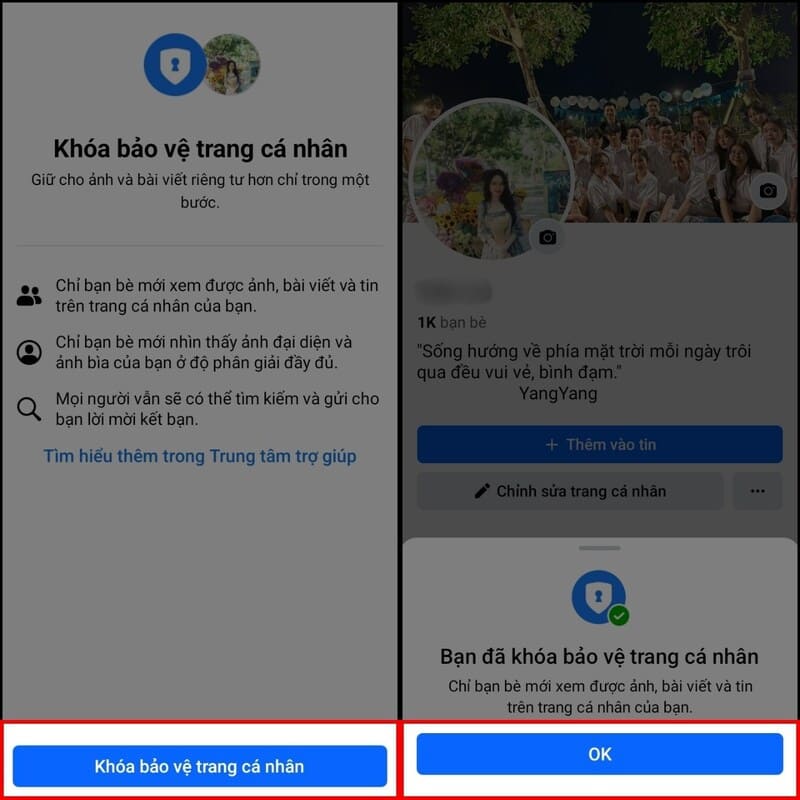
Click 'Lock profile protection'

Step 3: Facebook will announce privacy changes when you enable this feature.
Press 'OK' to finish.

See more: How to Download Videos From Facebook Be Efficient With Online Tools

Steps to unlock Facebook profile protection

Step 1: Go to Settings on your profile, select 'Unlock Profile' > Next, click 'Unlock' with the padlock icon shown open.
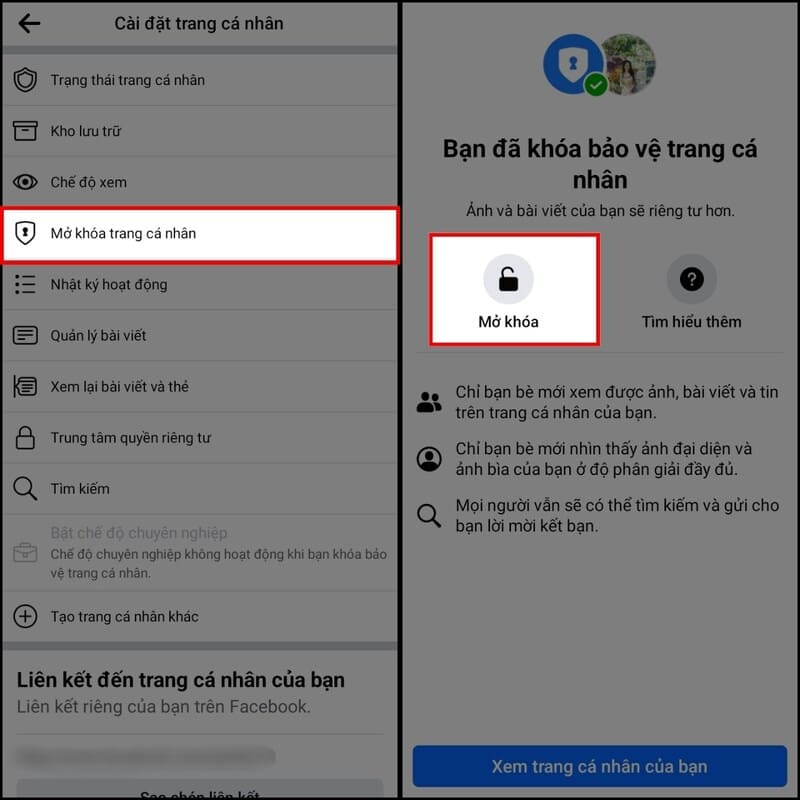
Steps to unlock and protect your Facebook personal page
Steps to unlock Facebook profile protection

Step 2: Select 'Unlock profile' to edit access permissions to posts, images or information on your page > Finally, click 'OK' to finish the process of unlocking your Facebook profile.
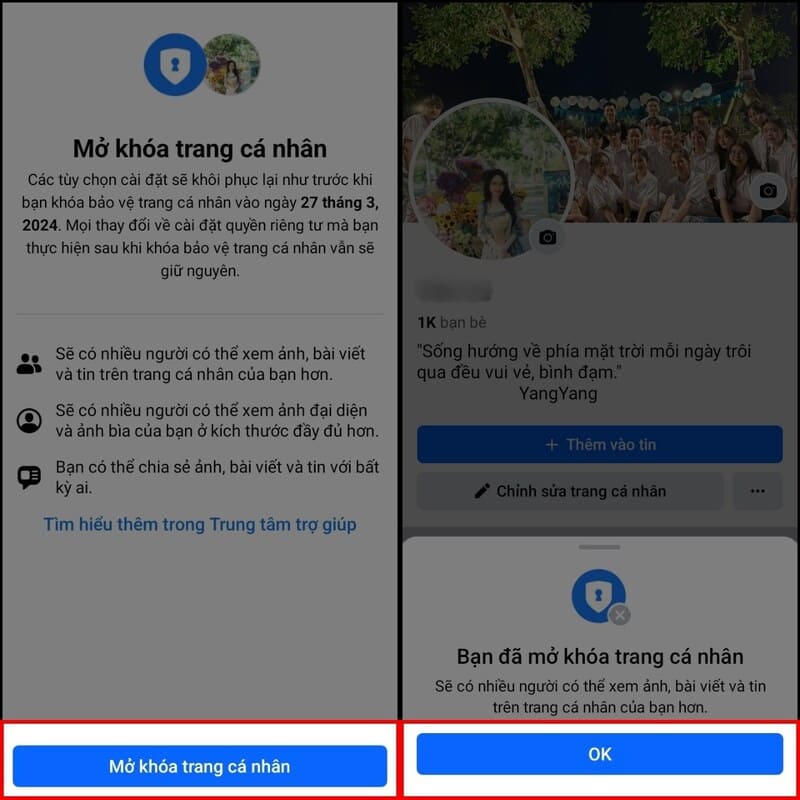
Select 'Unlock profile'

Why can't I lock and protect my Facebook profile?

Common reasons why this feature doesn't work include:

1. Feature not yet implemented

Facebook often rolls out new features on a regional basis. If you don't see the option to lock your profile, it may not be available in your country or region. Please be patient or check with Facebook for more details.

2. Not meeting the conditions

Facebook may impose certain requirements to use this feature. For example, you need to have a minimum number of friends or have been active on Facebook for a certain period of time. If your account is newly created, you may not be eligible to use this feature.
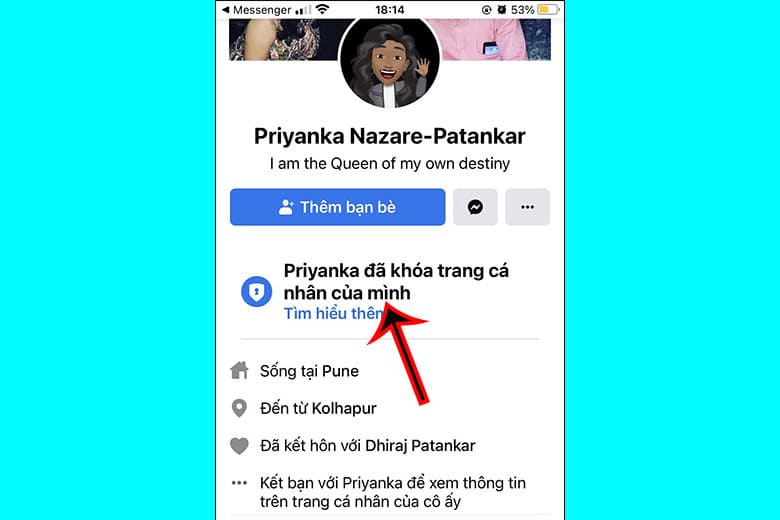
There are many reasons why you may not be able to use this feature
There are several reasons why you cannot use this feature.

3. Technical error

Sometimes, due to technical issues on Facebook's part, you may have trouble enabling profile lock. Try again later or contact Facebook support for assistance.

4. Old Facebook version

Make sure you're using the latest version of the Facebook app or accessing Facebook on the latest web browser. Because older versions may not support this feature.

5. Restricted Account

If your account has a history of violating Facebook community rules (e.g., posts, videos have been removed, or you are in the process of being penalized), you may be restricted from using certain features, including 'Profile Protection Lock'.

6. Other reasons

There may also be other reasons why you can't enable this feature, for example due to account settings or system errors.

See more: How to transfer Facebook block list from one account to another

Epilogue

With feature Lock to protect Facebook personal page, you can rest assured about privacy and sharing personal information is always safe on social networks. Hope this article has provided you with useful instructions.


Tags: FacebookInstructionsLockonoffpagepersonalProtectturning
Previous Post

How to Add Google Drive to File Explorer on Windows 11

Next Post

How to Fix AirDrop Not Working on iPhone

AnonyViet

AnonyViet

Related Posts

Windows 7/8.1/10 users will be upgraded to Windows 11 for free
Tips

Windows 7/8.1/10 users will be upgraded to Windows 11 for free

July 30, 2026
Instructions for receiving ChatGPT Plus for 1 month for free in 2026
Tips

Instructions for receiving ChatGPT Plus for 1 month for free in 2026

July 28, 2026
Some reasons I don’t like Windows 11
Tips

Some reasons I don’t like Windows 11

July 27, 2026
Instructions on how to get free Facebook white ticks
Tips

Instructions on how to get free Facebook white ticks

July 27, 2026
Collection of Windows 11 wallpapers for computers and phones
Tips

Collection of Windows 11 wallpapers for computers and phones

July 26, 2026
Don’t install leaked Windows 11
Tips

Don’t install leaked Windows 11

July 25, 2026
Next Post
How to Fix AirDrop Not Working on iPhone

How to Fix AirDrop Not Working on iPhone

0 0 votes
Article Rating
Subscribe
Login
Notify of
guest

guest

0 Comments
Oldest
Newest Most Voted

Recent News

Windows 7/8.1/10 users will be upgraded to Windows 11 for free

Windows 7/8.1/10 users will be upgraded to Windows 11 for free

July 30, 2026
Instructions for receiving the free Certified LLM Security Expert certificate

Instructions for receiving the free Certified LLM Security Expert certificate

July 30, 2026
MSI laptops are not just for gamers: Which line is suitable for students, office workers and creative people?

MSI laptops are not just for gamers: Which line is suitable for students, office workers and creative people?

July 29, 2026
What is quantum resistant cryptography? Why must the Internet change?

What is quantum resistant cryptography? Why must the Internet change?

July 29, 2026
Windows 7/8.1/10 users will be upgraded to Windows 11 for free

Windows 7/8.1/10 users will be upgraded to Windows 11 for free

July 30, 2026
Instructions for receiving the free Certified LLM Security Expert certificate

Instructions for receiving the free Certified LLM Security Expert certificate

July 30, 2026
MSI laptops are not just for gamers: Which line is suitable for students, office workers and creative people?

MSI laptops are not just for gamers: Which line is suitable for students, office workers and creative people?

July 29, 2026
AnonyViet - English Version

AnonyViet

AnonyViet is a website share knowledge that you have never learned in school!

We are ready to welcome your comments, as well as your articles sent to AnonyViet.

Follow Us

Contact:

Email: anonyviet.com[@]gmail.com

Main Website: https://anonyviet.com

Recent News

Windows 7/8.1/10 users will be upgraded to Windows 11 for free

Windows 7/8.1/10 users will be upgraded to Windows 11 for free

July 30, 2026
Instructions for receiving the free Certified LLM Security Expert certificate

Instructions for receiving the free Certified LLM Security Expert certificate

July 30, 2026
  • Home
  • Home 2
  • Home 3
  • Home 4
  • Home 5
  • Home 6
  • Next Dest Page
  • Sample Page

say88 tỷ lệ kèo nhà cái kèo nhà cái 5 febet

No Result
View All Result
  • Home
  • News
  • Software
  • Knowledge
  • MMO
  • Tips
  • Security
  • Network
  • Office

say88 tỷ lệ kèo nhà cái kèo nhà cái 5 febet

wpDiscuz
0
0
Would love your thoughts, please comment.x
()
x
| Reply