• Home
  • News
  • Software
  • Knowledge
  • MMO
  • Tips
  • Security
  • Network
  • Office
AnonyViet - English Version
  • Home
  • News
  • Software
  • Knowledge
  • MMO
  • Tips
  • Security
  • Network
  • Office
No Result
View All Result
  • Home
  • News
  • Software
  • Knowledge
  • MMO
  • Tips
  • Security
  • Network
  • Office
No Result
View All Result
AnonyViet - English Version
No Result
View All Result

Instructions for rereading the first message on Messenger

AnonyViet by AnonyViet
January 27, 2023
in Tips
0

You have important messages, but these are above and quite a long way from now. If you drag your mouse up to see it, you don’t know when you’ll be able to read it. In this article, I will guide you how to read the first message on Messenger very quickly

Join the channel Telegram of the AnonyViet 👉 Link 👈

Review messages on messenger for what?

“Oh, so the message search function is empty?”. I know you’ll be asking questions about the default message search function on Messenger, but today, I’m going to show you how to view messages based on when you sent the message. .

For a specific example, what if a brother has a lover or has a crush, but what if he wants to see the message again? Surely many of you have thought about using the available message search function, but what if you forget to text something or how. But I’m sure many of you reading this remember the first day you and your lover chatted. So searching messages by time is a great option.

Instructions for rereading the first message on Messenger

I hope this feature will be turned into a feature by the META guys (Facebook / Messenger) but before it becomes a feature, you will probably have to follow this article to be able to see it.

Unfortunately, I tried to review the deleted messages and as a result, I can’t see the deleted messages again. In my opinion, maybe Messenger has removed and deleted them from the database to be able to manage space better, but after this article I will show you how to review deleted messages on messenger!

Instructions on how to review your lover’s old messages on Messenger

Here are a few things to know when getting started:

Time stamp or timestamp: A timestamp is a sequence of characters or encoded information that identifies when an event occurred, usually giving the date and time of the day, sometimes to a fraction of the accuracy. of a second.

So since each time stamp is different, even a number will give us different date and time results. And how to do the message review will also depend on the Time Stamp because each different message will have a different timestamp.

Step 1: Access to m.facebook.com
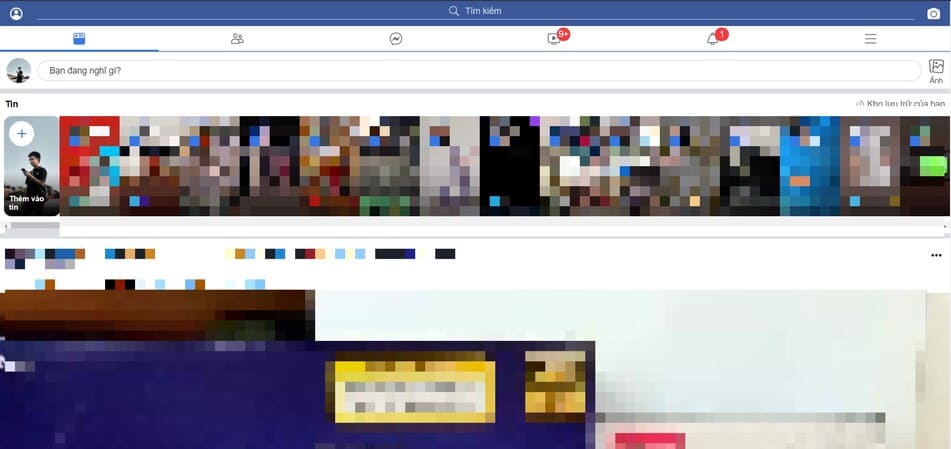
go to m.facebook.com and go to messenger

Step 2: go to messenger

Step 3: Find the person you want to see the message again

Step 4: right click to view older messages > open in new tab
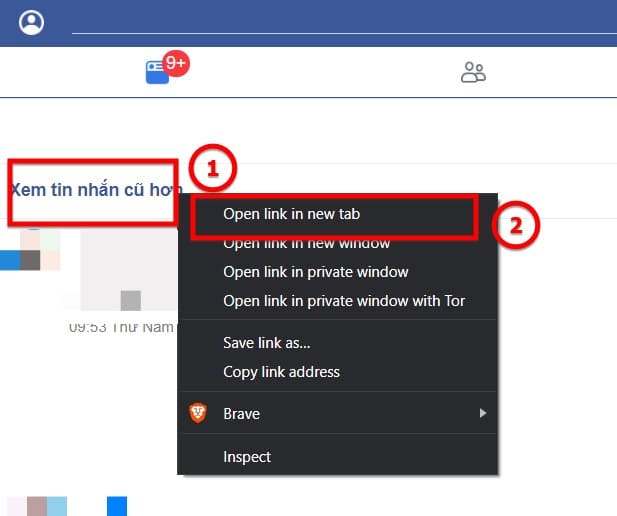
Open older messages in a new tab

Step 5: Go to the following website in a new tab: Time stamp

Step 6: Enter the date and time you want to search here and click Human date to Timestamp

Date time to time stamp

Step 7: After clicking, copy for me the Epoch timestamp line right below
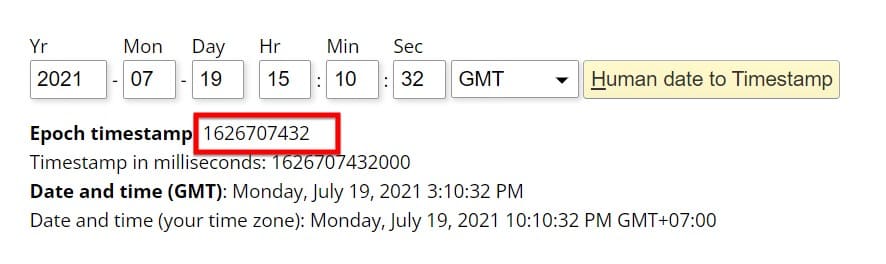
copy the Epoch timestamp

Step 8: Go back to the Messenger page you just opened in step 4. Replace last_message_timestamp=[số time stamp bạn vừa lấy từ website] and press enter

Eg:
last_message_timestamp=1635994405332 -> last_message_timestamp=1626707432

change timestamp

From now on, those who are afraid of their lover asking about what they chatted in the past will not be afraid anymore! What are you waiting for, try it now lest the heat run out!!!!!!!!!


The article achieved: 5/5 – (100 votes)

Tags: InstructionsmessageMessengerrereading
Previous Post

Sign up for a free 10 day VPS with NeuPrime

Next Post

How to increase Likes and Followers in Instagram with Followers Gallery

AnonyViet

AnonyViet

Related Posts

New features of Windows 10 21H1 are coming soon
Tips

New features of Windows 10 21H1 are coming soon

March 16, 2026
How to convert normal music into 8D music with Audioalter
Tips

How to convert normal music into 8D music with Audioalter

March 14, 2026
How to prevent your family’s Security Camera from being hacked
Tips

How to prevent your family’s Security Camera from being hacked

March 13, 2026
Pixel Agents: Turn VS Code into a Pixel Art Office for AI
Tips

Pixel Agents: Turn VS Code into a Pixel Art Office for AI

March 12, 2026
English learning app Memrise is offering a lifetime discount of only 21,000 VND
Tips

English learning app Memrise is offering a lifetime discount of only 21,000 VND

March 11, 2026
Instructions for upgrading to Windows 10 Sun Valley (February 21)
Tips

Instructions for upgrading to Windows 10 Sun Valley (February 21)

March 11, 2026
Next Post
How to increase Likes and Followers in Instagram with Followers Gallery

How to increase Likes and Followers in Instagram with Followers Gallery

0 0 votes
Article Rating
Subscribe
Login
Notify of
guest

guest

0 Comments
Oldest
Newest Most Voted
Inline Feedbacks
View all comments

Recent News

How to install extension to remind office workers to drink water

How to install extension to remind office workers to drink water

March 17, 2026
Why are iPhones and MacBooks still the number 1 “weapons” of the technology world?

Why are iPhones and MacBooks still the number 1 “weapons” of the technology world?

March 16, 2026
New features of Windows 10 21H1 are coming soon

New features of Windows 10 21H1 are coming soon

March 16, 2026
Receive Advanced SystemCare 19 Pro key for free for 6 months

Receive Advanced SystemCare 19 Pro key for free for 6 months

March 16, 2026
How to install extension to remind office workers to drink water

How to install extension to remind office workers to drink water

March 17, 2026
Why are iPhones and MacBooks still the number 1 “weapons” of the technology world?

Why are iPhones and MacBooks still the number 1 “weapons” of the technology world?

March 16, 2026
New features of Windows 10 21H1 are coming soon

New features of Windows 10 21H1 are coming soon

March 16, 2026
AnonyViet - English Version

AnonyViet

AnonyViet is a website share knowledge that you have never learned in school!

We are ready to welcome your comments, as well as your articles sent to AnonyViet.

Follow Us

Contact:

Email: anonyviet.com[@]gmail.com

Main Website: https://anonyviet.com

Recent News

How to install extension to remind office workers to drink water

How to install extension to remind office workers to drink water

March 17, 2026
Why are iPhones and MacBooks still the number 1 “weapons” of the technology world?

Why are iPhones and MacBooks still the number 1 “weapons” of the technology world?

March 16, 2026
No Result
View All Result
  • Home
  • News
  • Software
  • Knowledge
  • MMO
  • Tips
  • Security
  • Network
  • Office

wpDiscuz
0
0
Would love your thoughts, please comment.x
()
x
| Reply