
• Home
  • News
  • Software
  • Knowledge
  • MMO
  • Tips
  • Security
  • Network
  • Office
AnonyViet - English Version
  • Home
  • News
  • Software
  • Knowledge
  • MMO
  • Tips
  • Security
  • Network
  • Office
No Result
View All Result
  • Home
  • News
  • Software
  • Knowledge
  • MMO
  • Tips
  • Security
  • Network
  • Office
No Result
View All Result
AnonyViet - English Version
No Result
View All Result

Instructions for creating Virtual Tokens Buff Sub Tit Ga

AnonyViet by AnonyViet
February 16, 2023
in Tips
0

If you want to have a lot of Facebook followers, you must have a sufficient amount of Tokens and be alive to be able to buff sub (Hack tracking). First of all, I will briefly explain what Token is for those of you who do not know. Then how to create virtual Token to buffs the sub sucks all the time.

Join the channel Telegram belong to AnonyViet 👉 Link 👈

What are Facebook tokens?

We can understand Facebook Token is a piece of code generated by Facebook for each specific user (For example, 1 individual, 1 Fanpage or 1 application). This code can help you do many actions for that object without having to directly manage it (no need to know the password).

To put it more simply, Token is a person’s identification code like an ID card number. Each person needs a code for Facebook to distinguish each other from each other. Two people can have the same Facebook name but the Token is different.

How is the buff Sub?

Buff Sub is the term for increasing the number of followers on your personal page. The fact that Buff sub uses the Token code to silently increase the sub without having to give a password, so it is very safe.

Steps to make Virtual Token

Facebook has just launched a Facebook White system for users to find bugs with a test account. When you create an account above, it will give you an Account and password created by Facebook itself.

You can use those virtual Token accounts to Get Token and conduct buff sub for you.

Instructions for buffing sub with Virtual Token

My Whitehat Facebook link is below.

Link Facebook White

Remember to skip the ad to support me.

After accessing the link, the Facebook White interface will appear.
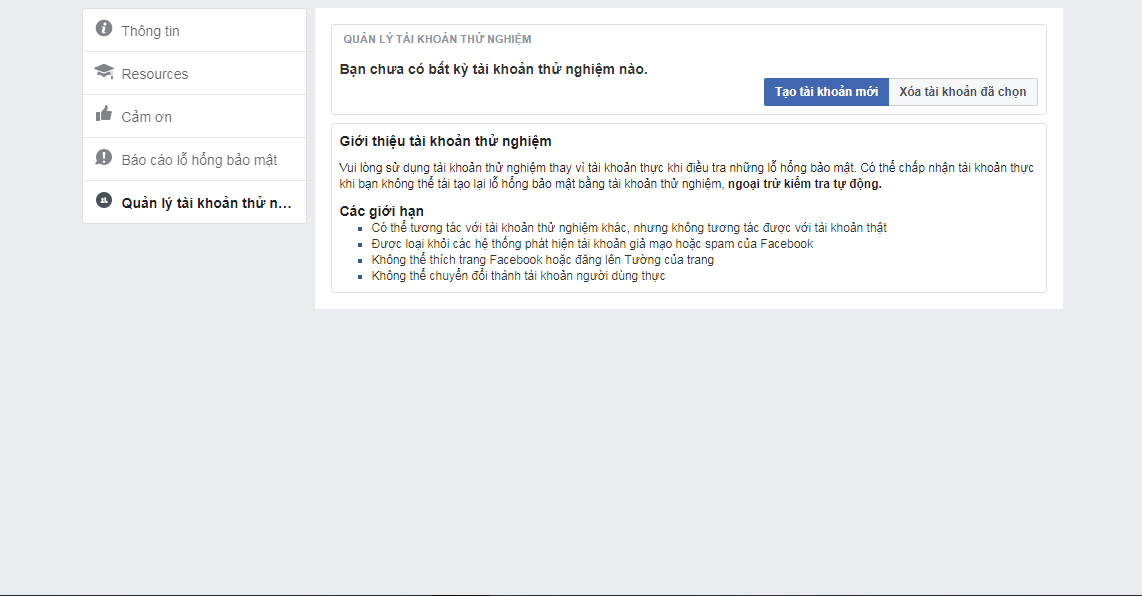
test1

Next, click on the “Create New Account” section to proceed with creating it.
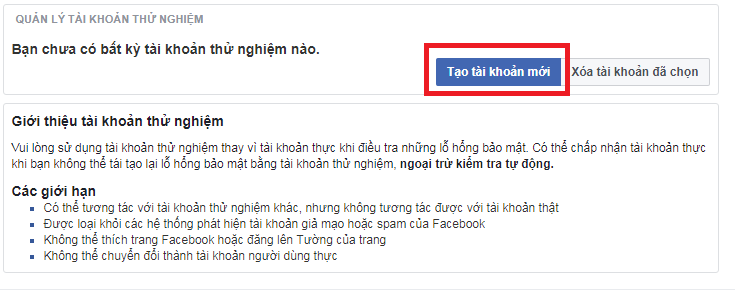
test2

Then wait about 10 seconds, it’s done for us.

Below is the information about the test Facebook account after creating it.
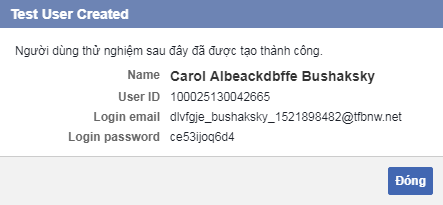
login

After you have your personal information including Email and Password, all you need to do is Get Token and Buff Sub.

Currently, there are only 2 websites that support Get Token and buffs on test accounts. Please click on the link below to access it.

Link Get Token

Link Buff Sub

(Skip the ad to support Anonyviet)

You go to the Get Token link above and then enter the Email and Password of the test account and then click Login.
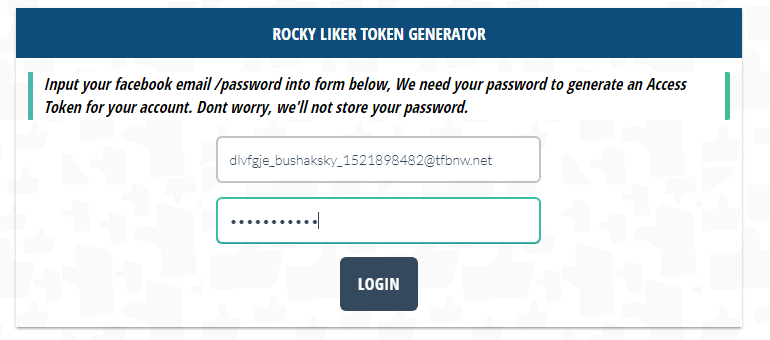
token

Scroll down to see a piece of code. In it will have our token in quotes. You proceed to copy that token.
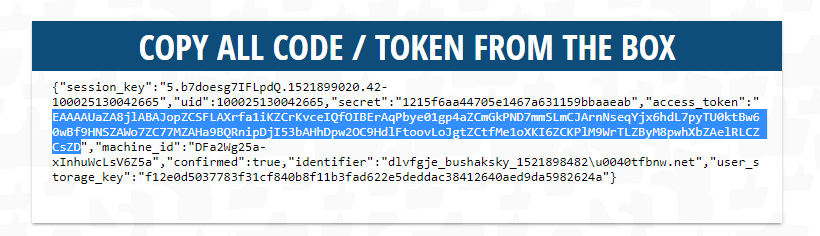
get

Switch to the Buff sub link and paste the token in and enjoy the results.
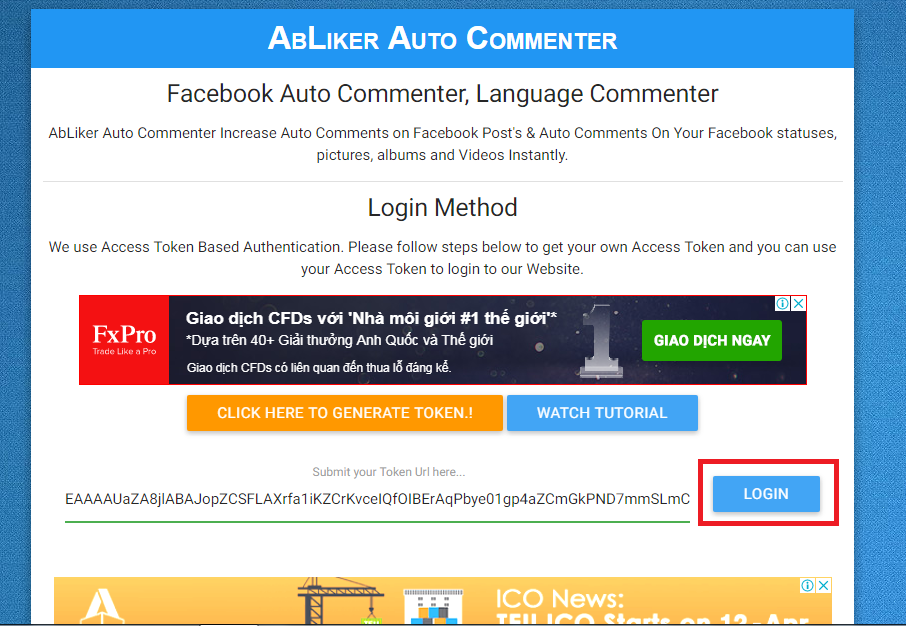
Instructions for creating Virtual Tokens Buff Sub Tit Ga

Each time you finish buffing, you Delete that account and create a new one and then buff it again. As long as your arm is broken, it’s okay ^^

Like Fanpage or follow website for early updates of good articles.

Good luck
TMQ.

The article achieved: 5/5 – (100 votes)

Previous Post

Summary of ways to download videos quickly and with quality

Next Post

How to create a virtual MasterCard for international online payments

AnonyViet

AnonyViet

Related Posts

How to open “This PC” instead of “Quick Access” in File Explorer by default
Tips

How to open “This PC” instead of “Quick Access” in File Explorer by default

October 17, 2026
How to create a virtual Pet, a virtual character running around on the Desktop to relax
Tips

How to create a virtual Pet, a virtual character running around on the Desktop to relax

October 15, 2026
15 cách tăng tốc Windows 10 nhanh như gió
Tips

15 cách tăng tốc Windows 10 nhanh như gió

October 14, 2026
How to create Guest mode Shortcuts for Chrome and Edge
Tips

How to create Guest mode Shortcuts for Chrome and Edge

October 13, 2026
Test what breed of dog you are through 10 multiple choice questions
Tips

Test what breed of dog you are through 10 multiple choice questions

October 13, 2026
Fliqlo – Create digital clock screens on Windows and phones
Tips

Fliqlo – Create digital clock screens on Windows and phones

October 12, 2026
Next Post

How to create a virtual MasterCard for international online payments

0 0 votes
Article Rating
Subscribe
Login
Notify of
guest

guest

0 Comments
Oldest
Newest Most Voted

Recent News

How to open “This PC” instead of “Quick Access” in File Explorer by default

How to open “This PC” instead of “Quick Access” in File Explorer by default

October 17, 2026
Instructions for receiving 3 months of MultCloud Premium for free with 200GB data

Instructions for receiving 3 months of MultCloud Premium for free with 200GB data

October 17, 2026
Instructions for receiving pension through VNeID without going to the ward

Instructions for receiving pension through VNeID without going to the ward

October 16, 2026
MBTI, Big Five, DISC or Holland: which personality test should you choose?

MBTI, Big Five, DISC or Holland: which personality test should you choose?

October 15, 2026
How to open “This PC” instead of “Quick Access” in File Explorer by default

How to open “This PC” instead of “Quick Access” in File Explorer by default

October 17, 2026
Instructions for receiving 3 months of MultCloud Premium for free with 200GB data

Instructions for receiving 3 months of MultCloud Premium for free with 200GB data

October 17, 2026
Instructions for receiving pension through VNeID without going to the ward

Instructions for receiving pension through VNeID without going to the ward

October 16, 2026
AnonyViet - English Version

AnonyViet

AnonyViet is a website share knowledge that you have never learned in school!

We are ready to welcome your comments, as well as your articles sent to AnonyViet.

Follow Us

Contact:

Email: anonyviet.com[@]gmail.com

Main Website: https://anonyviet.com

Recent News

How to open “This PC” instead of “Quick Access” in File Explorer by default

How to open “This PC” instead of “Quick Access” in File Explorer by default

October 17, 2026
Instructions for receiving 3 months of MultCloud Premium for free with 200GB data

Instructions for receiving 3 months of MultCloud Premium for free with 200GB data

October 17, 2026
  • Home
  • Home 2
  • Home 3
  • Home 4
  • Home 5
  • Home 6
  • Next Dest Page
  • Sample Page

say88 tỷ lệ kèo nhà cái kèo nhà cái 5 febet

No Result
View All Result
  • Home
  • News
  • Software
  • Knowledge
  • MMO
  • Tips
  • Security
  • Network
  • Office

say88 tỷ lệ kèo nhà cái kèo nhà cái 5 febet

wpDiscuz
0
0
Would love your thoughts, please comment.x
()
x
| Reply





