Create virtual live photos at Ma Pi Leng pass Now it’s easy thanks to the power of advanced AI technology. Instead of having to plan a long and expensive trip, you can completely experience the feeling of standing in the middle of the “first pass in the world” right at home. Let’s explore the set of formulas for creating amazing photos below.
📢 Join the channel Telegram belong to AnonyViet
Update new articles, cool tools and IT tips fastest
Instructions for creating virtual live photos at Ma Pi Leng Pass
To get realistic, sharp and breath-taking pictures of the rocky plateau, users need to follow the process below.
Step 1: First, visit the tool Google Gemini via web browser or phone application. Find the feature create images of this AI. In order for the output to retain the most natural facial expression, users should prepare a high-quality personal portrait photo, with good lighting and appropriate expression as a reference model (if the tool supports the image-to-image feature).
Step 2: This is the most important step that determines the soul of the photo. Below is a set of 6 commands optimized for the concept “Girl wearing a red cardigan, white dress” standing out in the nature of Ha Giang. Please copy and paste into Gemini’s chat box:
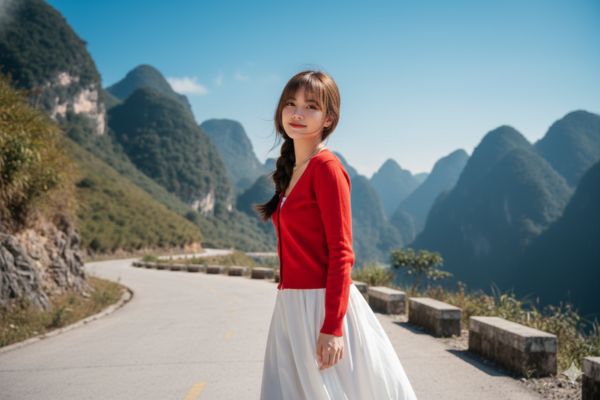
Concept 1: Walking naturally on the pass
Tạo hình ảnh độ phân giải 8K, sắc nét và trong trẻo theo phong cách tự nhiên. Cô gái sải bước trên con đường quanh co ở đèo Mã Pí Lèng, khẽ ngoảnh đầu về phía ống kính và nở nụ cười dịu dàng. Cô diện áo cardigan đỏ rực cổ tim cài nút, kết hợp cùng chân váy trắng dài thanh thoát; mái tóc tết lệch khẽ tung bay trong gió núi. Làn da hồng hào nổi bật dưới ánh nắng cao nguyên. Những sợi tóc con lay động nhẹ, phía sau là bầu trời xanh thẳm và dãy núi đá sừng sững. Chi tiết rõ ràng, cảm giác trong veo và sống động.
Concept 2: Personality sitting pose on the side of the road
Tạo hình ảnh chất lượng 8K, trong trẻo và chân thực. Cô gái ngồi xổm bên lề đường đèo, chống cằm bằng một tay và nở nụ cười rạng ngời. Cô khoác áo cardigan đỏ tươi dáng cổ tim cài nút, phối cùng chân váy trắng dài thanh lịch; mái tóc tết lệch khẽ bay theo làn gió. Làn da trắng hồng nổi bật dưới ánh nắng vùng núi, ánh sáng chiếu trực tiếp làm gương mặt thêm mềm mại và tươi sáng. Bố cục cận trung, hậu cảnh là dãy núi phía xa mờ dần tạo chiều sâu. Tổng thể tự nhiên và giàu cảm xúc.

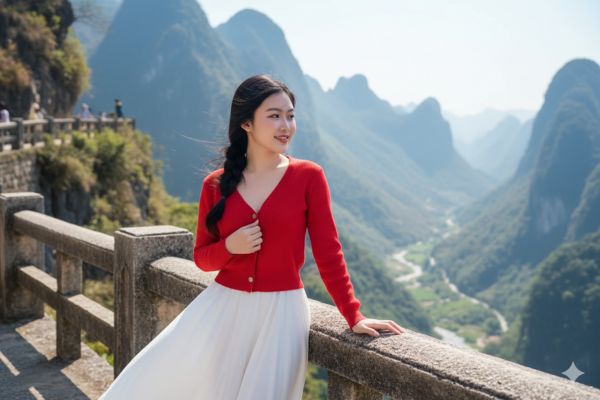
Concept 3: Deep mood looking down into the valley
Tạo hình ảnh 8K sắc nét, màu sắc tươi sáng và tự nhiên. Cô gái đứng tựa nhẹ vào lan can đá trên con đèo, một tay khẽ ôm lấy chiếc cardigan, ánh nhìn hướng xa xuống thung lũng Nho Quế, môi nở nụ cười hiền dịu. Cô diện áo len cardigan đỏ rực cổ tim cài khuy, phối cùng chân váy trắng dài mềm mại; mái tóc tết lệch bay nhẹ trong gió núi. Làn da trắng hồng nổi bật dưới nắng cao nguyên, gió thổi làm váy trắng khẽ tung bay. Tone ảnh sáng – trong – rực rỡ, những sợi tóc con chuyển động tự nhiên. Phía sau là núi đá Hà Giang rõ nét, hùng vĩ.
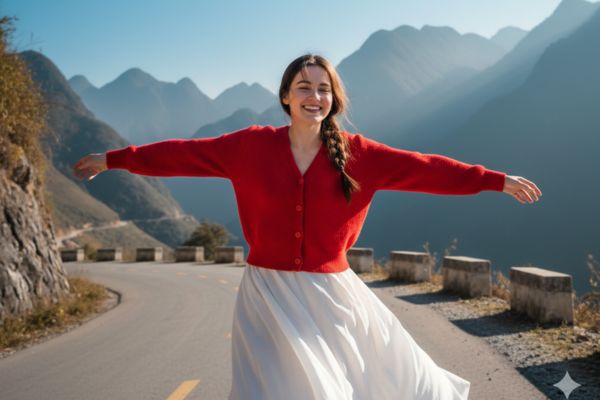
Concept 4: Rotate freely between heaven and earth
Tạo hình ảnh 8K rực rỡ, màu sắc trong trẻo và sống động. Cô gái xoay người nhẹ trên con đường uốn lượn ở đèo Mã Pí Lèng, dang rộng hai tay đầy cảm giác tự do, nở nụ cười tươi rạng. Chiếc cardigan đỏ tươi cổ tim cài khuy nổi bật trên nền núi xám xanh trùng điệp, kết hợp cùng chân váy trắng dài xoè mềm mại. Mái tóc nâu tết lệch tung bay trong gió, làn da trắng hồng bừng sáng dưới ánh nắng vùng cao. Bầu trời xanh thẳm, ánh sáng tự nhiên viền quanh mái tóc tạo hiệu ứng lung linh. Tổng thể tươi mới và đầy năng lượng.
Concept 5: Sit comfortably next to the wooden railing
Tạo hình ảnh 8K với ánh sáng tự nhiên trong veo và rõ nét. Cô gái ngồi trên lan can gỗ ven đèo, chân duỗi nhẹ về phía trước, hai tay chống ra sau, nở nụ cười tươi tắn hướng thẳng vào ống kính. Cô diện áo cardigan đỏ tươi cổ tim cài khuy kết hợp cùng chân váy trắng dài, mái tóc tết lệch bay lòa xòa trong gió núi. Làn da trắng hồng nổi bật dưới ánh nắng cao nguyên, tạo cảm giác mềm mại và rạng rỡ. Phía sau là toàn cảnh núi đá hùng vĩ phủ lớp sương mỏng, gió thổi mạnh làm khung hình thêm sống động. Tỉ lệ dọc 9:16, tổng thể sắc nét và giàu chiều sâu.

Concept 6: Close-up of radiant beauty
Tạo hình ảnh 8K với chất lượng trong trẻo, sáng và cực kỳ sắc nét. Cô gái đứng trên mỏm đá ở đèo Mã Pí Lèng, làn gió nhẹ thổi qua, một tay đưa lên vuốt tóc, gương mặt nghiêng cười rạng rỡ hướng xuống dòng sông Nho Quế xanh ngọc phía dưới. Cô mặc áo cardigan len đỏ tươi cổ tim cài khuy, phối cùng chân váy trắng dài khẽ tung bay trong gió. Mái tóc tết lệch mềm mại, làn da trắng hồng nổi bật dưới ánh nắng vùng cao. Bố cục khung hình dọc 9:16, hậu cảnh là những lớp đồi núi Hà Giang chồng xếp rõ nét, tạo cảm giác hùng vĩ và thoáng đãng.
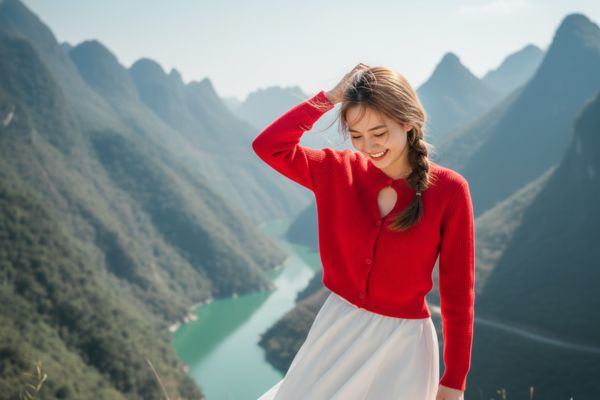
Step 3: After Gemini returns the results, take a close look at the details. If you are not satisfied, you can ask AI to regenerate or change a little in the color and lighting commands.
A good tip is to always add the requirement “Preserve facial features” if you are trying to recreate your own likeness to avoid distortion. Finally, download the photos to your device at the highest resolution.
Conclusion
Hope that guides create virtual live photos at Ma Pi Leng pass This will bring you interesting experiences. Even though it is a virtual image, the emotions and beauty of Ha Giang recreated are extremely realistic. Wishing you “million-like” photos on social networks.