• Home
  • News
  • Software
  • Knowledge
  • MMO
  • Tips
  • Security
  • Network
  • Office
AnonyViet - English Version
  • Home
  • News
  • Software
  • Knowledge
  • MMO
  • Tips
  • Security
  • Network
  • Office
No Result
View All Result
  • Home
  • News
  • Software
  • Knowledge
  • MMO
  • Tips
  • Security
  • Network
  • Office
No Result
View All Result
AnonyViet - English Version
No Result
View All Result

Instructions for creating surreal POV product review photos

AnonyViet by AnonyViet
October 1, 2026
in Tips
0

Create POV product review photos Using AI will save you countless time and effort. Thanks to that, items from cosmetics to technology are presented in a lifelike way. Let’s go together AnonyViet Learn the detailed steps right below!

📢 Join the channel Telegram belong to AnonyViet


👉 Go to Telegram AnonyViet

Update new articles, cool tools and IT tips fastest

The attraction of first-person (POV) photos

You know, to have attractive product review videos, the first thing we need to do is prepare images holding the product in our hands in the most natural way. Previously, this required you to have a good camera, know how to light and set up a messy scene. Instead, with the rapid development of AI today, everything has become much easier.

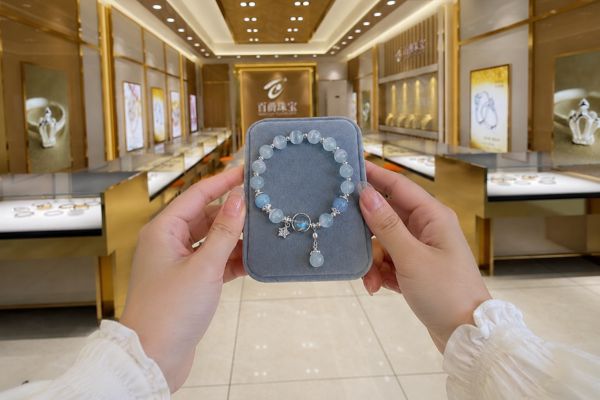
As long as you have a photo of the item in hand and know how to command the AI, the system will automatically create an extremely realistic photo of a human hand holding the item. From luxury watches, small cosmetic bottles, new phones to household items or fashionable clothes, all can be transformed into frames for real-life experiences. Thanks to that, viewers will feel like they are directly touching the product.
Instructions for creating surreal POV product review photos
The attraction of first-person (POV) photos

Steps to create POV product review photos

In order for the process of creating POV product review photos to go smoothly, you do not need to be very technical. Just do it slowly according to the instructions below and it will be successful no matter what.

Step 1: First, you need to find a clear photo of your item. Next, choose a landscape or background photo that you want to use as the background. Once you have these two pictures, open them ChatGPT Upload and upload both photos into the chat box.

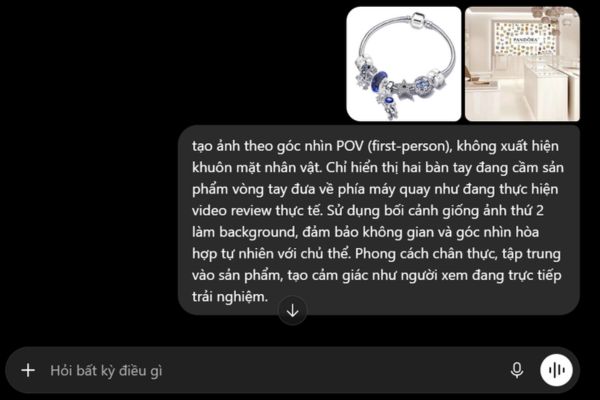
Step 2: At this point, AI has seen your image. Please copy and paste this request into the chat box:

Tạo ảnh theo góc nhìn POV (first-person), không xuất hiện khuôn mặt nhân vật. Chỉ hiển thị hai bàn tay đang cầm sản phẩm [tên sản phẩm] đưa về phía máy quay như đang thực hiện video review thực tế. Sử dụng bối cảnh giống ảnh thứ 2 làm background, đảm bảo không gian và góc nhìn hòa hợp tự nhiên với chủ thể. Phong cách chân thực, tập trung vào sản phẩm, tạo cảm giác như người xem đang trực tiếp trải nghiệm.

You remember instead product name in the prompt into the name of the actual item you want such as a bracelet, watch, etc.
Change the product name in the prompt to the actual item name

Step 3: Very quickly, ChatGPT will return you a complete photo. In the photo, you will see two hands holding the item in front of the camera extremely naturally, just like you are filming a vlog yourself. Finally, you just need to download this photo to your device and you can use it to run ads, post on Facebook or combine it into videos comfortably.

Instructions for creating surreal POV product review photos

Conclusion

Overall, work Create product review photos from POV angle This way is both leisurely and produces a quality finished product. You can experiment with many different backgrounds to find the most satisfactory photo angle.

Frequently Asked Questions (Q&A)

1. Is it free to use ChatGPT to create images?

Yes, currently creating photos on ChatGPT is completely free!

2. Why do AI-generated photos sometimes have errors?

This is a common limitation of current AI tools when processing finger details. If this is the case, you just need to press the Regenerate button or add the phrase “perfect hands, realistic fingers” to the command so the AI ​​can adjust it more accurately.

3. Can I use this photo to run sales ads?

Absolutely. Images created by AI are usually not copyrighted by others, so you can freely use them for commercial purposes, making TikTok videos or running Facebook ads.

Tags: creatingInstructionsphotosPOVproductreviewsurreal
Previous Post

SuperPaste: Tool to save files from clipboard without installation

Next Post

How to lock notes on iPhone with Face ID and password

AnonyViet

AnonyViet

Related Posts

Instructions for getting 12 months of Google AI Plus for free (Indian students)
Tips

Instructions for getting 12 months of Google AI Plus for free (Indian students)

October 1, 2026
Instructions for creating job card photos using AI
Tips

Instructions for creating job card photos using AI

October 1, 2026
Free course to bypass antivirus and EDR software
Tips

Free course to bypass antivirus and EDR software

October 1, 2026
How to turn photos into editable design files with Canva
Tips

How to turn photos into editable design files with Canva

October 1, 2026
How to use AI Text Watermark Remover: Delete hidden watermark created by AI
Tips

How to use AI Text Watermark Remover: Delete hidden watermark created by AI

October 1, 2026
Instructions for registering for Deepgram to receive 200USD free credit
Tips

Instructions for registering for Deepgram to receive 200USD free credit

October 1, 2026
Next Post
How to lock notes on iPhone with Face ID and password

How to lock notes on iPhone with Face ID and password

0 0 votes
Article Rating
Subscribe
Login
Notify of
guest

guest

0 Comments
Oldest
Newest Most Voted

Recent News

iPhone 18 Pro Max camera: when lens aperture, shutter speed and white balance are decided by the photographer

iPhone 18 Pro Max camera: when lens aperture, shutter speed and white balance are decided by the photographer

October 1, 2026
Instructions for getting 12 months of Google AI Plus for free (Indian students)

Instructions for getting 12 months of Google AI Plus for free (Indian students)

October 1, 2026
Instructions on how to increase the font size on Apple TV are extremely easy

Instructions on how to increase the font size on Apple TV are extremely easy

October 1, 2026
The most standard way to set up and use Wise Care 365

The most standard way to set up and use Wise Care 365

October 1, 2026
iPhone 18 Pro Max camera: when lens aperture, shutter speed and white balance are decided by the photographer

iPhone 18 Pro Max camera: when lens aperture, shutter speed and white balance are decided by the photographer

October 1, 2026
Instructions for getting 12 months of Google AI Plus for free (Indian students)

Instructions for getting 12 months of Google AI Plus for free (Indian students)

October 1, 2026
Instructions on how to increase the font size on Apple TV are extremely easy

Instructions on how to increase the font size on Apple TV are extremely easy

October 1, 2026
AnonyViet - English Version

AnonyViet

AnonyViet is a website share knowledge that you have never learned in school!

We are ready to welcome your comments, as well as your articles sent to AnonyViet.

Follow Us

Contact:

Email: anonyviet.com[@]gmail.com

Main Website: https://anonyviet.com

Recent News

iPhone 18 Pro Max camera: when lens aperture, shutter speed and white balance are decided by the photographer

iPhone 18 Pro Max camera: when lens aperture, shutter speed and white balance are decided by the photographer

October 1, 2026
Instructions for getting 12 months of Google AI Plus for free (Indian students)

Instructions for getting 12 months of Google AI Plus for free (Indian students)

October 1, 2026
  • Home
  • Home 2
  • Home 3
  • Home 4
  • Home 5
  • Home 6
  • Next Dest Page
  • Sample Page

say88 tỷ lệ kèo nhà cái kèo nhà cái 5 febet

No Result
View All Result
  • Home
  • News
  • Software
  • Knowledge
  • MMO
  • Tips
  • Security
  • Network
  • Office

say88 tỷ lệ kèo nhà cái kèo nhà cái 5 febet

wpDiscuz
0
0
Would love your thoughts, please comment.x
()
x
| Reply