• Home
  • News
  • Software
  • Knowledge
  • MMO
  • Tips
  • Security
  • Network
  • Office
AnonyViet - English Version
  • Home
  • News
  • Software
  • Knowledge
  • MMO
  • Tips
  • Security
  • Network
  • Office
No Result
View All Result
  • Home
  • News
  • Software
  • Knowledge
  • MMO
  • Tips
  • Security
  • Network
  • Office
No Result
View All Result
AnonyViet - English Version
No Result
View All Result

Instructions for creating online student cards for schools in Vietnam, America, Japan, and Korea

AnonyViet by AnonyViet
October 10, 2025
in Tips
0

Create student card is now simpler than ever thanks to modern online tools. You can design your own student card with full information such as name, university, major and even add personal photos and barcodes. AnonyViet will guide you how to use an effective student card creation tool, along with important notes to ensure legality and safety.

Join the channel Telegram belong to AnonyViet 👉 Link 👈

Student ID Generator student card creation tool

Student ID Card Maker is an online platform that allows users to design custom student cards without the need for complex design skills. You can choose a university from many countries such as Vietnam, America, Korea, Japan, and add personal information such as name, date of birth, major, and expiration date. In particular, this tool also supports creating random avatars or using AI to create a suitable face.
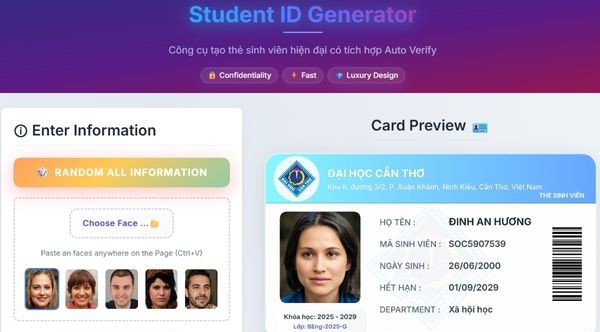
Student ID Generator student card creation tool

Instructions for using the Student ID Generator student card creation tool

Step 1: Visit the page Student ID Generator.

Step 2: Select a school from the list of supported countries. The language will automatically adjust according to the country.

Step 3: Enter your full name, student code, date of birth, major and expiration date to create a complete student card.

  • Or you can press the button Random Let the system fill in random information.
  • Or you can press Random all information If you want to generate completely random cards from start to finish in one click, save time.
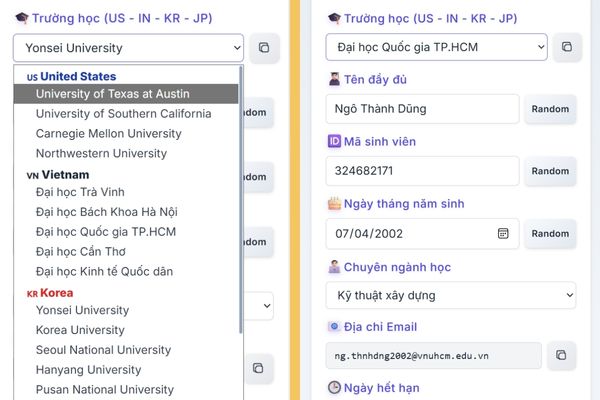
Click Random to have the system fill in random information.

Step 4: Use button Choose Face to upload personal photos or AI Face Generator to use AI to create new images. The barcode and email on the card will automatically change according to the name you enter, increasing authenticity.
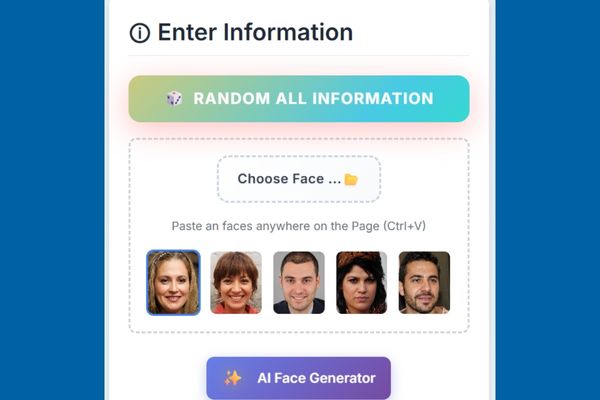
Click Choose Face to upload your personal photo

Step 5: Once you’re satisfied, click Download Cards to download that student card image to your computer.
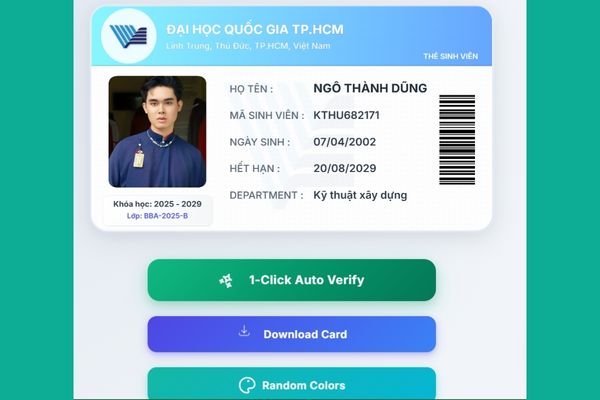
Click Download Card
Click Download Card

Important notes when creating a student card

Although this tool brings convenience, you need to keep in mind a few points to use it safely and legally:

  • For personal use only: This tool is suitable for creating mock student cards for personal projects, such as design, study, or entertainment. Using the card for illegal purposes (such as identity fraud) can lead to serious consequences.
  • Representative photo quality: The system sometimes uses random photos from third parties, which may include children’s faces. To ensure compatibility, you should use “AI Face Generator” to create a new photo or upload a personal photo.
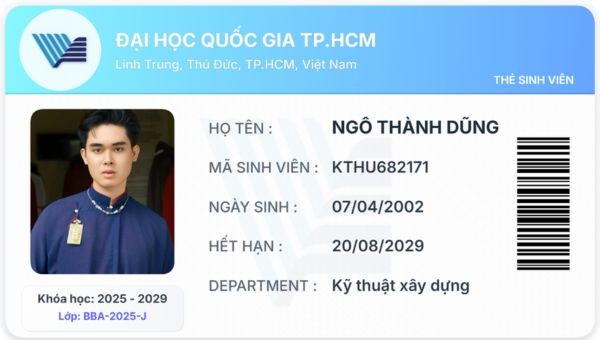
Important notes when creating a student card

Conclusion

Create student card online is a convenient solution for those who need to design cards quickly and professionally. However, always use this tool responsibly, comply with the law and only for personal use!


Tags: AmericacardscreatingInstructionsJapanKoreaonlineschoolsstudentVietnam
Previous Post

Hack Google with Thanos’ Infinity Gauntlet with one click

Next Post

Share Beautiful Colored Facebook Biography Characters on Facebook Lite

AnonyViet

AnonyViet

Related Posts

How to change the default font on Windows 10
Tips

How to change the default font on Windows 10

April 13, 2026
5 tips for using a Browser to replace an App (helps save RAM, time and money)
Tips

5 tips for using a Browser to replace an App (helps save RAM, time and money)

April 13, 2026
How to make funny MeMe photos without Photoshop within 10 seconds
Tips

How to make funny MeMe photos without Photoshop within 10 seconds

April 11, 2026
How to quickly design your own Logo without Photoshop
Tips

How to quickly design your own Logo without Photoshop

April 10, 2026
How to convert Website into App on Windows
Tips

How to convert Website into App on Windows

April 9, 2026
Instructions for getting 3 months of Adobe Express Pro for free
Tips

Instructions for getting 3 months of Adobe Express Pro for free

April 9, 2026
Next Post
Share Beautiful Colored Facebook Biography Characters on Facebook Lite

Share Beautiful Colored Facebook Biography Characters on Facebook Lite

0 0 votes
Article Rating
Subscribe
Login
Notify of
guest

guest

0 Comments
Oldest
Newest Most Voted
Inline Feedbacks
View all comments

Recent News

Japanese Watch Week: Choose the color that suits your destiny, start the new year well at Mobile World

Japanese Watch Week: Choose the color that suits your destiny, start the new year well at Mobile World

April 20, 2026
4K Video Downloader Plus – Tool to download YouTube videos on macOS

4K Video Downloader Plus – Tool to download YouTube videos on macOS

April 20, 2026
How to add Watermark to Google Docs to protect copyright

How to add Watermark to Google Docs to protect copyright

April 19, 2026
How to intercept traffic using Burp Suite to analyze HTTP/HTTPS

How to intercept traffic using Burp Suite to analyze HTTP/HTTPS

April 18, 2026
Japanese Watch Week: Choose the color that suits your destiny, start the new year well at Mobile World

Japanese Watch Week: Choose the color that suits your destiny, start the new year well at Mobile World

April 20, 2026
4K Video Downloader Plus – Tool to download YouTube videos on macOS

4K Video Downloader Plus – Tool to download YouTube videos on macOS

April 20, 2026
How to add Watermark to Google Docs to protect copyright

How to add Watermark to Google Docs to protect copyright

April 19, 2026
AnonyViet - English Version

AnonyViet

AnonyViet is a website share knowledge that you have never learned in school!

We are ready to welcome your comments, as well as your articles sent to AnonyViet.

Follow Us

Contact:

Email: anonyviet.com[@]gmail.com

Main Website: https://anonyviet.com

Recent News

Japanese Watch Week: Choose the color that suits your destiny, start the new year well at Mobile World

Japanese Watch Week: Choose the color that suits your destiny, start the new year well at Mobile World

April 20, 2026
4K Video Downloader Plus – Tool to download YouTube videos on macOS

4K Video Downloader Plus – Tool to download YouTube videos on macOS

April 20, 2026
No Result
View All Result
  • Home
  • News
  • Software
  • Knowledge
  • MMO
  • Tips
  • Security
  • Network
  • Office

wpDiscuz
0
0
Would love your thoughts, please comment.x
()
x
| Reply