Although the Wifi menu on Android is already very user-friendly, Samsung also provides a hidden Wifi menu for those who want to explore further. Hidden WiFi menu on Samsung not only allows you to perform basic operations, but also opens up many advanced options and tools for connection optimization and diagnosis. This article will guide you step by step to enable this hidden feature on your Samsung devices.
| Join the channel Telegram belong to AnonyViet 👉 Link 👈 |
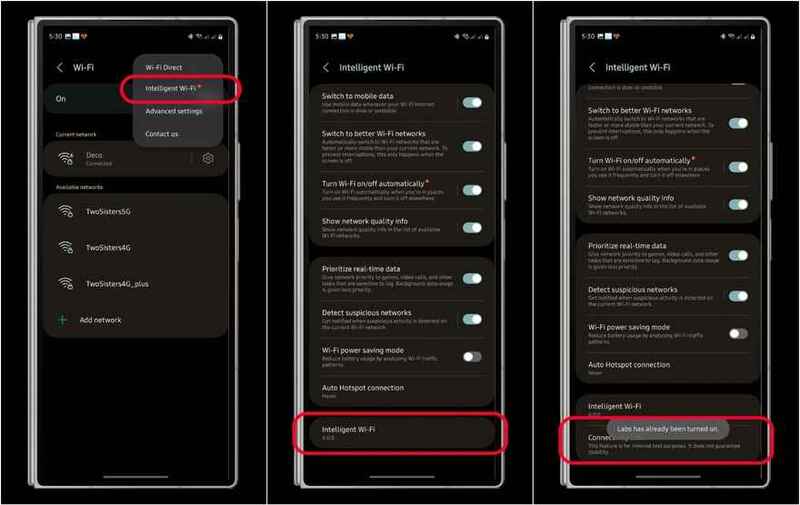
First, you need to enable developer mode to be able to access the hidden Wi-Fi menu. The enhanced Wi-Fi menu was introduced with One UI 5 and is accessible from the main Wi-Fi settings section. Below are specific instructions:
Step 1: Visit Settings > Connections > Wi-Fi.
Step 2: Click three dot icon (⋮) in the upper right corner to open the menu.
Step 3: Select Smart Wi-Fi.
Step 4: Tap the firmware version 5 to 10 times to enable the Labs feature.
Once completed, a Connectivity Lab option will appear in your Wi-Fi menu.
See more: Why does Samsung phone screen have streaks and how to fix it?
After activating the Labs option, you can access the item Connectivity Lab without having to go through separate steps to enable developer mode. Here are the features you can find in this menu:
Current connection
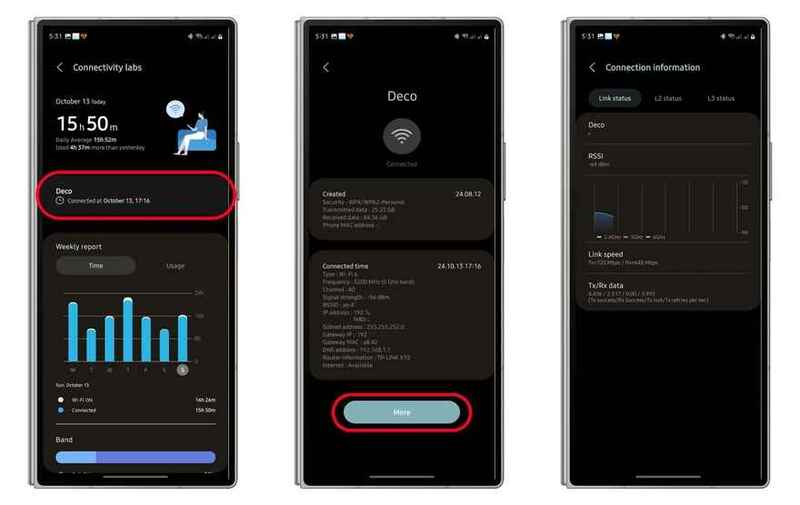
In Connectivity Lab, information about the Wi-Fi network you are using is displayed. By tapping the Wi-Fi name, you can view details about the access point and WLAN, including security type, frequency, channel, IP and MAC addresses, and more technical information.
Additionally, in section Moreyou can access the connection information of the current Wi-Fi network. This information is categorized into three tabs: “Link Status”, “L2 Status”, and “L3 Status”. Here you'll see real-time signal metrics measured in dB and specific Tx/Rx link speeds.
Usage time and Wifi type
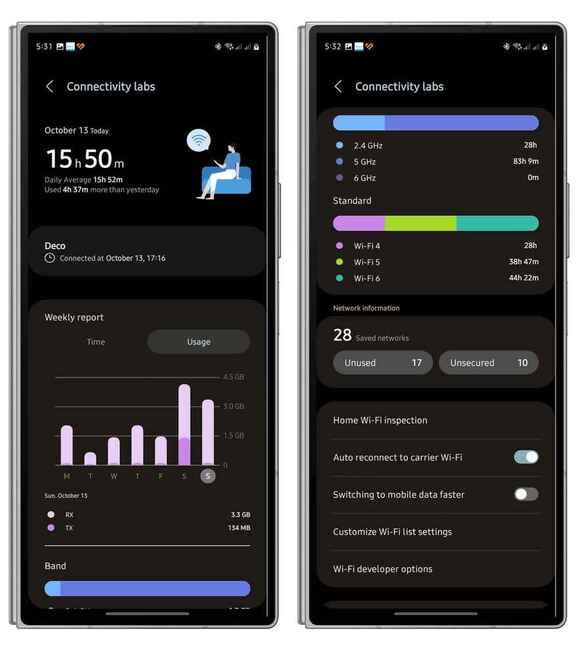
Below the current connection section, you'll find weekly graphical reports of connection time and usage, broken down by day.
In tab Timeyou can track daily connection times, distinguishing between the time Wi-Fi is turned on and the time actually connected to the network.
Tab Use will display a weekly chart with Tx (transmit) and Rx (receive) indicators. In addition, the 2.4/5/6 GHz Wi-Fi bands and Wi-Fi type are also presented in detail, showing specific connection times.
Network information
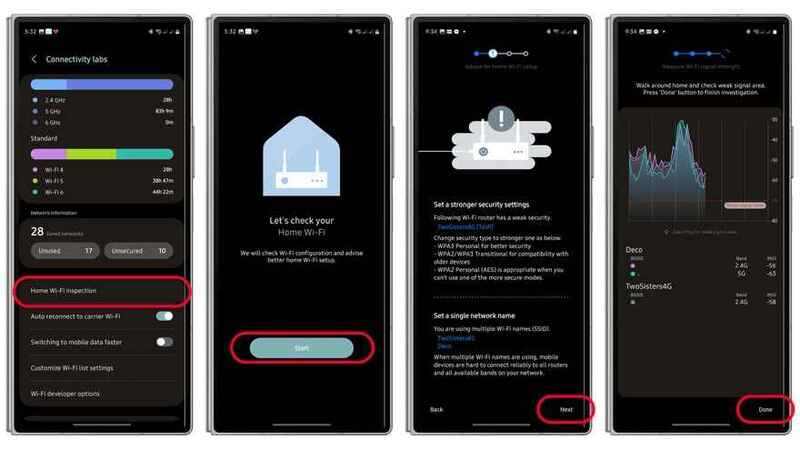
Next part, Network information will provide an overview of how many Wi-Fi networks have been stored, along with unused and unsecured networks. When you go to the unused or unsecured networks section, a list of networks will appear. If you tap a saved Wi-Fi network, you can see its creation date, security type, Tx/Rx data, and MAC address.
Evaluate Wi-Fi signal strength
One of the useful tools in the hidden Wifi menu above Samsung that many users can exploit is optional Check Wifi at home. As the name suggests, you can use this function to perform a Wifi configuration test, including suggestions about switching to a stronger security key, and a signal test to determine areas with good signal and weakest.
To check your home Wi-Fi signal, you just need to:
- Press the button to start the Wi-Fi signal test process.
- Before doing so, the password type and integrity will be checked.
The results of the test will be presented as a graph with lines showing how the signal changes as you move through your living space or surrounding area.
Accelerate mobile data switching
On the device, there are two separate switches for automatically reconnecting to the carrier's Wi-Fi, which are enabled by default and allow for quick switching to mobile data. If you enable the second option, your device will automatically connect to the mobile network faster by shortening the time it takes to scan for available Wi-Fi networks.
Show more Wi-Fi networks and hide/show bands
Right below these two toggle buttons is the Customize Wifi list setting. This menu allows you to apply additional filters to classify networks by weak and strong signal levels. A slider is available to help you choose to display more Wi-Fi networks, including those with weak signals, or select only networks with stable and strong signals.
Analyze and optimize battery life
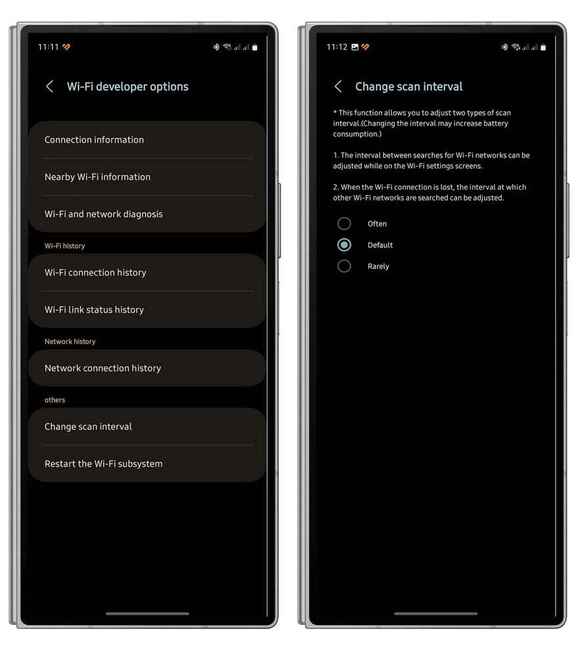
By activating the hidden Wifi menu on Samsung, developers and experienced users can learn more about the tools in the Wi-Fi developer options. This panel provides the same connection information as in the current connections section, along with a signal strength indicator of available networks, Wi-Fi network or connection diagnostics options, and connection history .
See more: How to share battery from Samsung Galaxy to another Android device
Conclusion
With Hidden WiFi menu on Samsungusers can optimize connections and access many useful diagnostic tools. Follow the instructions above to explore these features and enhance your Wi-Fi experience. Wish you success!