How to use Google Maps to find old houses Will take you on an unexpected emotional trip. Have you ever wished to look back at the old house, the old street where you have grown up? Let’s explore Anonyviet with this special “time machine” right in the article below!
| Join the channel Telegram belong to Anonyviet 👉 Link 👈 |
Why does the trend of “finding old houses” cause fever?
In recent days, the online community, especially on the basis Tiktok“fever” with the trend of use Google Maps To travel against the past. A series of videos sharing the moment of rediscovering their home 5 years, 10 years ago attracted millions of views and comments. Not only is a “trend” technology, this is also an emotional train that takes each of us to the beloved memory domain.
The attraction of this trend is not in the complexity of technology, but comes from the deep emotional values that it brings. In the middle of a hustle and modern life, being able to “see” a familiar corner is an invaluable experience.
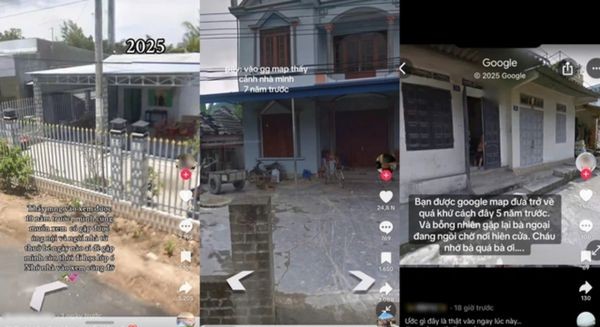
It was a feeling of recovery when seeing the appearance of the old house before being repaired, the image of the dirt road now has been plastic, or simply the guava tree in front of the yard is still tiny. More specifically, many people burst into emotion when accidentally encountered the image of the deceased loved one, like the grandmother sitting in front of the porch, the grandfather who was taking care of the small garden.
Those moments were accidentally recorded by Google Maps have become valuable documentary films, helping to warm the soul and connect the present to the past. Therefore, this trend is not only a technology tip but has become a journey to find the roots, finding the familiar things that have shaped us.
Instructions on how to use Google Maps to find old houses
Step 1: Determine the “need to return”
First, open the Google Maps application or access the website maps.google.com. Here, you need to determine the exact location you want to “visit”.
Method 1: Type the specific address of the house (house number, street name, ward/commune, district/district …) into the search bar and press Enter.
Method 2: If you do not remember the exact address, you can move the map to the familiar area and “pins”(Hold the mouse or touch on the phone screen) into the right position of your home.
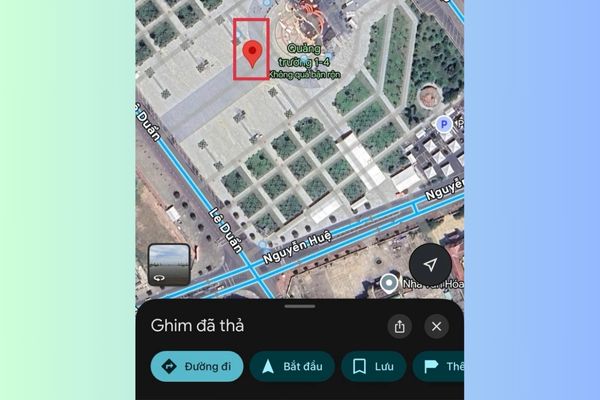
Step 2: Activate the “Time Machine” Street View View
In the lower left corner of the screen (on the computer) or the map icon (on the phone), select the view mode Satellite (Satellite).
Next, in that section, turn on the class Street view (Street View).
At this time, on the map will appear blue lines. These are the roads that have been passed by Google cars and record images. Your house must be on these routes to be able to see.

Step 3: Enter the 360 -degree memory space
Click any point on the blue line right in front of your home. Immediately, the screen will switch to the street view interface, displaying 360 -degree images of the road. You can use a mouse or swipe the screen to turn around, move forward, backing away as if you were really standing there.
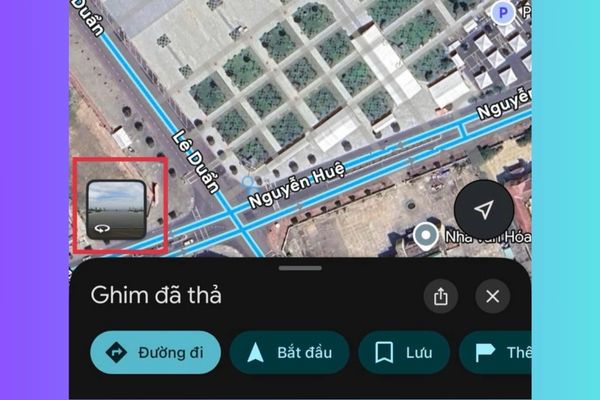
Step 4: Travel back time
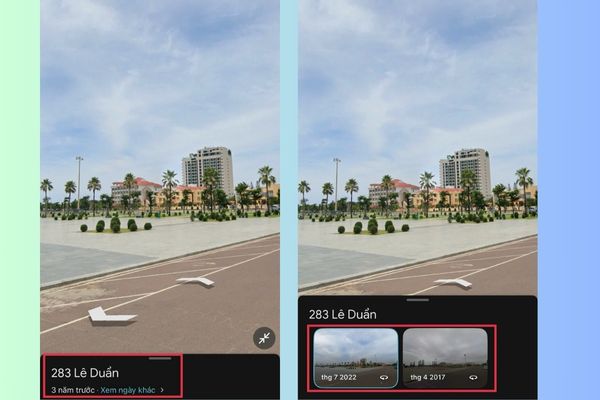
In the upper left corner of the screen (for computers) or below (for phones), you will see a small box that displays the address and date of the image taken.
Find and click on the words “See other days“, A strip of miniature images representing different timelines (for example: 2022, 2019, 2019, 2015, 2011 …) will appear.
Your job now is just choosing the older timeline. Every time you choose, the scene will change, bringing you back at the right time when the image is recorded. Slowly discover and enjoy the feeling of seeing the change of the house and the surrounding scenery through each year.
A few important notes you need to know
Although this feature is great, you also need to note a few points to have the best experience and not be depressed:
- Google Street View cars mainly move on large roads and main roads. Therefore, if your home is deep in the alley (alley) small and narrow, it is likely that there will be no image data.
- Depending on the area, image data may be updated regularly or not. There are places where you can review images more than 10 years ago, but there are also places that only have data in the past few years.
- Images from older years may have lower resolutions than the present.

Conclusion
How to use Google Maps to find old houses Remind us that even though the scenery changes, the beautiful memories will always be forever. The operation is simple but what it brings is priceless. Wish you have beautiful and meaningful nostalgic moments!