Voice Isolation is a smart audio filtering technology integrated by Apple to improve call quality. This feature helps eliminate background noise, keeping your voice standing out in any environment. Let’s explore with AnonyViet how to use this useful feature.
📢 Join the channel Telegram belong to AnonyViet
Update new articles, cool tools and IT tips fastest
What is Voice Isolation and how it works on iPhone
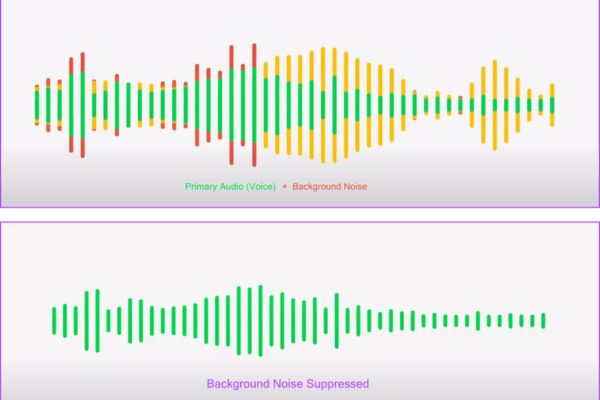
Voice Isolation is a smart feature first introduced by Apple in the iOS 15 update. The core goal of this feature is to prioritize the user’s voice and maximally eliminate noise from the surrounding environment.
When you activate this mode, the artificial intelligence system is on iPhone will perform real-time analysis to separate your voice from disturbing sounds such as wind, car horns, machinery or public noise.
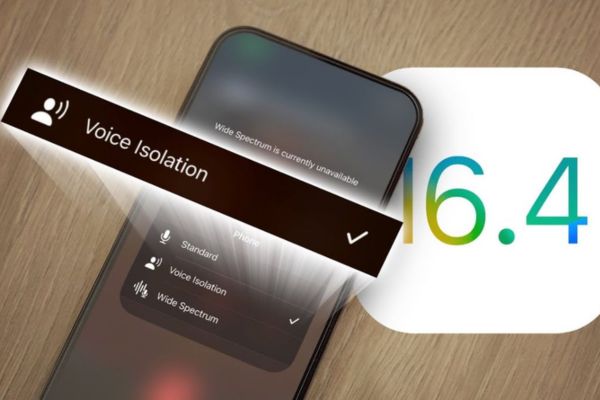
Initially, this feature is limited to calls only FaceTime and some third-party applications. However, since iOS 16.4 launched, Apple has expanded support to include regular phone calls.
This brings great benefits to users, making conversations more professional and clearer than ever. To use this feature, your device needs to be an iPhone XS, XR or newer models, and must be updated to a compatible iOS version.
The simplest way to turn on Voice Isolation on iPhone
Enabling this feature is not complicated, but you need to note that this option only appears when you are making an actual call. Below are the detailed steps:
Step 1: Please open it Control Center (Control Center) by swiping down from the top right corner of the screen while on a call.
Step 2: You click on the item Mic Mode (Mic mode) is located in the upper right corner of the control panel.
Step 3: You choose Voice Isolation from the list of options that appears.
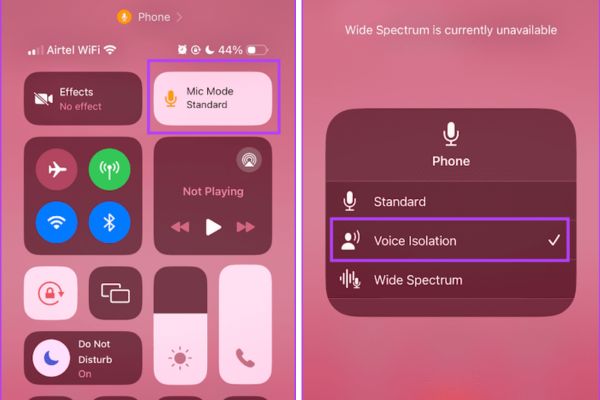
Once done, the system will automatically apply the audio filter. The person on the other end of the line will immediately feel the difference when your voice becomes clear, completely separate from surrounding noise.
Compare mic modes on iPhone
Apple provides three different mic options for users to flexibly change depending on actual usage needs. Below is a detailed comparison table for you to easily choose:
| Regime | Main characteristics | Intended use |
| Standard | System default mode. | Used for regular calls. |
| Voice Isolation | Prioritize voice, block noise. | Use in crowded, noisy places. |
| Wide Spectrum | Record all surrounding sounds. | Use when you want to record music or groups. |
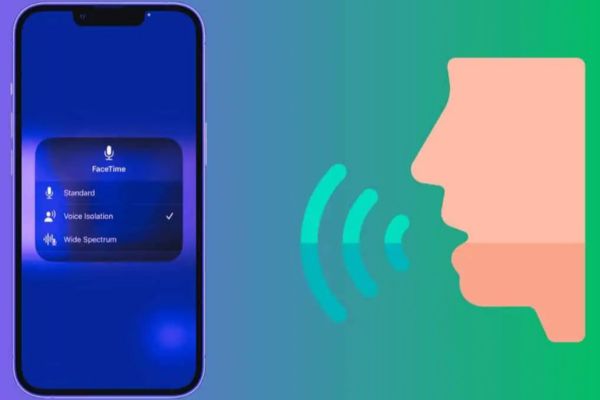
Standard mode is the default setting that does not interfere with the sound, preserving the original quality of the microphone. On the contrary, Wide Spectrum is the perfect choice when you want the listener to feel the space where you are standing. This mode does not block noise, allowing you to record all surrounding sounds, very suitable if you want to share music or when there are many people participating in a conversation in the same room.
Voice Isolation compatibility
A big plus of Voice Isolation is its flexibility in connecting devices. This feature not only works with the built-in microphone on the iPhone, but also supports both wired headphones and wireless headphones like AirPods.
Besides, Voice Isolation is also deeply integrated into popular third-party calling applications such as WhatsApp, Telegram, Instagram, Slack and Microsoft Teams. This ensures that no matter what platform you use to communicate, the audio quality is always guaranteed to be at the highest level.
Conclusion
Usage Voice Isolation The right way will help your calls become much more professional and effective. Hopefully the above instructions have helped you master this smart noise filtering feature on iPhone. Apply now with AnonyViet to have the best conversation experience!
Frequently Asked Questions (Q&A)
1. Does this feature work with headphones?
Yes, Voice Isolation works well with both built-in microphones, wired headphones, and wireless headphones.
2. Why don’t I see the Mic Mode option?
You need to make sure you’re on a call and that your device is an iPhone XS/XR or later and has the latest iOS update.
3. Is Voice Isolation available for third-party applications?
Yes, this feature supports most popular calling apps like WhatsApp, Telegram, Instagram, Slack, and Microsoft Teams.