• Home
  • News
  • Software
  • Knowledge
  • MMO
  • Tips
  • Security
  • Network
  • Office
AnonyViet - English Version
  • Home
  • News
  • Software
  • Knowledge
  • MMO
  • Tips
  • Security
  • Network
  • Office
No Result
View All Result
  • Home
  • News
  • Software
  • Knowledge
  • MMO
  • Tips
  • Security
  • Network
  • Office
No Result
View All Result
AnonyViet - English Version
No Result
View All Result

How to Turn Off Comments on Facebook Posts

AnonyViet by AnonyViet
January 27, 2023
in Tips
0

Want to prevent your friends from making silly comments on your posts on Facebook? Then you should read this article, I will show you how to turn off comments on my posts on your Facebook or the Facebook groups you join.

Join the channel Telegram of the AnonyViet 👉 Link 👈

How to Turn Off Comments on Facebook Posts

Things to know about turning off Facebook comments

For individual posts you post on your Facebook timeline, you must set visibility to “Public” to manage comments. Also, you can’t completely turn off comments on your posts; you can limit comments to friends or friends of friends only.

However, in any Facebook group where you are an admin or moderator, you can completely turn off comments for any post you want.

How to turn off comments for personal Facebook posts

You can change who can comment on your posts for all public posts or selected public posts. I will show you how to turn off comments for both of the above cases.

Turn off comments for all public posts

To apply a single rule about who can comment on all of your public posts, change your Facebook account settings.

Start by opening a web browser on your Windows, Mac, Linux or Chromebook computer and go to the page Facebook. You can also use the Facebook app on your iPhone, iPad, or Android phone.

In the top right corner of the Facebook page, click the down arrow icon and select “Settings & Privacy”.
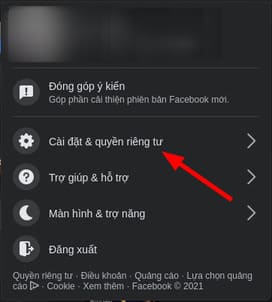
How to Turn Off Commenting on Facebook Posts 13

From the “Settings and privacy” menu, select “Settings”.
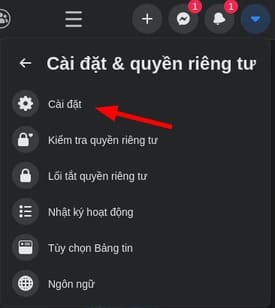
How to Turn Off Comments on Facebook Posts 14

On the “Settings” page, from the menu on the left, select “Public Posts”.
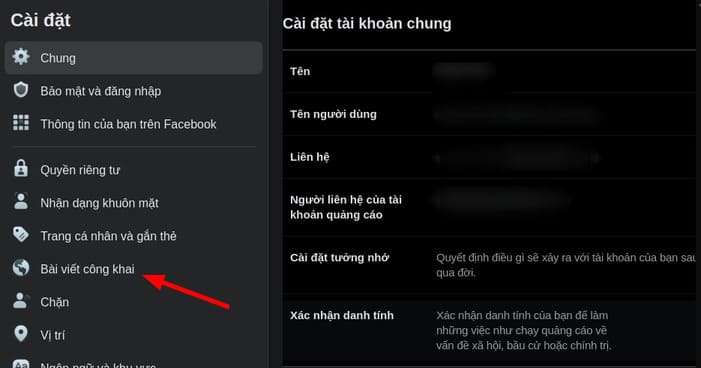
How to Turn Off Commenting on Facebook Posts 15

You will be taken to the “Public Posts Filters and Tools” page. Here, next to the “Who can follow me” option, click the drop-down menu and select “Public” or “Everyone.”
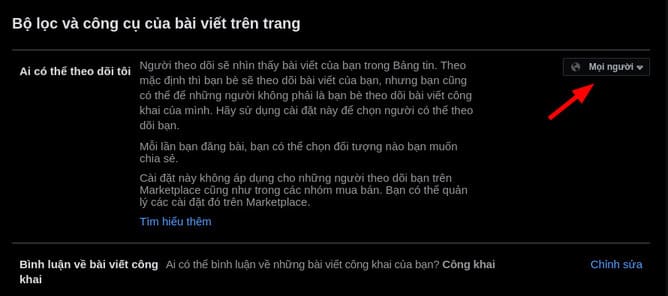
How to Turn Off Comments on Facebook Posts 16

Next, click on the “Comment on Public Posts” option.
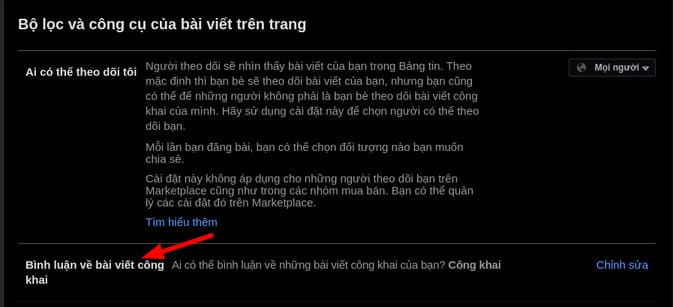
How to Turn Off Comments on Facebook Posts 17

In the “Comment on Public Posts” menu, click the drop-down menu and choose who can comment on your public posts.

The available options are:

  • Public: Anyone, including users who don’t follow you, can comment on your public posts.
  • Friend: Only your friends can comment. If you tag someone in your post, that person and their friends can also comment on your post.
  • Friends of friends: Your friends and their friends can comment on your posts.
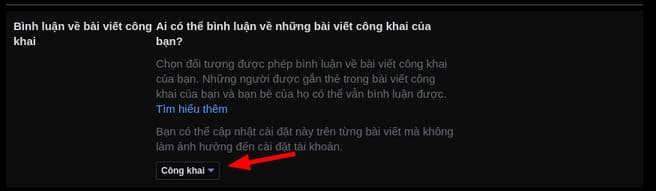
How to Turn Off Commenting on Facebook Posts 18

Once you’ve made your selection, Facebook will automatically save your changes.

Manage comments for each public post

To manage who can comment on a particular post, go to that post on Facebook.

In the upper right corner of the post, select the three dots. From the three-dot menu, select “Who can comment on your post.”
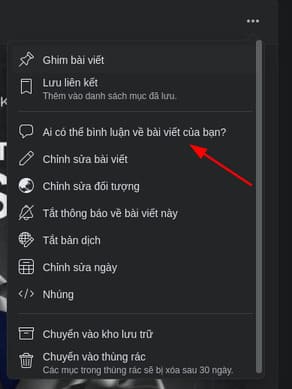
How to Turn Off Comments on Facebook Posts 19

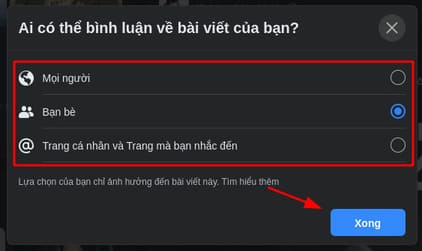
The “Who can comment on your post” window opens. Here, choose one of three options:

  • Public: Allow anyone to comment on your posts.
  • Friend: Allow your Facebook friends to comment on your posts.
  • Profiles and Pages you mention: If you mention a Facebook profile or page in your post, that profile or page may comment on your post.
How to Turn Off Comments on Facebook Posts 20

And that’s all it takes to manage comments for your Facebook posts. If there are certain friends that you don’t want to comment on your post, you can hide the post from them.

Turn off commenting in Facebook Groups

Unlike individual posts, you can completely turn off comments on posts in a Facebook group. To do this, you must be an admin or moderator in the group.

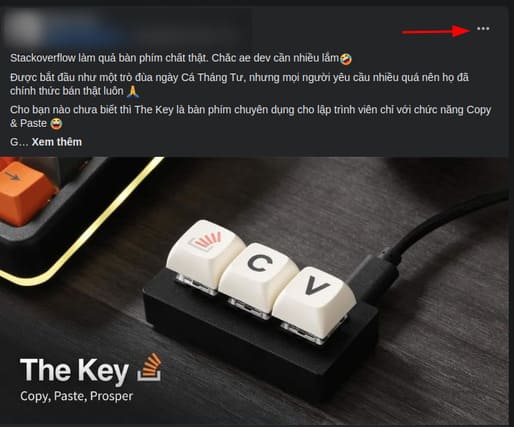
To use this feature, go to the post for which you want to disable comments on Facebook.

In the top right corner of the post, click the three dots.
How to Turn Off Comments on Facebook Posts 21

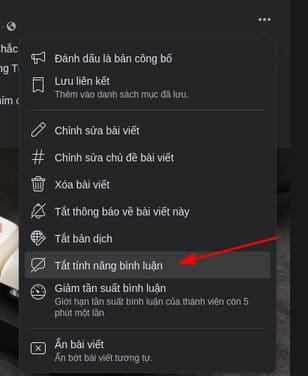
In the three-dot menu, click “Turn off comments.”
How to Turn Off Comments on Facebook Posts 22

And immediately, Facebook will disable comments on that post. However, existing comments will still be retained.

In addition, what you write above is posted in Anonyviet’s Facebook Group. If you want to join, please visit here. You can also turn off comments on Instagram here.


The article achieved: 5/5 – (100 votes)

Tags: CommentsFacebookpoststurn
Previous Post

Share Tool DDoS Bypass Cloudflare Japan V3.0

Next Post

Backup and Restore MySQL Database with command (Command)

AnonyViet

AnonyViet

Related Posts

How to write Shell Script in Linux/Unix
Tips

How to write Shell Script in Linux/Unix

December 6, 2025
How to completely uninstall WSL on Windows 11?
Tips

How to completely uninstall WSL on Windows 11?

December 6, 2025
Kinh nghiệm mua Laptop cho sinh viên nhóm ngành kế toán, kinh tế, xã hội…
Tips

Kinh nghiệm mua Laptop cho sinh viên nhóm ngành kế toán, kinh tế, xã hội…

December 5, 2025
8 tips for more successful PowerPoint presentations
Tips

8 tips for more successful PowerPoint presentations

December 4, 2025
Chrome extensions to improve productivity in 2021
Tips

Chrome extensions to improve productivity in 2021

December 2, 2025
How to create photos that run KPIs while crying using Gemini for the 12 zodiac animals
Tips

How to create photos that run KPIs while crying using Gemini for the 12 zodiac animals

December 1, 2025
Next Post
Backup and Restore MySQL Database with command (Command)

Backup and Restore MySQL Database with command (Command)

0 0 votes
Article Rating
Subscribe
Login
Notify of
guest

guest

0 Comments
Oldest
Newest Most Voted
Inline Feedbacks
View all comments

Recent News

How to create Mind Map and Flowchart using ChatGPT is super simple

How to create Mind Map and Flowchart using ChatGPT is super simple

December 7, 2025
Free Gemini Google certification exam guide and Answers

Free Gemini Google certification exam guide and Answers

December 6, 2025
How to write Shell Script in Linux/Unix

How to write Shell Script in Linux/Unix

December 6, 2025
How to completely uninstall WSL on Windows 11?

How to completely uninstall WSL on Windows 11?

December 6, 2025
How to create Mind Map and Flowchart using ChatGPT is super simple

How to create Mind Map and Flowchart using ChatGPT is super simple

December 7, 2025
Free Gemini Google certification exam guide and Answers

Free Gemini Google certification exam guide and Answers

December 6, 2025
How to write Shell Script in Linux/Unix

How to write Shell Script in Linux/Unix

December 6, 2025
AnonyViet - English Version

AnonyViet

AnonyViet is a website share knowledge that you have never learned in school!

We are ready to welcome your comments, as well as your articles sent to AnonyViet.

Follow Us

Contact:

Email: anonyviet.com[@]gmail.com

Main Website: https://anonyviet.com

Recent News

How to create Mind Map and Flowchart using ChatGPT is super simple

How to create Mind Map and Flowchart using ChatGPT is super simple

December 7, 2025
Free Gemini Google certification exam guide and Answers

Free Gemini Google certification exam guide and Answers

December 6, 2025
  • Home
  • Home 2
  • Home 3
  • Home 4
  • Home 5
  • Home 6
  • Next Dest Page
  • Sample Page

trang chủ f168 nhà cái 78win https://www.qq8827.com/

No Result
View All Result
  • Home
  • News
  • Software
  • Knowledge
  • MMO
  • Tips
  • Security
  • Network
  • Office

trang chủ f168 nhà cái 78win https://www.qq8827.com/

wpDiscuz
0
0
Would love your thoughts, please comment.x
()
x
| Reply