Google Chrome is a very popular web browser, but everyone has a common problem that it uses too much RAM. It’s hard to completely fix this problem, but you can do some simple things below to reduce Chrome’s RAM usage.
| Join the channel Telegram of the AnonyViet 👉 Link 👈 |

Why does Chrome use so much RAM?
You may not believe it, but Google Chrome has actually been less RAM hungry over the years. However, why is Chrome still using so much memory?
Chrome and other web browsers store all tabs and extensions in a separate RAM process. Isolating processes like this provides better stability, improved security, and better performance with modern multi-core CPUs. These processes are small, but they add up quickly.
In short, Chrome splits everything into its own process, and chances are you’re doing multiple things at once. Multiple processes means a lot of RAM is being used. So how can we improve this?
Turn off background apps
Chrome apps may run in the background after you close your browser. It will eat up memory while you don’t even realize it’s open. You can use Task Manager to manually close them, but there is an even better solution than turning them off.
To do that, open Chrome Settings and go to Advanced > System. Turn off “Continue running background apps when Google Chrome is closed”. This will make sure Chrome doesn’t use any memory when you close all Chrome browser windows.

Note that not all Chrome apps run in the background.
Don’t leave too many tabs open
This may seem obvious, but one of the simplest things you can do to reduce RAM usage is clean up your browser’s tabs. If you continuously open more than a dozen tabs, Chrome will always use a lot of memory.
Chrome tries to manage tabs so that they don’t eat up a lot of RAM. Tabs that haven’t been opened in a while will go to sleep. However, the fewer tabs and windows you have open, the less RAM is used.
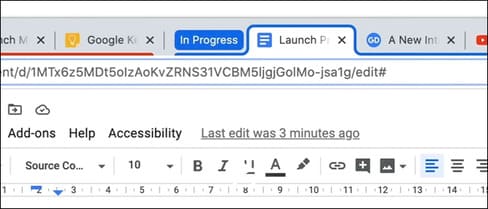
If you absolutely need to open multiple tabs, you should use the feature tab group. That way, you can group them together, collapse the group, and let them go to sleep.
Remove unused extensions
Extensions are an important part of the Chrome experience, so you probably have at least some installed. Just like tabs, extensions also have their own processes. If you have some unused extensions, deleting them may free up some RAM.
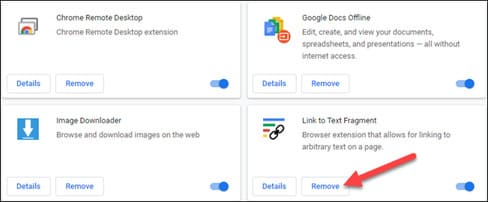
Click on the three-dot menu icon in the top right corner and look for “Extensions” under “More Tools”. You can also type chrome://extensions/ in the address bar. From here, simply click “Remove” to remove unused extensions.
Follow Chrome’s Task Manager
Chrome has its own built-in Task Manager just like Windows. You can use this tool to get a very detailed look at what exactly is running in Chrome. In general, you probably don’t need to kill Chrome processes. If there are some processes consuming RAM, you can turn them off here.
You can find the Task Manager in the three-dot menu icon in the right corner under “More Tools”. It can also be opened with the keyboard shortcut Shift + Esc.
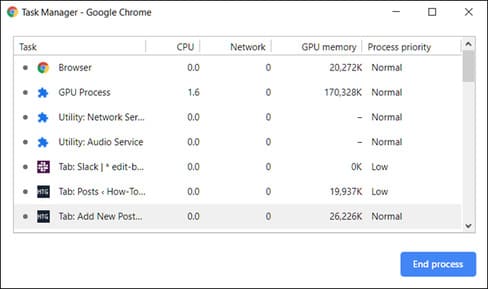
Just select a task that you do not want to perform and click the “End Process” button. In general, you don’t need to kill these processes. Simply closing tabs is easier.
Reset to default or try reinstalling Chrome
Finally, if you really feel that Chrome is using more RAM than usual, you can start Chrome again by resetting your settings or installing a fresh Chrome.
Resetting the settings will bring everything back to the way it was when you first installed Chrome. It will reset start page, new tab page, search engine and pinned tabs. Also, it will disable extensions (until you enable them) and delete temporary data. Your bookmarks, history and passwords will not be deleted.
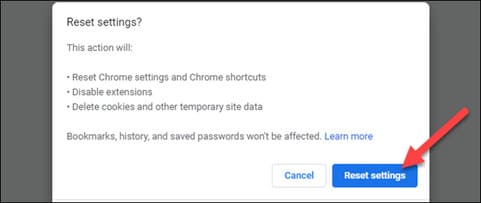
Open Settings Chrome and go to Advanced > Reset & Clean Up. Select “KRestore settings to their original defaults” then click “Reset Settings”.
For the second method, you will need to uninstall and reinstall Chrome. This will also reset everything but will also delete all your saved data. If you use Chrome Sync, you should be able to restore.
Google Chrome is a RAM-hungry browser. In general, Chrome’s memory usage shouldn’t be too much of an issue unless your device is weak or having problems. Hopefully some of these tips can help.