• Home
  • News
  • Software
  • Knowledge
  • MMO
  • Tips
  • Security
  • Network
  • Office
AnonyViet - English Version
  • Home
  • News
  • Software
  • Knowledge
  • MMO
  • Tips
  • Security
  • Network
  • Office
No Result
View All Result
  • Home
  • News
  • Software
  • Knowledge
  • MMO
  • Tips
  • Security
  • Network
  • Office
No Result
View All Result
AnonyViet - English Version
No Result
View All Result

How to reuse GPT-4O: Solution for those who are not used to GPT-5

AnonyViet by AnonyViet
August 24, 2025
in Knowledge
0

You have just been updated to GPT-5 and feel it is not “as” like GPT-4O? A lot of people are also looking How to reuse GPT-4O Because the new version responds a bit “embarrassed” and not as smart. Don’t worry, this article Anonyviet Will show you tips to return to your familiar version of AI.


Join the channel Telegram belong to Anonyviet 👉 Link 👈

What is happening to GPT-5?

Recently, Openai has officially launched GPT-5 For everyone, including free users. They advertise that the new version is faster, smarter and about to have more dedicated modes.

However, many long -time users feel disappointed. They complained that the GPT-5 answered not smoothly, the reasoning seemed less and feels like a step back.

It was Openai’s CEO, Sam Altman, who also had to admit that the original system had an error. Simply put the system has “wrongly assigned”, bringing difficult tasks for a model that is only strong in speed, leading to the quality of the answer is not satisfactory. Despite fixing the error, but this bad initial impression made many people want to return to GPT-4O.
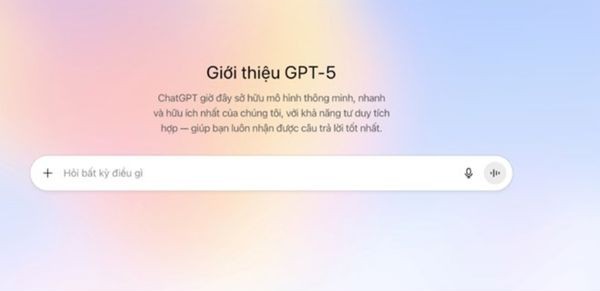
What is happening to GPT-5?

Why do many people want to return to GPT-4O?

Frankly, because more people feel “familiar with hands” with GPT-4o. They think this version produces sentences Answer is more depth, stability and more reliable.

Meanwhile, GPT-5, though fast, sometimes gives quite superficial results. Therefore, finding a way to reuse GPT-4O has become the need of many people, especially when Openai has hid this option.

Instructions on how to use GPT-4O super easy

The good news is that Openai still allows us to return to GPT-4O, just that they hide it a bit carefully. You only need to follow the following 3 steps on your computer.

Step 1: First, you need to enter Chatgpt’s website. Remember this way only on the computer, the phone app is not available. Next, click on your avatar in the bottom left corner.

A small menu will appear, you choose Setting.
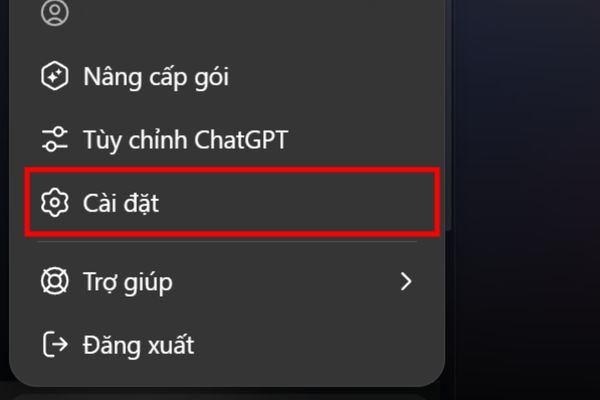
Instructions on how to use GPT-4O super easy

Step 2: In the settings table, you go to the item Shared. You will see the words Show old modelswitch the switch next to it. If you don’t see this line, your account may not be updated, try it again after a few days.
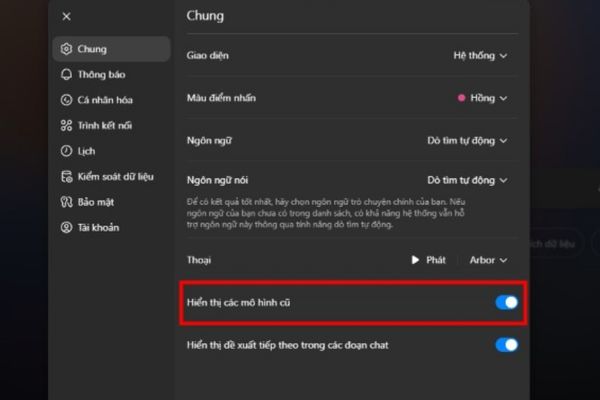
Activate the old model display

Step 3: Now, you return to the main chat screen. Look above, select the model (is GPT-5), then click on it. You will see a new item called “Legacy Models“

You can try to ask who a question to check. You will see it confirms you are using the GPT-4 Omni model to answer you.

A new item named "Legacy Models"
A new section named “Legacy Models”

Conclusion

That’s it! Now you know How to reuse GPT-4O Every time you feel “not suitable” with GPT-5. Although the GPT-5 may be better in the future, but now, being able to freely move back and forth between the two versions will help you work more effectively.


Tags: GPT4oGPT5reuseSolution
Previous Post

Instructions for receiving 80GB Data Mobifone for only 34k

Next Post

2 simple ways to fix Chrome errors blocked by Family Safety

AnonyViet

AnonyViet

Related Posts

Instructions on how to exit iOS 27 Beta and update to the official version
Knowledge

Instructions on how to exit iOS 27 Beta and update to the official version

October 22, 2026
Instructions for turning off automatic subtitles on iPhone and Macbook
Knowledge

Instructions for turning off automatic subtitles on iPhone and Macbook

October 20, 2026
MBTI, Big Five, DISC or Holland: which personality test should you choose?
Knowledge

MBTI, Big Five, DISC or Holland: which personality test should you choose?

October 15, 2026
Super virtual way to change the photography angle using AI on iPhone
Knowledge

Super virtual way to change the photography angle using AI on iPhone

October 9, 2026
How to create Safari extension on iOS 27 and macOS 27
Knowledge

How to create Safari extension on iOS 27 and macOS 27

October 3, 2026
How to write the word Hoa Ki on Casio calculator
Knowledge

How to write the word Hoa Ki on Casio calculator

October 3, 2026
Next Post
2 simple ways to fix Chrome errors blocked by Family Safety

2 simple ways to fix Chrome errors blocked by Family Safety

0 0 votes
Article Rating
Subscribe
Login
Notify of
guest

guest

0 Comments
Oldest
Newest Most Voted

Recent News

Receive copyright for 3 Halloween software worth 0

Receive copyright for 3 Halloween software worth $150

October 23, 2026
How to use Messenger without a Facebook account

How to use Messenger without a Facebook account

October 22, 2026
Instructions on how to exit iOS 27 Beta and update to the official version

Instructions on how to exit iOS 27 Beta and update to the official version

October 22, 2026
Instructions for updating PHP to avoid PHP2Shell

Instructions for updating PHP to avoid PHP2Shell

October 22, 2026
Receive copyright for 3 Halloween software worth 0

Receive copyright for 3 Halloween software worth $150

October 23, 2026
How to use Messenger without a Facebook account

How to use Messenger without a Facebook account

October 22, 2026
Instructions on how to exit iOS 27 Beta and update to the official version

Instructions on how to exit iOS 27 Beta and update to the official version

October 22, 2026
AnonyViet - English Version

AnonyViet

AnonyViet is a website share knowledge that you have never learned in school!

We are ready to welcome your comments, as well as your articles sent to AnonyViet.

Follow Us

Contact:

Email: anonyviet.com[@]gmail.com

Main Website: https://anonyviet.com

Recent News

Receive copyright for 3 Halloween software worth 0

Receive copyright for 3 Halloween software worth $150

October 23, 2026
How to use Messenger without a Facebook account

How to use Messenger without a Facebook account

October 22, 2026
  • Home
  • Home 2
  • Home 3
  • Home 4
  • Home 5
  • Home 6
  • Next Dest Page
  • Sample Page

say88 tỷ lệ kèo nhà cái kèo nhà cái 5 febet

No Result
View All Result
  • Home
  • News
  • Software
  • Knowledge
  • MMO
  • Tips
  • Security
  • Network
  • Office

say88 tỷ lệ kèo nhà cái kèo nhà cái 5 febet

wpDiscuz
0
0
Would love your thoughts, please comment.x
()
x
| Reply