• Home
  • News
  • Software
  • Knowledge
  • MMO
  • Tips
  • Security
  • Network
  • Office
AnonyViet - English Version
  • Home
  • News
  • Software
  • Knowledge
  • MMO
  • Tips
  • Security
  • Network
  • Office
No Result
View All Result
  • Home
  • News
  • Software
  • Knowledge
  • MMO
  • Tips
  • Security
  • Network
  • Office
No Result
View All Result
AnonyViet - English Version
No Result
View All Result

How to restore old Task Manager on Windows 11

AnonyViet by AnonyViet
May 23, 2024
in Tips
0

Windows 11's 22H2 update has many significant improvements, including designing Task Manager with tabs placed on the left and support for dark mode. However, some users prefer to use the older version of Task Manager. If you are also one of them, follow the article below to know How to restore old Task Manager above Windows 11.

Join the channel Telegram belong to AnonyViet 👉 Link 👈

How to restore old Task Manager on Windows 11

Step 1: Press the Windows + R combination to open the Run dialog box

Step 2: Type taskmgr.exe -d and click OK.
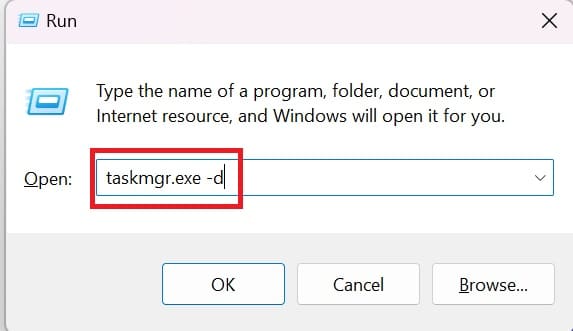
How to restore old Task Manager
Type taskmgr.exe -d

It is done! Additionally, you can save time every time you access the old Task Manager by creating a shortcut for it right on the desktop. Proceed as follows:

Step 1: Right-click on empty space on the desktop > Select New > Select Shortcut.
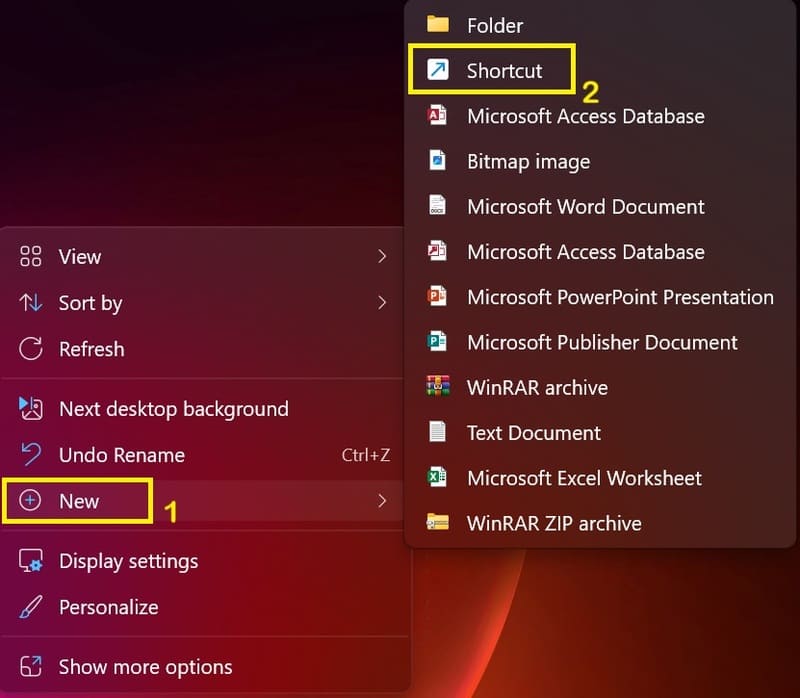
How to restore old Task Manager
Select New > Select Shortcut.

Step 2: In the location box, enter taskmgr.exe -d and click Next.
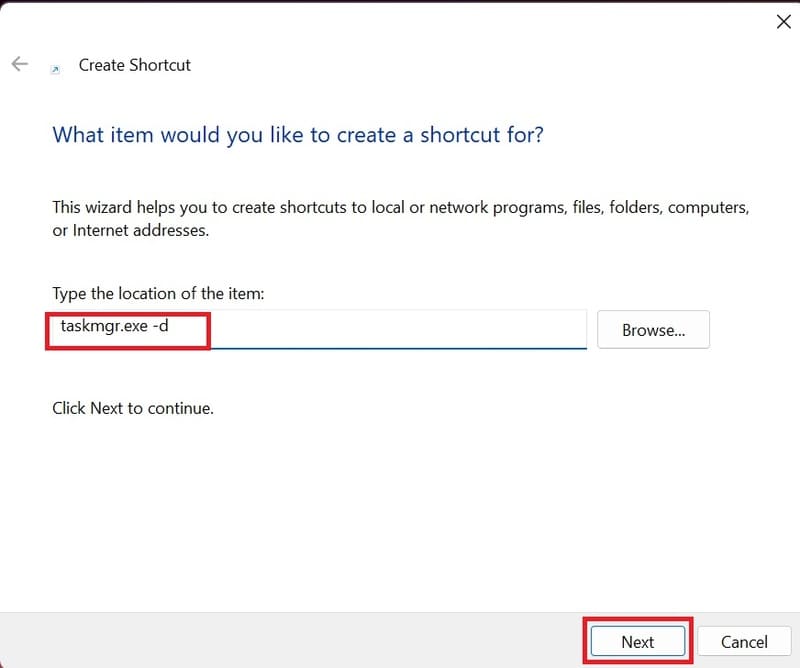
How to restore old Task Manager
Type taskmgr.exe -d

Step 3: Name the shortcut, for example “Old Task Manager”, then click Finish.
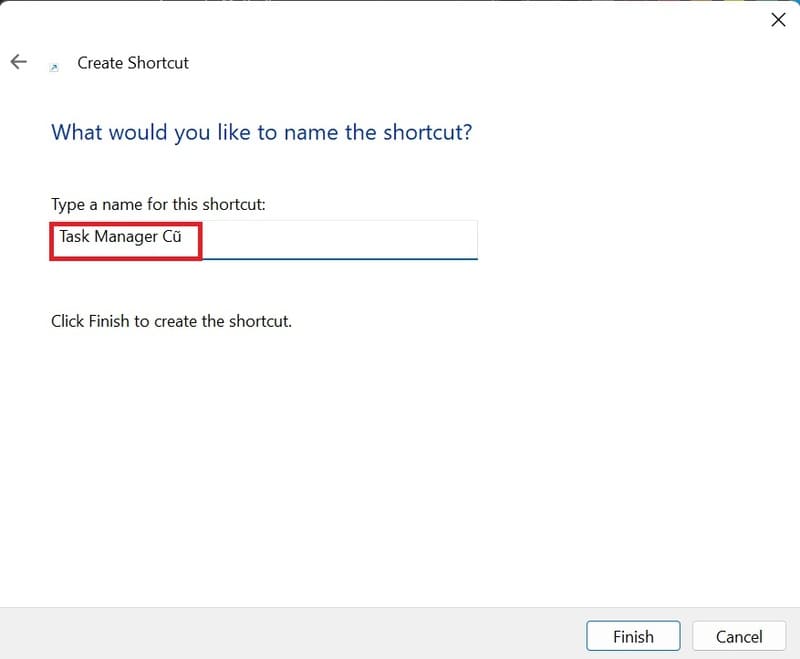
How to restore old Task Manager
Name the shortcut

Then, you just need to double-click on the newly created shortcut to open the old Task Manager.
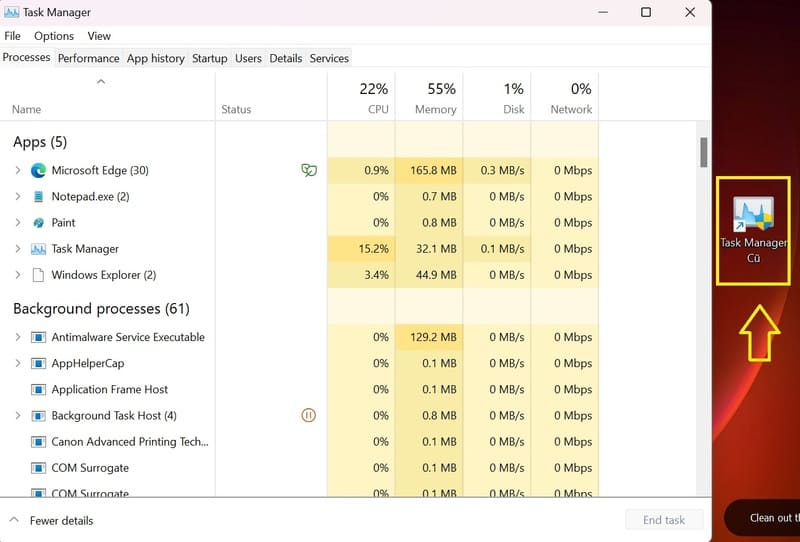
How to restore old Task Manager
Double-click on the shortcut

Epilogue

How to restore old Task Manager on Windows 11 is not only simple but also helps you improve your usage experience. Please follow AnonyViet's next articles to update many other useful tips! Good luck!


Tags: ManagerrestoreTaskWindows
Previous Post

Instructions for getting someone else's IP to find their online location

Next Post

How to set up Dynamic Lighting to customize RGB devices

AnonyViet

AnonyViet

Related Posts

Some reasons I don’t like Windows 11
Tips

Some reasons I don’t like Windows 11

July 27, 2026
Instructions on how to get free Facebook white ticks
Tips

Instructions on how to get free Facebook white ticks

July 27, 2026
Collection of Windows 11 wallpapers for computers and phones
Tips

Collection of Windows 11 wallpapers for computers and phones

July 26, 2026
Don’t install leaked Windows 11
Tips

Don’t install leaked Windows 11

July 25, 2026
Microsoft announced the end of support date for Windows 10
Tips

Microsoft announced the end of support date for Windows 10

July 24, 2026
Microsoft confirms leaked Windows 11 is real
Tips

Microsoft confirms leaked Windows 11 is real

July 22, 2026
Next Post
How to set up Dynamic Lighting to customize RGB devices

How to set up Dynamic Lighting to customize RGB devices

0 0 votes
Article Rating
Subscribe
Login
Notify of
guest

guest

0 Comments
Oldest
Newest Most Voted

Recent News

Some reasons I don’t like Windows 11

Some reasons I don’t like Windows 11

July 27, 2026
Instructions on how to get free Facebook white ticks

Instructions on how to get free Facebook white ticks

July 27, 2026
How to delete hidden files on Samsung phones, free up device space

How to delete hidden files on Samsung phones, free up device space

July 27, 2026
Collection of Windows 11 wallpapers for computers and phones

Collection of Windows 11 wallpapers for computers and phones

July 26, 2026
Some reasons I don’t like Windows 11

Some reasons I don’t like Windows 11

July 27, 2026
Instructions on how to get free Facebook white ticks

Instructions on how to get free Facebook white ticks

July 27, 2026
How to delete hidden files on Samsung phones, free up device space

How to delete hidden files on Samsung phones, free up device space

July 27, 2026
AnonyViet - English Version

AnonyViet

AnonyViet is a website share knowledge that you have never learned in school!

We are ready to welcome your comments, as well as your articles sent to AnonyViet.

Follow Us

Contact:

Email: anonyviet.com[@]gmail.com

Main Website: https://anonyviet.com

Recent News

Some reasons I don’t like Windows 11

Some reasons I don’t like Windows 11

July 27, 2026
Instructions on how to get free Facebook white ticks

Instructions on how to get free Facebook white ticks

July 27, 2026
  • Home
  • Home 2
  • Home 3
  • Home 4
  • Home 5
  • Home 6
  • Next Dest Page
  • Sample Page

say88 tỷ lệ kèo nhà cái kèo nhà cái 5 febet

No Result
View All Result
  • Home
  • News
  • Software
  • Knowledge
  • MMO
  • Tips
  • Security
  • Network
  • Office

say88 tỷ lệ kèo nhà cái kèo nhà cái 5 febet

wpDiscuz
0
0
Would love your thoughts, please comment.x
()
x
| Reply