• Home
  • News
  • Software
  • Knowledge
  • MMO
  • Tips
  • Security
  • Network
  • Office
AnonyViet - English Version
  • Home
  • News
  • Software
  • Knowledge
  • MMO
  • Tips
  • Security
  • Network
  • Office
No Result
View All Result
  • Home
  • News
  • Software
  • Knowledge
  • MMO
  • Tips
  • Security
  • Network
  • Office
No Result
View All Result
AnonyViet - English Version
No Result
View All Result

How to quickly design your own Logo without Photoshop

AnonyViet by AnonyViet
January 30, 2023
in Tips
0

In this 4.0 technology era when businesses switch to online business, what they need is a Logo. Logos represent their organization/company and each logo has a distinct meaning that only someone with high enlightenment can understand. If you are a person with no artistic skills, you can still design a quick Logo yourself with your name.

Join the channel Telegram of the AnonyViet 👉 Link 👈

To be able to make a Logo for you, instead of thinking about how to do it, I will guide you to make a logo very quickly in just 30 seconds.

What is logo?

A logo is a mark, symbol, symbol, etc. Used to identify a company, organization, product or brand. It can be in the form of an abstract or symbolic design, or it can be an image, text, shape, or a combination of all three.

How to design a quick Logo without Photoshop

We will use a tool called Placeit. This is a tool that you can use to design your own logo in minutes. Highlights are: You don’t need any software or design knowledge to create your logo. All you need to do is add your brand name in the area that says “Enter your brand name”.

Instead of trying to come up with a design from scratch or shelling out tons of money to hire logo designers, you can simply use this tool to create a tool for your brand.

There are over 8,000 potential designs that you can apply to your logo.

So next we come to the exclusive quick Logo design that only you have.

First, you visit the website Placeit so that you can proceed to create a logo to your liking
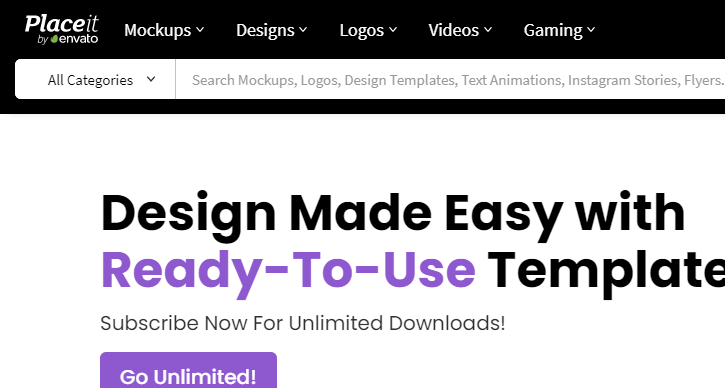
placeit.net quick logo design

Then you enter Logo -> find your own choice Logo Maker
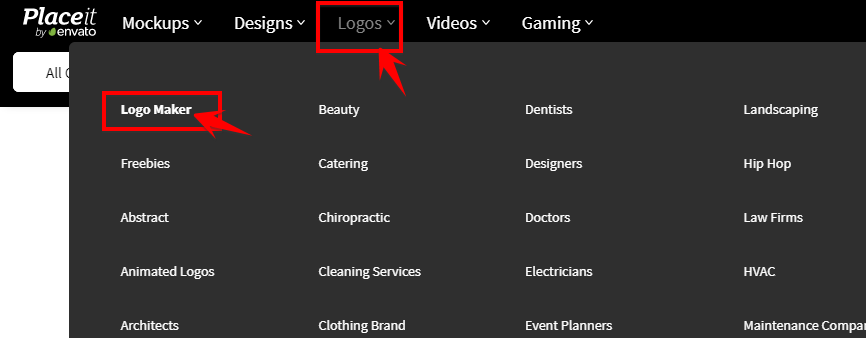
Logo Maker

Here you will enter your brand name, it can be your organization or personal name, nickname or slogan you like. This page will design a quick Logo by yourself according to the data you provide.
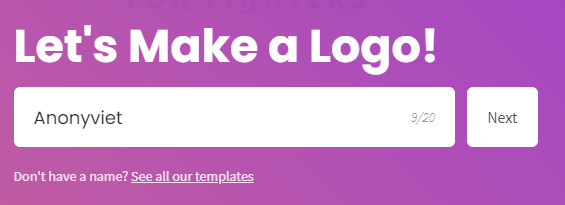
enter brand name

Then it will let you choose a Logo according to an industry, the field you are working on, the website will have templates suitable for your chosen industry, avoiding selling cars but creating a logo to sell clothes.
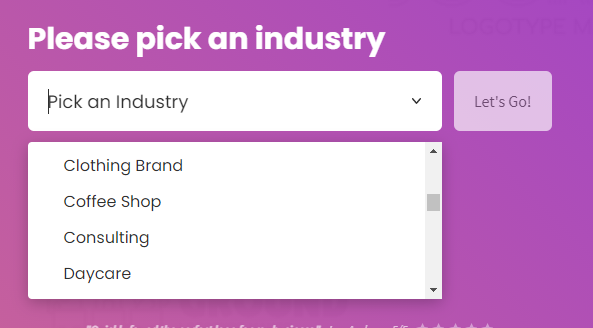
choose a Logo by an industry

Since AnonyViet is a technology site, I will choose Technology.

create a quick logo online

Wait a minute, the website will create for you a lot of Logo templates, choose the best Logo according to the list below.

How to quickly design your own Logo without Photoshop

You can change the colors, adjust the texture according to the available templates of the Logo in the right and left sidebars.

edit logo design fast online

After finishing editing, just click Download to download the logo and use it.
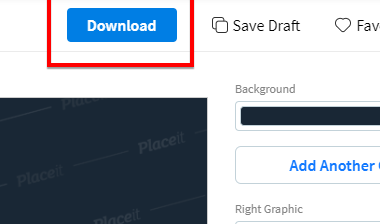
Download the designed logo

Summary

So I have guided you to quickly design a logo without having to think about designs, mixing colors… Here’s how to create the fastest and most beautiful instant noodle logo I’ve ever known. Hope you will find a logo that you love.


The article achieved: 5/5 – (100 votes)

Tags: DesignLogoPhotoshopQuickly
Previous Post

List of iOS 14 features borrowed from tweaks in Cydia

Next Post

What are botnets? Instructions for creating a simple botnet

AnonyViet

AnonyViet

Related Posts

How to see your email account creation date
Tips

How to see your email account creation date

November 11, 2025
Microsoft’s ranking of the 10 best Windows versions
Tips

Microsoft’s ranking of the 10 best Windows versions

November 11, 2025
Recover deleted data on Windows 10 with Windows File Recovery
Tips

Recover deleted data on Windows 10 with Windows File Recovery

November 10, 2025
Tips

Why hasn’t your computer been updated to Windows 10 2004?

November 9, 2025
3 OCR Tools Extract Text from Images without Retyping
Tips

3 OCR Tools Extract Text from Images without Retyping

November 8, 2025
Ways hackers use to hack your Facebook and how to fix it
Tips

Ways hackers use to hack your Facebook and how to fix it

November 7, 2025
Next Post
What are botnets?  Instructions for creating a simple botnet

What are botnets? Instructions for creating a simple botnet

0 0 votes
Article Rating
Subscribe
Login
Notify of
guest

guest

0 Comments
Oldest
Newest Most Voted
Inline Feedbacks
View all comments

Recent News

How to create an order on Shopee to send items to relatives

How to create an order on Shopee to send items to relatives

November 12, 2025
How to install Anh Hai’s Pho Shop on MacBook is super easy

How to install Anh Hai’s Pho Shop on MacBook is super easy

November 11, 2025
How to turn off ads on Yoosee app in just 1 minute

How to turn off ads on Yoosee app in just 1 minute

November 11, 2025
Windows 11 and MS Office 2021 lifetime license, genuine from  during Keysoff’s 11.11 sale

Windows 11 and MS Office 2021 lifetime license, genuine from $14 during Keysoff’s 11.11 sale

November 11, 2025
How to create an order on Shopee to send items to relatives

How to create an order on Shopee to send items to relatives

November 12, 2025
How to install Anh Hai’s Pho Shop on MacBook is super easy

How to install Anh Hai’s Pho Shop on MacBook is super easy

November 11, 2025
How to turn off ads on Yoosee app in just 1 minute

How to turn off ads on Yoosee app in just 1 minute

November 11, 2025
AnonyViet - English Version

AnonyViet

AnonyViet is a website share knowledge that you have never learned in school!

We are ready to welcome your comments, as well as your articles sent to AnonyViet.

Follow Us

Contact:

Email: anonyviet.com[@]gmail.com

Main Website: https://anonyviet.com

Recent News

How to create an order on Shopee to send items to relatives

How to create an order on Shopee to send items to relatives

November 12, 2025
How to install Anh Hai’s Pho Shop on MacBook is super easy

How to install Anh Hai’s Pho Shop on MacBook is super easy

November 11, 2025
  • Home
  • Home 2
  • Home 3
  • Home 4
  • Home 5
  • Home 6
  • Next Dest Page
  • Sample Page

new88 trang chủ shbet trang chủ f168 trang chủ qq88 nhà cái 78win

No Result
View All Result
  • Home
  • News
  • Software
  • Knowledge
  • MMO
  • Tips
  • Security
  • Network
  • Office

new88 trang chủ shbet trang chủ f168 trang chủ qq88 nhà cái 78win

wpDiscuz
0
0
Would love your thoughts, please comment.x
()
x
| Reply