• Home
  • News
  • Software
  • Knowledge
  • MMO
  • Tips
  • Security
  • Network
  • Office
AnonyViet - English Version
  • Home
  • News
  • Software
  • Knowledge
  • MMO
  • Tips
  • Security
  • Network
  • Office
No Result
View All Result
  • Home
  • News
  • Software
  • Knowledge
  • MMO
  • Tips
  • Security
  • Network
  • Office
No Result
View All Result
AnonyViet - English Version
No Result
View All Result

How to move the Chrome address bar to the bottom of the iPhone screen

AnonyViet by AnonyViet
February 4, 2024
in Software
0

How to move Chrome address bar down Phone screen is an issue that many people are concerned about. This way, you can easily customize the address bar without having to reach up with your finger to operate it. Let's see in detail how to do it in the following article!

Join the channel Telegram belong to AnonyViet 👉 Link 👈

How to move the Chrome address bar to the bottom of the iPhone screen

Note: Google has started rolling out this feature with Chrome for iOS 119. We tested this feature on various iPhones, including iPhone 11, 12, 12 Pro, and 15 Pro Max. If you don't have this feature yet, update the Chrome app.

Method 1

Step 1: You open the Chrome application on your phone

Step 2: Hold down the address bar and select 'Move address bar to bottom'

How to move Chrome address bar down
Hold down the address bar and select 'Move address bar to bottom'

How to move Chrome address bar down

Method 2

Another way you can do it is as follows:

Step 1: Tap the three dots at the bottom right of the screen > Select Settings.

How to move Chrome address bar down
Tap the three dots > Select Settings.

Step 2: Tap 'Address Bar'

How to move Chrome address bar down
Tap 'Address Bar'

Step 3: Select 'Below' > Done
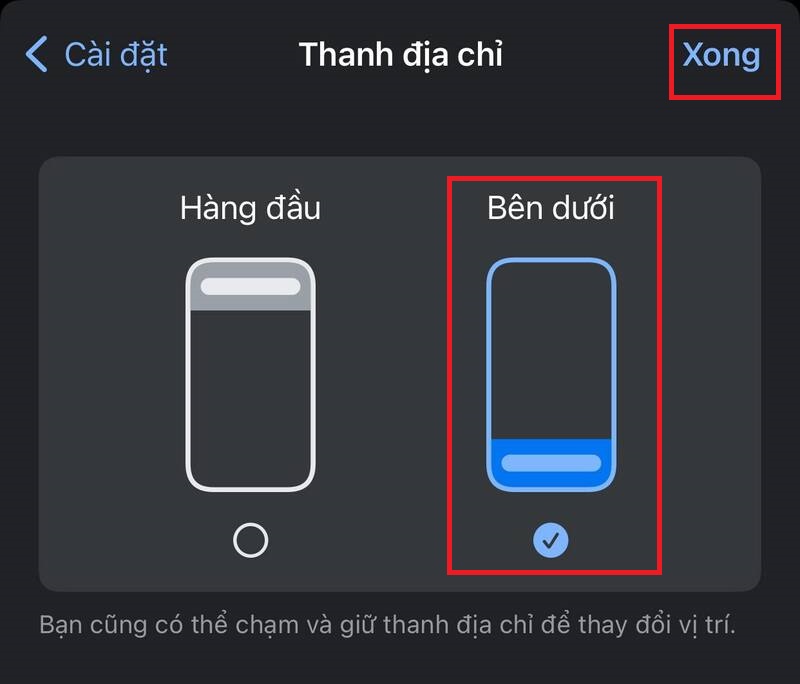
How to move Chrome address bar down
Select 'Below' > Done

To move the address bar back up, do the same thing.

Benefits of moving the Chrome address bar down

Moving the address bar Chrome down the screen can help you:

  • Access functions such as going back, sharing, searching or opening new tabs more easily
  • Minimize stress on fingers and prevent infection when using the phone
  • Enhance user comfort and convenience when using the browser

Epilogue

So you know How to move Chrome address bar down it's the screen. This is a way for you to navigate the web without having to lift your finger. Wishing you a successful application!


The article scored: 5/5 – (100 votes)

Tags: addressbarbottomChromeiPhoneMovescreen
Previous Post

Compare Referring Domain and Backlink

Next Post

Control iPhone iPad with head and facial expressions – Interesting and useful feature

AnonyViet

AnonyViet

Related Posts

Share Key Active Visual Studio 2026
Software

Share Key Active Visual Studio 2026

November 15, 2025
Instructions for using the online number-to-word conversion tool for accountants and offices
Software

Instructions for using the online number-to-word conversion tool for accountants and offices

November 15, 2025
2 applications to monitor flooding situation in Ho Chi Minh City
Software

2 applications to monitor flooding situation in Ho Chi Minh City

November 14, 2025
How to get 2000 free Manus credits in just 3 steps
Software

How to get 2000 free Manus credits in just 3 steps

November 14, 2025
Detailed instructions on how to submit red books on VNeID right at home
Software

Detailed instructions on how to submit red books on VNeID right at home

November 13, 2025
How to install Anh Hai’s Pho Shop on MacBook is super easy
Software

How to install Anh Hai’s Pho Shop on MacBook is super easy

November 11, 2025
Next Post
Control iPhone iPad with head and facial expressions – Interesting and useful feature

Control iPhone iPad with head and facial expressions - Interesting and useful feature

0 0 votes
Article Rating
Subscribe
Login
Notify of
guest

guest

0 Comments
Oldest
Newest Most Voted
Inline Feedbacks
View all comments

Recent News

Instructions on how to edit Facebook scheduled posts

Instructions on how to edit Facebook scheduled posts

November 16, 2025
Suggested AI command to create a rustic and charming image of a Ban Lien girl

Suggested AI command to create a rustic and charming image of a Ban Lien girl

November 16, 2025
Windows 10 will have a new, simpler interface

Windows 10 will have a new, simpler interface

November 16, 2025
Share Key Active Visual Studio 2026

Share Key Active Visual Studio 2026

November 15, 2025
Instructions on how to edit Facebook scheduled posts

Instructions on how to edit Facebook scheduled posts

November 16, 2025
Suggested AI command to create a rustic and charming image of a Ban Lien girl

Suggested AI command to create a rustic and charming image of a Ban Lien girl

November 16, 2025
Windows 10 will have a new, simpler interface

Windows 10 will have a new, simpler interface

November 16, 2025
AnonyViet - English Version

AnonyViet

AnonyViet is a website share knowledge that you have never learned in school!

We are ready to welcome your comments, as well as your articles sent to AnonyViet.

Follow Us

Contact:

Email: anonyviet.com[@]gmail.com

Main Website: https://anonyviet.com

Recent News

Instructions on how to edit Facebook scheduled posts

Instructions on how to edit Facebook scheduled posts

November 16, 2025
Suggested AI command to create a rustic and charming image of a Ban Lien girl

Suggested AI command to create a rustic and charming image of a Ban Lien girl

November 16, 2025
  • Home
  • Home 2
  • Home 3
  • Home 4
  • Home 5
  • Home 6
  • Next Dest Page
  • Sample Page

new88 trang chủ shbet trang chủ f168 trang chủ qq88 nhà cái 78win

No Result
View All Result
  • Home
  • News
  • Software
  • Knowledge
  • MMO
  • Tips
  • Security
  • Network
  • Office

new88 trang chủ shbet trang chủ f168 trang chủ qq88 nhà cái 78win

wpDiscuz
0
0
Would love your thoughts, please comment.x
()
x
| Reply