• Home
  • News
  • Software
  • Knowledge
  • MMO
  • Tips
  • Security
  • Network
  • Office
AnonyViet - English Version
  • Home
  • News
  • Software
  • Knowledge
  • MMO
  • Tips
  • Security
  • Network
  • Office
No Result
View All Result
  • Home
  • News
  • Software
  • Knowledge
  • MMO
  • Tips
  • Security
  • Network
  • Office
No Result
View All Result
AnonyViet - English Version
No Result
View All Result

How to get $300 from Google to run Nano Banana Pro for free

AnonyViet by AnonyViet
November 28, 2025
in Tips
0

How to get $300 from Google to run Nano Banana Pro and other AI projects are opportunities that Google offers new user. Instead of spending money on servers, you can completely own a “super computer” for free for 90 days. Let’s explore the detailed registration process so you don’t miss this attractive offer.

Join the channel Telegram belong to AnonyViet 👉 Link 👈

How to get $300 to run Nano Banana Pro

Step 1: Please visit the website aistudio.google.com and find the item Get API keythen select Create API key.
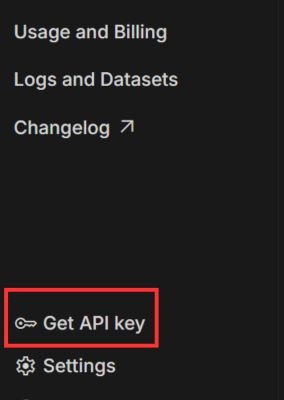
Select Get API key
Select Get API key

Step 2: In section Choose an imported project you need to choose Create project to set up a new workspace. Give your project a memorable name and then click Create project and Create key.
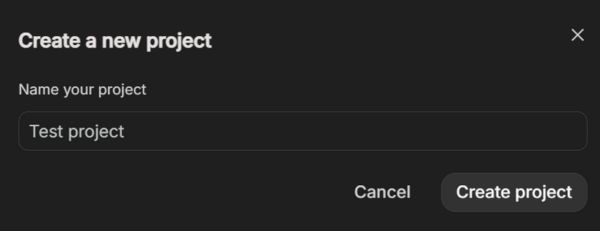
Give the project a memorable name

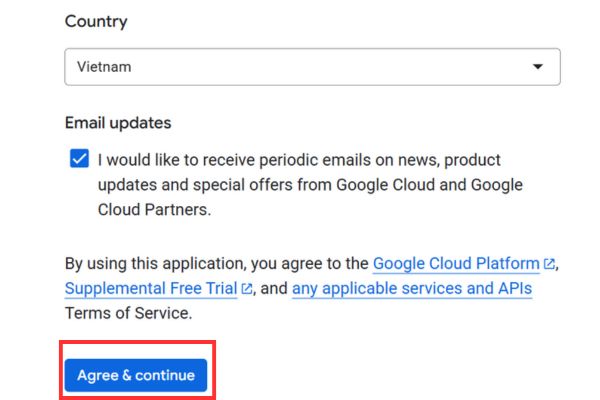
Step 3: Click on the line Set up billing > Press Agree and continue.

Click on Set up billing line
Click Agree and continue

Step 4: The system will ask you to add payment information. You need to press Change to update your address in Vietnam and fill in your Visa/Mastercard details in the section Add payment method. (The card should have more than 300k)

Part Add tax information then you just need to fill in 12 random numbers.
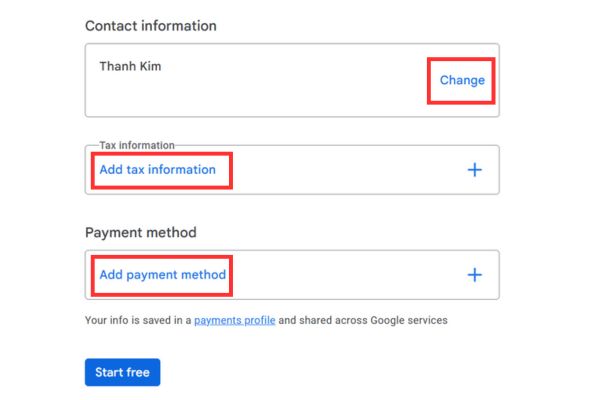
Fill in all information

Step 5: Once filled in completely, press Start free to complete. This is a standard authentication step, Google may temporarily hold a very small fee (about 20,000 – 30,000 VND) to check the card and will refund it immediately, so you can have complete peace of mind.
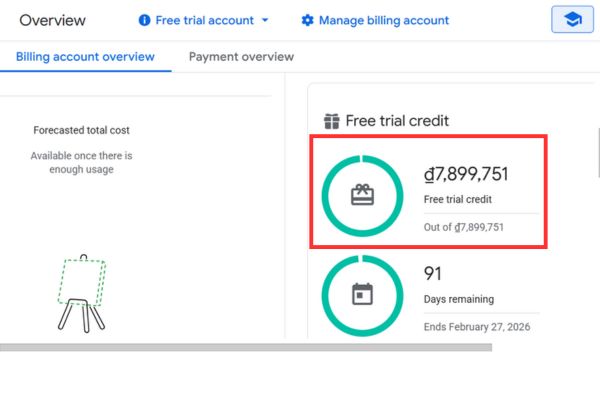
How to get $300 credit for running Nano Banana Pro

How to use Nano Banana Pro with $300 credit

You can go back to Google AI Studio and go to the section Get API Keys or use the direct link: https://aistudio.google.com/api-keys

Press Create key. Find and select the project you named in the step above.
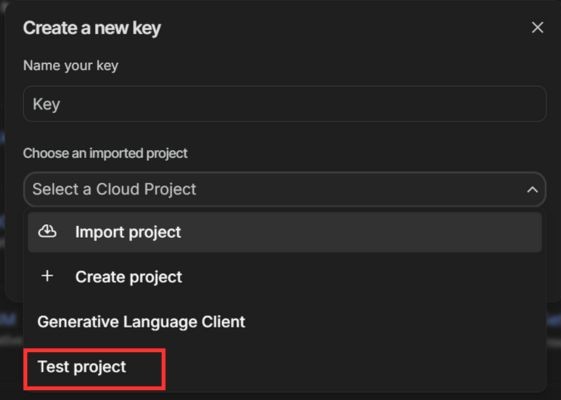
Select the project you named

A long string of characters will appear. This is your API Key. Copy it and save it somewhere safe. Note that each API Key is unique, so your character string will differ from the illustration.

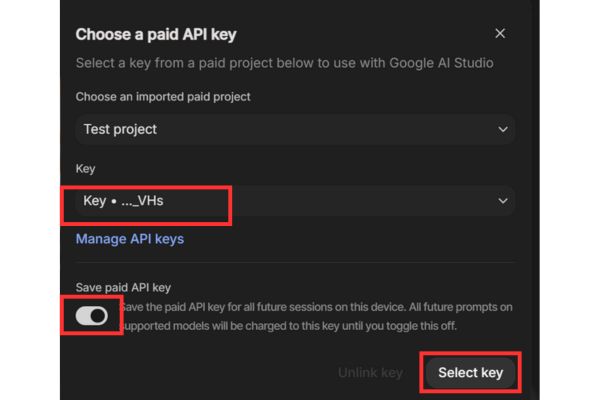
Return to page Dashboardplease find and select “Nano Banana Pro“. Next, select Link API Key and select the key as shown in the instructions.
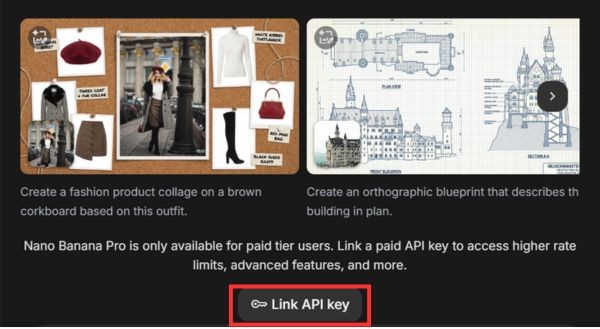
Select Link API Key
Select Link API Key
Select key
Select key

When done, your application has been successfully connected. All AI processing requests from Nano Banana Pro will now be made through your Google Cloud account and the cost will be deducted directly from your free $300 plan.

Important note to avoid money being deducted

This $300 offer is valid for use within 90 days. After this time, if you do not proactively cancel, Google will begin charging fees for the services you use to your registered card. So set a calendar or note a reminder on your phone before the due date. This ensures you can fully enjoy the offer without having to worry about unexpected costs.

Conclusion

So you’re done How to get $300 credit to run Nano Banana Pro and get ready to explore the world of AI on Google’s powerful platform. Make the most of your 90-day trial to learn and develop your own projects. Don’t forget to note the deadline to have the fullest free experience.


Tags: BananafreeGoogleNanoProRun
Previous Post

How to create beautiful infographics with Gemini like a pro

Next Post

How to know if your computer runs x64 or ARM64 chip in 30 seconds

AnonyViet

AnonyViet

Related Posts

How to record reaction videos with Android phones, no app needed
Tips

How to record reaction videos with Android phones, no app needed

June 1, 2026
Instructions on how to get Google AI Pro 1 year for free for new accounts
Tips

Instructions on how to get Google AI Pro 1 year for free for new accounts

June 1, 2026
Top free AI tools to help write, test and optimize content
Tips

Top free AI tools to help write, test and optimize content

June 1, 2026
Instructions for receiving Lovable Pro 12 months for free
Tips

Instructions for receiving Lovable Pro 12 months for free

May 29, 2026
Instructions for receiving 1 month of ElevenLabs Creator for free worth
Tips

Instructions for receiving 1 month of ElevenLabs Creator for free worth $22

May 25, 2026
How to create beautiful studio-like preschool graduation photos for your child
Tips

How to create beautiful studio-like preschool graduation photos for your child

May 21, 2026
Next Post
How to know if your computer runs x64 or ARM64 chip in 30 seconds

How to know if your computer runs x64 or ARM64 chip in 30 seconds

0 0 votes
Article Rating
Subscribe
Login
Notify of
guest

guest

0 Comments
Oldest
Newest Most Voted
Inline Feedbacks
View all comments

Recent News

How to record reaction videos with Android phones, no app needed

How to record reaction videos with Android phones, no app needed

June 1, 2026
Instructions on how to get Google AI Pro 1 year for free for new accounts

Instructions on how to get Google AI Pro 1 year for free for new accounts

June 1, 2026
Top free AI tools to help write, test and optimize content

Top free AI tools to help write, test and optimize content

June 1, 2026
TruyenDrive: Turn Google Drive into a professional manga reader

TruyenDrive: Turn Google Drive into a professional manga reader

May 31, 2026
How to record reaction videos with Android phones, no app needed

How to record reaction videos with Android phones, no app needed

June 1, 2026
Instructions on how to get Google AI Pro 1 year for free for new accounts

Instructions on how to get Google AI Pro 1 year for free for new accounts

June 1, 2026
Top free AI tools to help write, test and optimize content

Top free AI tools to help write, test and optimize content

June 1, 2026
AnonyViet - English Version

AnonyViet

AnonyViet is a website share knowledge that you have never learned in school!

We are ready to welcome your comments, as well as your articles sent to AnonyViet.

Follow Us

Contact:

Email: anonyviet.com[@]gmail.com

Main Website: https://anonyviet.com

Recent News

How to record reaction videos with Android phones, no app needed

How to record reaction videos with Android phones, no app needed

June 1, 2026
Instructions on how to get Google AI Pro 1 year for free for new accounts

Instructions on how to get Google AI Pro 1 year for free for new accounts

June 1, 2026
No Result
View All Result
  • Home
  • News
  • Software
  • Knowledge
  • MMO
  • Tips
  • Security
  • Network
  • Office

wpDiscuz
0
0
Would love your thoughts, please comment.x
()
x
| Reply