REDnote (also known as Xiaohongshu, Little Red Note) is gradually becoming a social networking platform loved by many people. With a short video viewing feature similar to TikTok, this application provides an interesting entertainment experience. This article AnonyViet will guide you how download videos from REDnote to your phone easily and quickly.
| Join the channel Telegram belong to AnonyViet 👉 Link 👈 |
What is REDnote and why is it attractive to users?
REDnote is an outstanding social networking application with a combination of entertainment and life experience sharing platform. Similar to TikTok, REDnote has a short video section where users can watch and interact with diverse content.

A special feature of REDnote is that it not only provides entertaining content but is also highly practical with many useful shares about travel, beauty and lifestyle.
In the context that TikTok is at risk of being banned in some countries, this application naturally becomes the perfect alternative. Therefore, knowing how to download videos from REDnote will help you save your favorite content to watch again at any time.
See more: Instructions for downloading and using REDnote (Xiaohongshu)
How to download videos from REDnote to your phone
Downloading videos from REDnote can be done easily through these simple steps:
Method 1: Download directly from the application
- Open the REDnote app and navigate to the video you want to download.
- Press and hold your finger on the video screen for a few seconds.
- When the new interface appears, select the icon Save to save the video to the phone gallery.
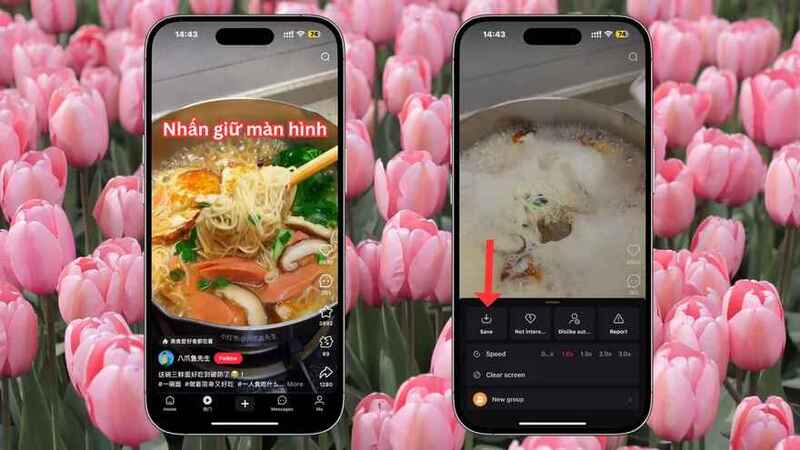
Note: Some videos may be “locked” by the author to download. In this case, you will not be able to use the Save option directly. Now you will apply method 2 below.
Method 2: Use using DLPanda website
Step 1: Click on the icon Share in the right corner of the screen. In the list of options that appears, select the icon Copy link (link icon).
Step 2: Visit Panda websitethen paste the path you just copied into the empty box on the interface. Press the button Download to start the download process.

Step 3: Wait a moment, the images or videos in the article will appear below (you can scroll down to see). To download a photo, just hold on the photo for a long time (about 3 – 5 seconds) and select Download image as usual.
With videos, you have two ways: Long press on the video and select Download videosor tap the icon Download Video or Download videos (watermark) below to save to your device.
Method 3: Download REDnote videos via Vtool Pro website
The function of downloading videos from REDnote to your computer using Vtool Pro is basically similar to the method of using Download Panda mentioned previously. The main difference lies in the website you use. Here are the detailed steps to do it:
Step 1: Copy the link of the article containing the photo or video you want to download from REDnote.
Step 2: Visit the website https://vtool.pro/paste the copied link into the white box on the interface. Then, click on the blue box below to start the download process.
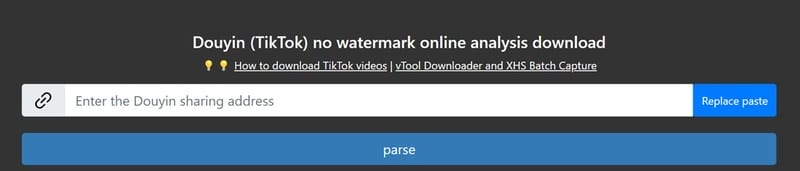
At this time, a new window will appear asking you to log in to your Vtool Pro account. If you don't have an account, you just need to register by email as usual. After completing registration, continue with the same steps as when using Download Panda.
Don't worry if you're not fluent in Chinese because modern browsers support automatic translation, making it easy for you to understand and act on requests on websites.
Some notes when downloading videos from REDnote
- Respect copyright: Only download videos for personal use, do not use downloaded content for commercial purposes or share publicly without the author's consent.
- Use a stable network connection: To ensure uninterrupted video downloads, use a strong Wi-Fi or mobile data network.
- Check memory capacity: Downloaded videos often take up a large amount of space, make sure your phone has enough storage space.
Conclusion
In short, download videos from REDnote It's not complicated if you follow the instructions properly. Hopefully the information in this article will help you have a better experience with this application. Start saving your favorite videos today!