• Home
  • News
  • Software
  • Knowledge
  • MMO
  • Tips
  • Security
  • Network
  • Office
AnonyViet - English Version
  • Home
  • News
  • Software
  • Knowledge
  • MMO
  • Tips
  • Security
  • Network
  • Office
No Result
View All Result
  • Home
  • News
  • Software
  • Knowledge
  • MMO
  • Tips
  • Security
  • Network
  • Office
No Result
View All Result
AnonyViet - English Version
No Result
View All Result

How to download thumbnails of videos on YouTube

AnonyViet by AnonyViet
January 27, 2023
in Tips
0

If you want to see the thumbnail of a YouTube video at a large size, or you want to design an image similar to the video’s thumbnail, YouTube makes it easy to download video thumbnails.

Join the channel Telegram of the AnonyViet 👉 Link 👈

How to download thumbnails of videos on YouTube

What is Youtube Thumbnail?

Thumbnail or Thumbnail it looks like your Avatar, but this is Video’s Avatar.

As of this writing in October 2021, there is no option on the YouTube website or in the YouTube app to download video thumbnails. However, you can use YouTube URLs to save thumbnails to your device.

Before you upload Youtube thumbnails, make sure you don’t run into any legal issues, such as using copyrighted works for commercial purposes.

How to download thumbnails of videos on YouTube

This works on both desktop and mobile devices. In this example, I will use the desktop as a guide. Thumbnails for a certain article or video, so that when users look at it, they can imagine what the article or video is about. On youtube, there are many beautiful thumbnails or you want to find pictures for reference, you can refer to the source of videos on Youtube. However, to download Thumbnail Youtube you need to follow these steps:

First, you have to find the unique ID of the video for which you want to download the thumbnail.

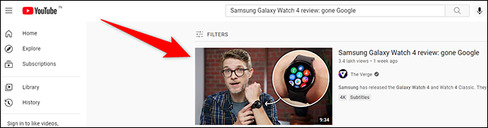
To get that ID, open a web browser on your Windows, Mac, Linux or Chromebook computer and go to the page YouTube. On the website, find the video you want and click on it.
How to download thumbnails of videos on YouTube 4

When the video opens, look at your web browser’s address bar. Here is the link of the current video, which looks like this:

https://www.youtube.com/watch?v=E5DlpONIW5M

In that link, the text after the “v=” part is the unique ID of the video. For the video above, the unique ID is:

E5DlpONIW5M

Replace the ID with the ID of the YouTube video you just found.

https://img.youtube.com/vi/ID/maxresdefault.jpg

For the video above, your link should look like this. Open this link in a new tab.

https://img.youtube.com/vi/E5DlpONIW5M/maxresdefault.jpg

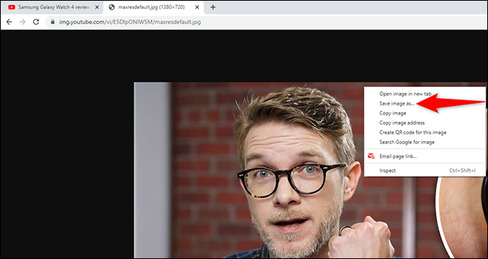
In the new tab, you’ll see a thumbnail version of the video in a large size. To save this thumbnail to your device, right-click it and select “Save Image As”.
How to download video thumbnails on YouTube 5

Choose a folder to save the thumbnails to and you’re done. In addition, you can also watch more Youtube views here


The article achieved: 5/5 – (100 votes)

Tags: DownloadthumbnailsvideosYoutube
Previous Post

How to install Google’s latest Fuchsia OS

Next Post

Some commands to check the Server when under DDOS attack

AnonyViet

AnonyViet

Related Posts

How to add sliders to Facebook Stories to easily rewind videos
Tips

How to add sliders to Facebook Stories to easily rewind videos

April 21, 2026
How to change the default font on Windows 10
Tips

How to change the default font on Windows 10

April 13, 2026
5 tips for using a Browser to replace an App (helps save RAM, time and money)
Tips

5 tips for using a Browser to replace an App (helps save RAM, time and money)

April 13, 2026
How to make funny MeMe photos without Photoshop within 10 seconds
Tips

How to make funny MeMe photos without Photoshop within 10 seconds

April 11, 2026
How to quickly design your own Logo without Photoshop
Tips

How to quickly design your own Logo without Photoshop

April 10, 2026
How to convert Website into App on Windows
Tips

How to convert Website into App on Windows

April 9, 2026
Next Post
Some commands to check the Server when under DDOS attack

Some commands to check the Server when under DDOS attack

0 0 votes
Article Rating
Subscribe
Login
Notify of
guest

guest

0 Comments
Oldest
Newest Most Voted
Inline Feedbacks
View all comments

Recent News

Create an avatar to celebrate April 30 with a beautiful red flag shirt with yellow stars

Create an avatar to celebrate April 30 with a beautiful red flag shirt with yellow stars

April 30, 2026
How to get 2 months of Super Duolingo for free worth 300k

How to get 2 months of Super Duolingo for free worth 300k

April 30, 2026
How to create a Face Sticker Collection using ChatGPT

How to create a Face Sticker Collection using ChatGPT

April 29, 2026
How to install the cute Bongo Cat mouse pointer for Windows

How to install the cute Bongo Cat mouse pointer for Windows

April 29, 2026
Create an avatar to celebrate April 30 with a beautiful red flag shirt with yellow stars

Create an avatar to celebrate April 30 with a beautiful red flag shirt with yellow stars

April 30, 2026
How to get 2 months of Super Duolingo for free worth 300k

How to get 2 months of Super Duolingo for free worth 300k

April 30, 2026
How to create a Face Sticker Collection using ChatGPT

How to create a Face Sticker Collection using ChatGPT

April 29, 2026
AnonyViet - English Version

AnonyViet

AnonyViet is a website share knowledge that you have never learned in school!

We are ready to welcome your comments, as well as your articles sent to AnonyViet.

Follow Us

Contact:

Email: anonyviet.com[@]gmail.com

Main Website: https://anonyviet.com

Recent News

Create an avatar to celebrate April 30 with a beautiful red flag shirt with yellow stars

Create an avatar to celebrate April 30 with a beautiful red flag shirt with yellow stars

April 30, 2026
How to get 2 months of Super Duolingo for free worth 300k

How to get 2 months of Super Duolingo for free worth 300k

April 30, 2026
No Result
View All Result
  • Home
  • News
  • Software
  • Knowledge
  • MMO
  • Tips
  • Security
  • Network
  • Office

wpDiscuz
0
0
Would love your thoughts, please comment.x
()
x
| Reply