• Home
  • News
  • Software
  • Knowledge
  • MMO
  • Tips
  • Security
  • Network
  • Office
AnonyViet - English Version
  • Home
  • News
  • Software
  • Knowledge
  • MMO
  • Tips
  • Security
  • Network
  • Office
No Result
View All Result
  • Home
  • News
  • Software
  • Knowledge
  • MMO
  • Tips
  • Security
  • Network
  • Office
No Result
View All Result
AnonyViet - English Version
No Result
View All Result

How to install Google’s latest Fuchsia OS

AnonyViet by AnonyViet
January 27, 2023
in Software
0

Google’s upcoming Fuchsia OS operating system is very popular in recent times. For starters, Fuchsia’s main goal is to create an operating system that fully meets the needs of developers, consumers, and manufacturers by focusing on security, updates, and performance. capacity.

Join the channel Telegram of the AnonyViet 👉 Link 👈

What is Fuchsia OS?

Fuchsia OS is an attempt by Google to create a source code operating system for smartphones with a focus on security, updateability, and performance. Fuchsia is a platform for developers to create lasting products and experiences across a wide range of devices. Fuchsia first became known to the public when the project appeared on the git platform in August 2016 without any official announcement. The name Fuchsia means “Pink + Purple = Fuchsia”, understood in Vietnamese as Purple Pink.

How to install Google’s latest Fuchsia OS

Another interesting information is that Fuchsia is written in C, C++, Dart, Go, Rust and Python. And since it’s an open source operating system, you can download Fuchsia and explore it yourself.

Sounds great, but Fuschia is still in development. Google can build Fuchsia from existing source, but it is very time consuming and sometimes requires enough hardware resources. The good news is that you can still try Fuchsia OS using an emulator, thanks to the experts at DahliaOS.

How to install Fuchsia OS emulator?

First, you download the FImage emulator from the official github page of DahliaOS FImage.

Next, extract the FImage installation file using any decompression software you like. Open terminal and access the extracted FImage folder with the command CD.

Copy and paste the commands below into the terminal and press Enter.

./ffx-linux-x64 platform preflight
./network-config
./fimage-gui 4096

It’s a bit sad that Windows and AMD users can’t install this emulator. Here is the required configuration of the FImage emulator:

  • 8GB RAM
  • Intel 4th generation CPU or higher (if dedicated graphics card is not available)
  • CPU processor manufactured after 2010 (If dedicated graphics card is available)
  • Version Ubuntu 20.04 or higher (Emulator author tested FImage on Manjaro and found it to work fine)
  • Curl, Unzip, Git and finally a graphics driver updater

That’s how to install the Fuchsia OS emulator. If you were expecting a colorful user interface like Android, you will be very disappointed. This build is intended to test Fuchsia and develop Flutter apps on Fuchsia using the Flutter SDK. Ironically, Flutter Development is yet to work due to a bug that is expected to be resolved soon.
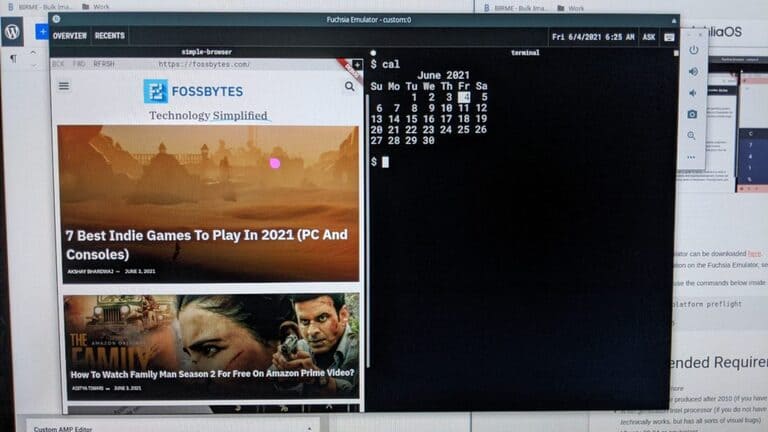
What is Fuchsia OS?

As I said, this is the basic deployment and testing of Fuchsia inside an emulator. Fuchsia OS only comes with Terminal and browser, but it works extremely fast and stable.

Some other bugs include slow mouse input, a bit sluggish performance, stuttering and occasional issues with the terminal, but everything else is fine.

The future of Fuchsia OS is also very promising. What do you think about Fuchsia OS? Can it be replaced? Android in the future?


The article achieved: 5/5 – (100 votes)

Tags: FuchsiaGooglesinstalllatest
Previous Post

Configuring anti-DDOS on Server Linux

Next Post

How to download thumbnails of videos on YouTube

AnonyViet

AnonyViet

Related Posts

Create an avatar to celebrate April 30 with a beautiful red flag shirt with yellow stars
Software

Create an avatar to celebrate April 30 with a beautiful red flag shirt with yellow stars

April 30, 2026
How to get 2 months of Super Duolingo for free worth 300k
Software

How to get 2 months of Super Duolingo for free worth 300k

April 30, 2026
How to create a Face Sticker Collection using ChatGPT
Software

How to create a Face Sticker Collection using ChatGPT

April 29, 2026
How to install the cute Bongo Cat mouse pointer for Windows
Software

How to install the cute Bongo Cat mouse pointer for Windows

April 29, 2026
Instructions for looking up prescriptions on VNeID instead of paper medical books
Software

Instructions for looking up prescriptions on VNeID instead of paper medical books

April 26, 2026
Compare Poco X8 Pro and Poco X7 Pro: A new step for the “king” of mid-range performance
Software

Compare Poco X8 Pro and Poco X7 Pro: A new step for the “king” of mid-range performance

April 24, 2026
Next Post
How to download thumbnails of videos on YouTube

How to download thumbnails of videos on YouTube

0 0 votes
Article Rating
Subscribe
Login
Notify of
guest

guest

0 Comments
Oldest
Newest Most Voted
Inline Feedbacks
View all comments

Recent News

Create an avatar to celebrate April 30 with a beautiful red flag shirt with yellow stars

Create an avatar to celebrate April 30 with a beautiful red flag shirt with yellow stars

April 30, 2026
How to get 2 months of Super Duolingo for free worth 300k

How to get 2 months of Super Duolingo for free worth 300k

April 30, 2026
How to create a Face Sticker Collection using ChatGPT

How to create a Face Sticker Collection using ChatGPT

April 29, 2026
How to install the cute Bongo Cat mouse pointer for Windows

How to install the cute Bongo Cat mouse pointer for Windows

April 29, 2026
Create an avatar to celebrate April 30 with a beautiful red flag shirt with yellow stars

Create an avatar to celebrate April 30 with a beautiful red flag shirt with yellow stars

April 30, 2026
How to get 2 months of Super Duolingo for free worth 300k

How to get 2 months of Super Duolingo for free worth 300k

April 30, 2026
How to create a Face Sticker Collection using ChatGPT

How to create a Face Sticker Collection using ChatGPT

April 29, 2026
AnonyViet - English Version

AnonyViet

AnonyViet is a website share knowledge that you have never learned in school!

We are ready to welcome your comments, as well as your articles sent to AnonyViet.

Follow Us

Contact:

Email: anonyviet.com[@]gmail.com

Main Website: https://anonyviet.com

Recent News

Create an avatar to celebrate April 30 with a beautiful red flag shirt with yellow stars

Create an avatar to celebrate April 30 with a beautiful red flag shirt with yellow stars

April 30, 2026
How to get 2 months of Super Duolingo for free worth 300k

How to get 2 months of Super Duolingo for free worth 300k

April 30, 2026
No Result
View All Result
  • Home
  • News
  • Software
  • Knowledge
  • MMO
  • Tips
  • Security
  • Network
  • Office

wpDiscuz
0
0
Would love your thoughts, please comment.x
()
x
| Reply