
• Home
  • News
  • Software
  • Knowledge
  • MMO
  • Tips
  • Security
  • Network
  • Office
AnonyViet - English Version
  • Home
  • News
  • Software
  • Knowledge
  • MMO
  • Tips
  • Security
  • Network
  • Office
No Result
View All Result
  • Home
  • News
  • Software
  • Knowledge
  • MMO
  • Tips
  • Security
  • Network
  • Office
No Result
View All Result
AnonyViet - English Version
No Result
View All Result

How to create 3D wallpapers on iOS 26 very beautiful

AnonyViet by AnonyViet
September 27, 2025
in Knowledge
0

How to create 3D wallpapers on iOS 26 is one of the interesting features that many iPhone users wait. With just a few simple steps, you can make your lock screen or the main screen become vivid, full of depth and completely different. If you are trying to refresh your iPhone interface, let’s find out instructions right away in this article.

Join the channel Telegram belong to Anonyviet 👉 Link 👈

What makes 3D wallpapers special?

3D wallpaper feature above iOS 26 Not only has the aesthetic factor but also brings many utilities in the daily experience:

  • When activating the 3D effect, the application icon and clock on the screen will display more prominent, creating an intuitive and vivid feeling.
  • You can choose any of your favorite photos and turn it into a unique 3D wallpaper. Customize the layout and color helps iPhone reflect its own style.
  • Thanks to the depth effect, the wallpaper displays more beautifully in many lighting conditions, especially at night, making the eyes comfortable when used.
  • Instead of using the default wallpaper, the creation of 3D wallpapers helps your phone stand out, not “in touch” with others.
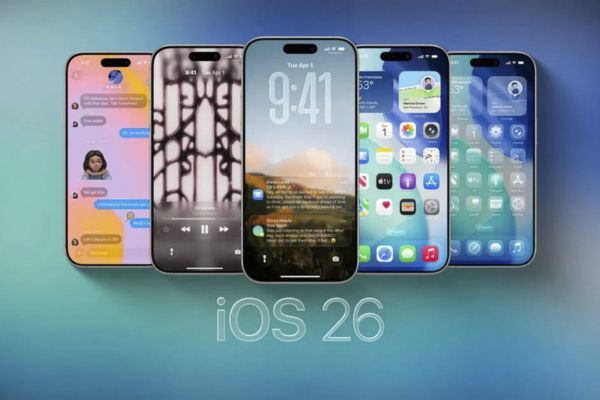
What makes 3D wallpapers special?

Tell you how to create 3D wallpapers on iOS 26

To set the 3D wallpapers above iPhoneyou just need to perform the following basic operations:

  1. Unlock the iPhone, hold down the lock screen for a few seconds until the interface switches to the editing mode.
  2. Select Custom To start changing the wallpaper.
  3. Choose your favorite photo from the library. Then, zoom in, shrink or move the image so that the subject is in the right position, not obscured by the clock or widget.
  4. Select Depth effect (Depth effect) to enable 3D feature. This is the highlight that helps the wallpaper become unique.
  5. Press Finished And choose to apply to the lock screen, the main screen or both depending on the needs.

In less than 1 minute, you have a beautiful 3D wallpaper, full of depth and personal impression.
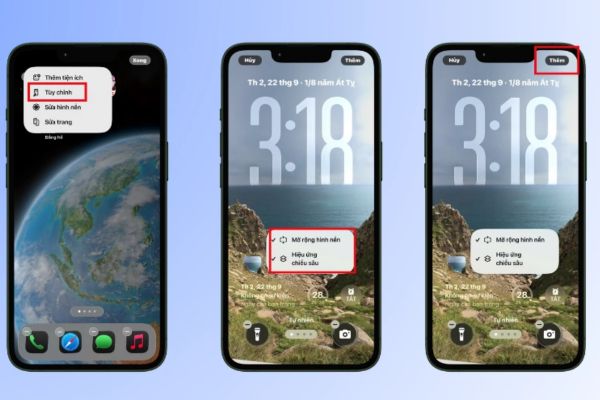
Tell you how to create 3D wallpapers on iOS 26

The notes when creating 3D wallpapers on iOS 26

  • 3D wallpapers will be more beautiful if the image has a prominent subject, separate from the background.
  • Photos with small details easily make the depth effect tangled, not outstanding the main point.
  • Before saving, align the image to avoid covering the important clock and widget display.
  • The sharp image will help the 3D effect to display better, not blurred when zooming in.
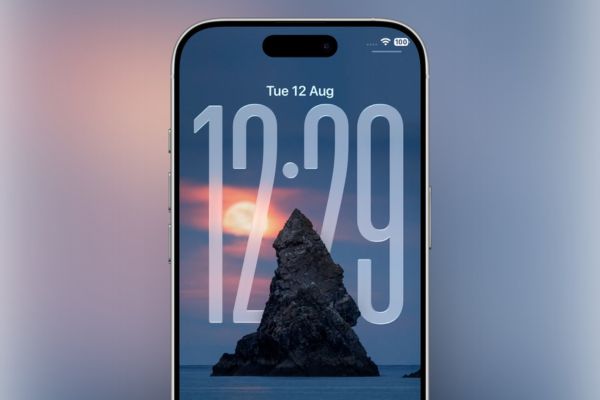
The notes when creating 3D wallpapers on iOS 26

Conclusion

Can see, How to create 3D wallpapers on iOS 26 Not only is a beauty feature, but also a way for each iPhone user to affirm its own personality. With just a few simple steps, you have a deep, vivid and different screen. If you have upgraded to iOS 26, do not miss the opportunity to experience this interesting feature right away!


Tags: beautifulcreateiOSwallpapers
Previous Post

Fix Chrome error suggesting the website address is the previous search result

Next Post

How to not let friends see yourself like and comment on Facebook

AnonyViet

AnonyViet

Related Posts

Postpaid for new employees: Should you start using it?
Knowledge

Postpaid for new employees: Should you start using it?

October 26, 2026
How to create a UFO Game that calls students to return their homework
Knowledge

How to create a UFO Game that calls students to return their homework

October 26, 2026
Instructions on how to exit iOS 27 Beta and update to the official version
Knowledge

Instructions on how to exit iOS 27 Beta and update to the official version

October 22, 2026
Instructions for turning off automatic subtitles on iPhone and Macbook
Knowledge

Instructions for turning off automatic subtitles on iPhone and Macbook

October 20, 2026
MBTI, Big Five, DISC or Holland: which personality test should you choose?
Knowledge

MBTI, Big Five, DISC or Holland: which personality test should you choose?

October 15, 2026
Super virtual way to change the photography angle using AI on iPhone
Knowledge

Super virtual way to change the photography angle using AI on iPhone

October 9, 2026
Next Post
How to not let friends see yourself like and comment on Facebook

How to not let friends see yourself like and comment on Facebook

0 0 votes
Article Rating
Subscribe
Login
Notify of
guest

guest

0 Comments
Oldest
Newest Most Voted

Recent News

Quét lỗ hổng bảo mật cho Vide Coding bằng Security Audit Skill

Quét lỗ hổng bảo mật cho Vide Coding bằng Security Audit Skill

October 27, 2026
Postpaid for new employees: Should you start using it?

Postpaid for new employees: Should you start using it?

October 26, 2026
How to create a UFO Game that calls students to return their homework

How to create a UFO Game that calls students to return their homework

October 26, 2026
Instructions for registering for OxionAI Pro for 1 year with many powerful AI models

Instructions for registering for OxionAI Pro for 1 year with many powerful AI models

October 24, 2026
Quét lỗ hổng bảo mật cho Vide Coding bằng Security Audit Skill

Quét lỗ hổng bảo mật cho Vide Coding bằng Security Audit Skill

October 27, 2026
Postpaid for new employees: Should you start using it?

Postpaid for new employees: Should you start using it?

October 26, 2026
How to create a UFO Game that calls students to return their homework

How to create a UFO Game that calls students to return their homework

October 26, 2026
AnonyViet - English Version

AnonyViet

AnonyViet is a website share knowledge that you have never learned in school!

We are ready to welcome your comments, as well as your articles sent to AnonyViet.

Follow Us

Contact:

Email: anonyviet.com[@]gmail.com

Main Website: https://anonyviet.com

Recent News

Quét lỗ hổng bảo mật cho Vide Coding bằng Security Audit Skill

Quét lỗ hổng bảo mật cho Vide Coding bằng Security Audit Skill

October 27, 2026
Postpaid for new employees: Should you start using it?

Postpaid for new employees: Should you start using it?

October 26, 2026
  • Home
  • Home 2
  • Home 3
  • Home 4
  • Home 5
  • Home 6
  • Next Dest Page
  • Sample Page

say88 tỷ lệ kèo nhà cái kèo nhà cái 5 febet

No Result
View All Result
  • Home
  • News
  • Software
  • Knowledge
  • MMO
  • Tips
  • Security
  • Network
  • Office

say88 tỷ lệ kèo nhà cái kèo nhà cái 5 febet

wpDiscuz
0
0
Would love your thoughts, please comment.x
()
x
| Reply





