• Home
  • News
  • Software
  • Knowledge
  • MMO
  • Tips
  • Security
  • Network
  • Office
AnonyViet - English Version
  • Home
  • News
  • Software
  • Knowledge
  • MMO
  • Tips
  • Security
  • Network
  • Office
No Result
View All Result
  • Home
  • News
  • Software
  • Knowledge
  • MMO
  • Tips
  • Security
  • Network
  • Office
No Result
View All Result
AnonyViet - English Version
No Result
View All Result

How to check if your computer supports AI

AnonyViet by AnonyViet
July 30, 2024
in Tips
0

Electronics manufacturers have been introducing groundbreaking products over the past few years, equipped with hardware and software specifically designed to handle AI-related tasks effectively. So, if you are considering upgrading or buying a new device, try the following test to determine whether AI-enabled computers or not.

Join the channel Telegram belong to AnonyViet 👉 Link 👈

How to determine if a computer supports AI?

NPU, short for Neural Processing Unit, also known as a neural processor, is a specialized processor designed to be optimized for specific tasks. WHOincluding machine learning and artificial neural networks.

NPUs process complex AI-related calculations faster and consume less power than conventional CPUs and GPUs. Currently, there are a number of Windows computers on the market that have integrated NPUs to help process AI tasks more efficiently.

How to determine if a computer supports AI?

Steps to check if your computer supports AI or not

Method 1: Through Task Manager

To get started, press Ctrl + Shift + Esc to open Task Manager, then go to the Performance tab. If your computer supports AI, the NPU item will appear.
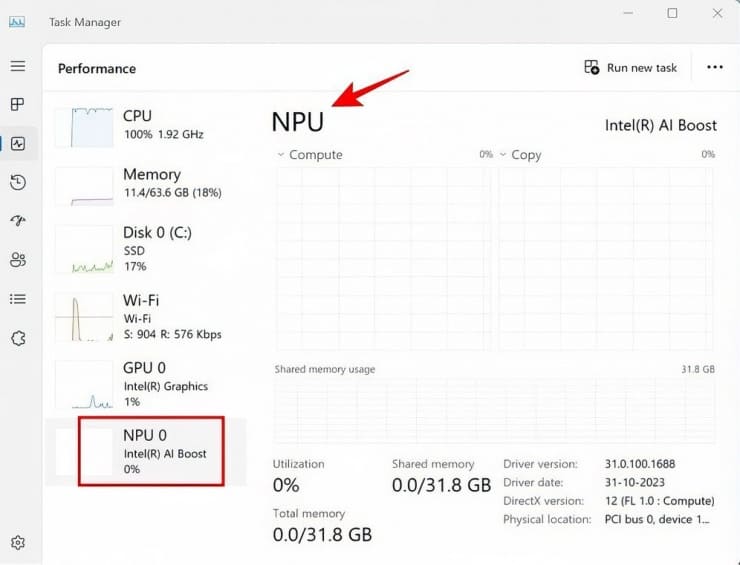
Check via Task Manager

NPUs are built into Intel processors from 14th generation and above, AMD processors with Ryzen AI technology, and Qualcomm Snapdragon 8cx Gen2 and above.

Method 2: Through Device Manager

Another way to check AI-enabled computers or not is through Device Manager. Here's how:

Click the Start menu and type 'Device Manager' in the search box. For computers with Intel processors, look for Intel AI Boost. For AMD processors, look for AMD IPU Device.
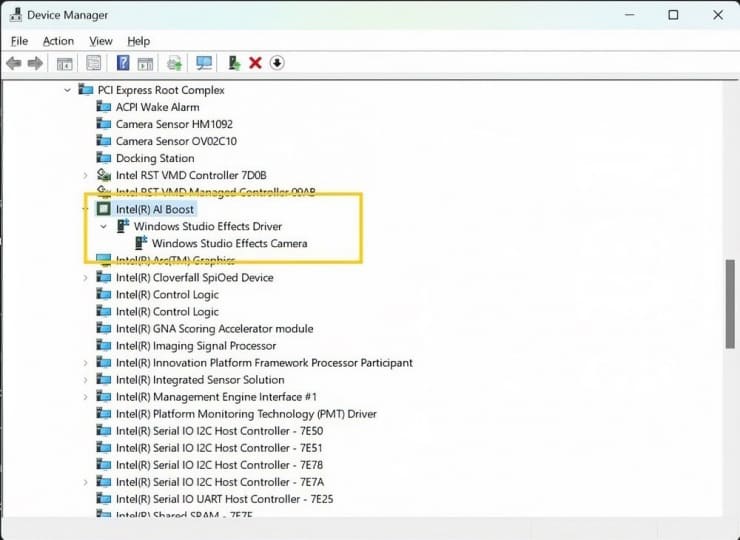
Check via Device Manager

If you don't see the NPU showing up in Device Manager even though your processor supports it, download the driver from Manufacturer's website. Computers equipped with Qualcomm chips usually have built-in NPU drivers and receive periodic updates through Windows Update.

Signs that your computer is compatible with AI

Importantly, determining whether a computer is AI-enabled is not just about hardware, but also about the right software and applications. A device with high configuration but lacking AI software will not be considered AI-enabled.

In short, the trend of AI-powered computers is becoming more and more popular, making AI more accessible to users and applied in many fields.

Epilogue

Thus, checking whether AI-enabled computers or not is an important step to ensure you can fully enjoy the benefits that AI brings. Good luck!


Tags: checkcomputersupports
Previous Post

How to Download YouTube Videos on Computer: A Comprehensive Guide

Next Post

Instructions for Downloading Videos on Edumall to Your Computer for Offline Viewing

AnonyViet

AnonyViet

Related Posts

How to create a virtual Pet, a virtual character running around on the Desktop to relax
Tips

How to create a virtual Pet, a virtual character running around on the Desktop to relax

October 15, 2026
15 cách tăng tốc Windows 10 nhanh như gió
Tips

15 cách tăng tốc Windows 10 nhanh như gió

October 14, 2026
How to create Guest mode Shortcuts for Chrome and Edge
Tips

How to create Guest mode Shortcuts for Chrome and Edge

October 13, 2026
Test what breed of dog you are through 10 multiple choice questions
Tips

Test what breed of dog you are through 10 multiple choice questions

October 13, 2026
Fliqlo – Create digital clock screens on Windows and phones
Tips

Fliqlo – Create digital clock screens on Windows and phones

October 12, 2026
SynthID Detector: Genuine AI checking tool from Google
Tips

SynthID Detector: Genuine AI checking tool from Google

October 11, 2026
Next Post
Instructions for Downloading Videos on Edumall to Your Computer for Offline Viewing

Instructions for Downloading Videos on Edumall to Your Computer for Offline Viewing

0 0 votes
Article Rating
Subscribe
Login
Notify of
guest

guest

0 Comments
Oldest
Newest Most Voted

Recent News

Instructions for receiving pension through VNeID without going to the ward

Instructions for receiving pension through VNeID without going to the ward

October 16, 2026
MBTI, Big Five, DISC or Holland: which personality test should you choose?

MBTI, Big Five, DISC or Holland: which personality test should you choose?

October 15, 2026
How to create a virtual Pet, a virtual character running around on the Desktop to relax

How to create a virtual Pet, a virtual character running around on the Desktop to relax

October 15, 2026
Record first, choose focus later: how to use 4K 60 fps Cinema mode on iPhone 18 Pro

Record first, choose focus later: how to use 4K 60 fps Cinema mode on iPhone 18 Pro

October 15, 2026
Instructions for receiving pension through VNeID without going to the ward

Instructions for receiving pension through VNeID without going to the ward

October 16, 2026
MBTI, Big Five, DISC or Holland: which personality test should you choose?

MBTI, Big Five, DISC or Holland: which personality test should you choose?

October 15, 2026
How to create a virtual Pet, a virtual character running around on the Desktop to relax

How to create a virtual Pet, a virtual character running around on the Desktop to relax

October 15, 2026
AnonyViet - English Version

AnonyViet

AnonyViet is a website share knowledge that you have never learned in school!

We are ready to welcome your comments, as well as your articles sent to AnonyViet.

Follow Us

Contact:

Email: anonyviet.com[@]gmail.com

Main Website: https://anonyviet.com

Recent News

Instructions for receiving pension through VNeID without going to the ward

Instructions for receiving pension through VNeID without going to the ward

October 16, 2026
MBTI, Big Five, DISC or Holland: which personality test should you choose?

MBTI, Big Five, DISC or Holland: which personality test should you choose?

October 15, 2026
  • Home
  • Home 2
  • Home 3
  • Home 4
  • Home 5
  • Home 6
  • Next Dest Page
  • Sample Page

say88 tỷ lệ kèo nhà cái kèo nhà cái 5 febet

No Result
View All Result
  • Home
  • News
  • Software
  • Knowledge
  • MMO
  • Tips
  • Security
  • Network
  • Office

say88 tỷ lệ kèo nhà cái kèo nhà cái 5 febet

wpDiscuz
0
0
Would love your thoughts, please comment.x
()
x
| Reply