• Home
  • News
  • Software
  • Knowledge
  • MMO
  • Tips
  • Security
  • Network
  • Office
AnonyViet - English Version
  • Home
  • News
  • Software
  • Knowledge
  • MMO
  • Tips
  • Security
  • Network
  • Office
No Result
View All Result
  • Home
  • News
  • Software
  • Knowledge
  • MMO
  • Tips
  • Security
  • Network
  • Office
No Result
View All Result
AnonyViet - English Version
No Result
View All Result

How to change account name on Windows 10 login screen

AnonyViet by AnonyViet
February 3, 2023
in Tips
0

You want to change your login name on Windows 10 because it’s… your “crush” name, I get it. Either it’s a public PC, or you don’t want to reveal your name, for fear of exposing national security secrets. You are using a Local account and want to display your full name instead of your Microsoft account name. With 3 simple ways below, AnonyViet will guide you to change your login name on the Windows 10 Login screen.

Join the channel Telegram belong to AnonyViet 👉 Link 👈

How to change account name on Windows 10 login screen

How to change username using Settings

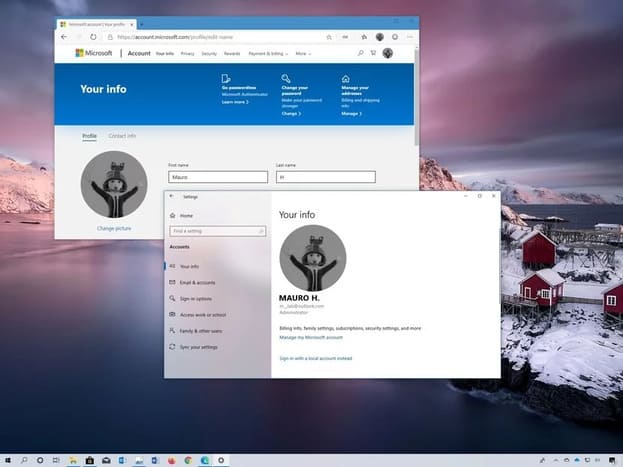
If you are using a Microsoft account to sign in to Windows 10, the login name will be taken from your Microsoft account name. If you want to do that, you’ll need to update your account settings with these steps:

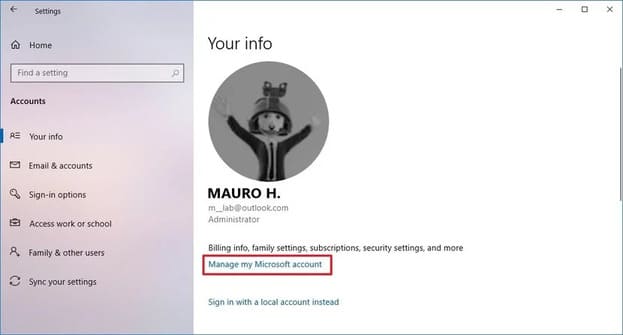
  1. Open Settings.
  2. Select Accounts.
  3. Select Your info.
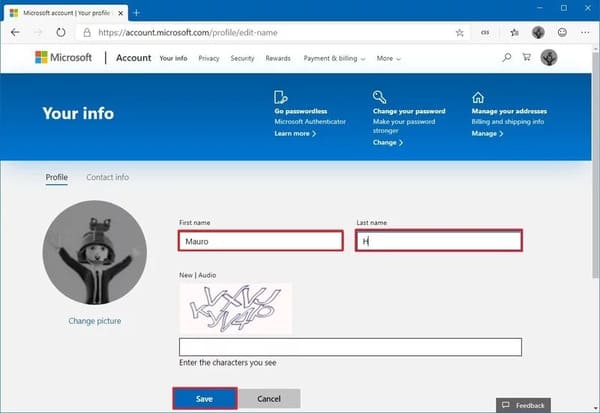
  4. Select Manage my Microsoft account.How to change account name on Windows 10 login screen
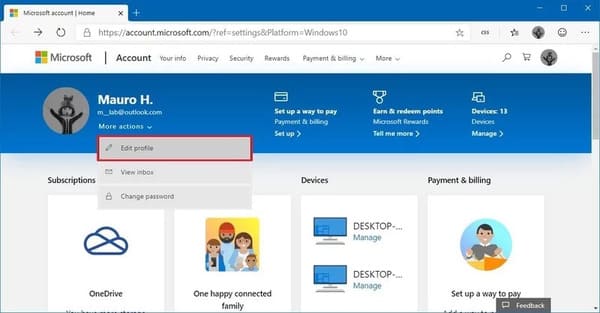
  5. Under username, press More actions.
  6. Select Edit profiles.change username login windows 10
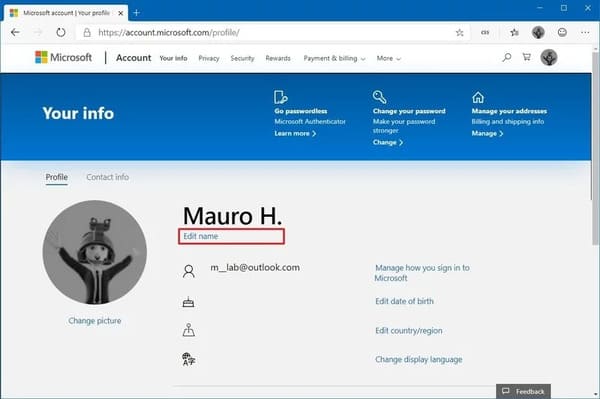
  7. In the menu, select next Edit name.edit name windows 10
  8. Change the first and last name as you like.Windows 10 name change
  9. Verify that you are not a robot.
  10. Click the button Save.
  11. Restart the PC.

Done, it’s as easy as the way your crush rejects you, see? However, it will take some time to sync the changes across all your devices.

How to change username using Control Panel

Also, if you’re using a local account, not linked to a Microsoft account, you’ll need to use the Control Panel to change your login name.

Using User Accounts

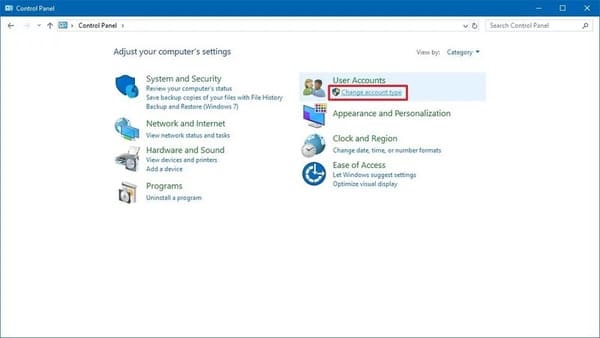
  1. Open Control Panel.
  2. Under “User Accounts”, select Change account type.How to change username using Control Panel
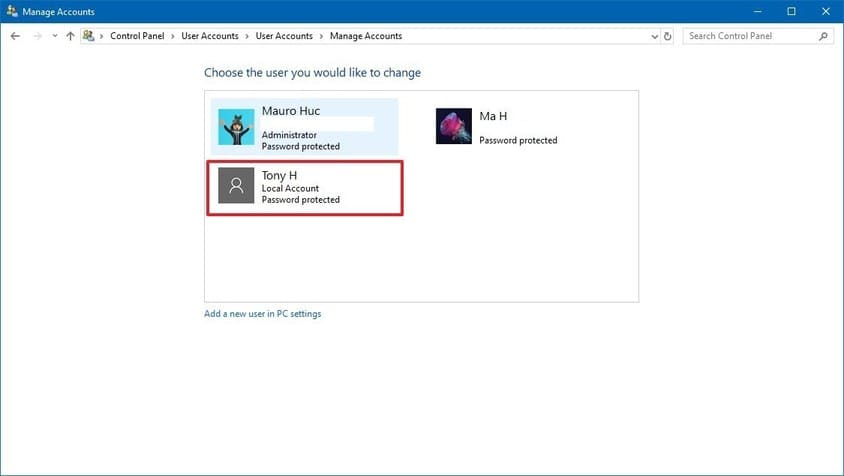
  3. Select the Local account you want to rename.Select the Local account you want to rename
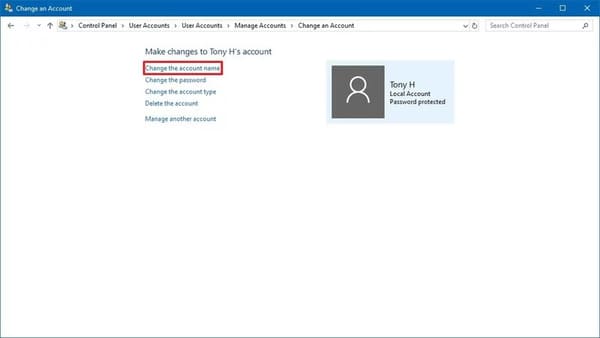
  4. Select Change the account name.Change the account name
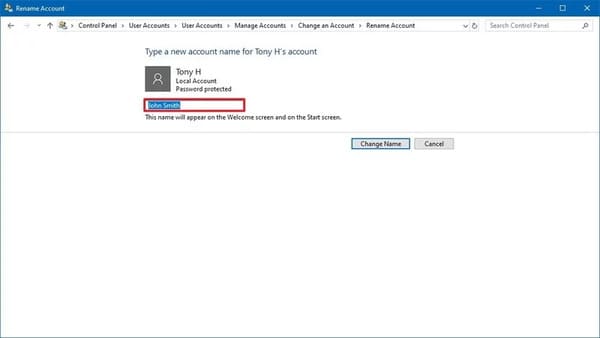
  5. Change the name you want it to appear on the login screen.Enter the name you want to change login windows 10
  6. Select Change Name.

After completing this step, log out and log back in to see the change.

Using netplwiz

You can also use other user settings (netplwiz) available in Control Panel.

To update Username with “User Accounts”, follow these steps:

  1. Open Start menu.
  2. Import netplwiz and select the first result that appears.
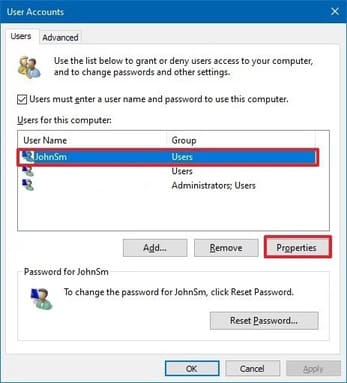
  3. Select the account you want to rename.
  4. Choose next Properties.Use netplwiz to rename windows 10 logon
  5. Change the name in the “Full Name” section to show a different name in the Sign-in screen.How to change the account name on the Windows 10 login screen 2
  6. India Apply.
  7. Select OK.
  8. Select OK Again.

Log in again and it will show the name you changed in the “Full Name” section.

You can also create a new local account and give it a completely different name without going through these steps. Anyway, good luck to you.

See more good articles about Windows at Anonyviet.

The source: Windows Central.

The article achieved: 5/5 – (100 votes)

Tags: accountchangeloginscreenWindows
Previous Post

How to download copyrighted App from Appstore without spending money with CokerNutx

Next Post

Instructions for grafting Nobita and Shizuka’s faces into simple pictures

AnonyViet

AnonyViet

Related Posts

Windows 7/8.1/10 users will be upgraded to Windows 11 for free
Tips

Windows 7/8.1/10 users will be upgraded to Windows 11 for free

July 30, 2026
Instructions for receiving ChatGPT Plus for 1 month for free in 2026
Tips

Instructions for receiving ChatGPT Plus for 1 month for free in 2026

July 28, 2026
Some reasons I don’t like Windows 11
Tips

Some reasons I don’t like Windows 11

July 27, 2026
Instructions on how to get free Facebook white ticks
Tips

Instructions on how to get free Facebook white ticks

July 27, 2026
Collection of Windows 11 wallpapers for computers and phones
Tips

Collection of Windows 11 wallpapers for computers and phones

July 26, 2026
Don’t install leaked Windows 11
Tips

Don’t install leaked Windows 11

July 25, 2026
Next Post
Instructions for grafting Nobita and Shizuka’s faces into simple pictures

Instructions for grafting Nobita and Shizuka's faces into simple pictures

0 0 votes
Article Rating
Subscribe
Login
Notify of
guest

guest

0 Comments
Oldest
Newest Most Voted

Recent News

Windows 7/8.1/10 users will be upgraded to Windows 11 for free

Windows 7/8.1/10 users will be upgraded to Windows 11 for free

July 30, 2026
Instructions for receiving the free Certified LLM Security Expert certificate

Instructions for receiving the free Certified LLM Security Expert certificate

July 30, 2026
MSI laptops are not just for gamers: Which line is suitable for students, office workers and creative people?

MSI laptops are not just for gamers: Which line is suitable for students, office workers and creative people?

July 29, 2026
What is quantum resistant cryptography? Why must the Internet change?

What is quantum resistant cryptography? Why must the Internet change?

July 29, 2026
Windows 7/8.1/10 users will be upgraded to Windows 11 for free

Windows 7/8.1/10 users will be upgraded to Windows 11 for free

July 30, 2026
Instructions for receiving the free Certified LLM Security Expert certificate

Instructions for receiving the free Certified LLM Security Expert certificate

July 30, 2026
MSI laptops are not just for gamers: Which line is suitable for students, office workers and creative people?

MSI laptops are not just for gamers: Which line is suitable for students, office workers and creative people?

July 29, 2026
AnonyViet - English Version

AnonyViet

AnonyViet is a website share knowledge that you have never learned in school!

We are ready to welcome your comments, as well as your articles sent to AnonyViet.

Follow Us

Contact:

Email: anonyviet.com[@]gmail.com

Main Website: https://anonyviet.com

Recent News

Windows 7/8.1/10 users will be upgraded to Windows 11 for free

Windows 7/8.1/10 users will be upgraded to Windows 11 for free

July 30, 2026
Instructions for receiving the free Certified LLM Security Expert certificate

Instructions for receiving the free Certified LLM Security Expert certificate

July 30, 2026
  • Home
  • Home 2
  • Home 3
  • Home 4
  • Home 5
  • Home 6
  • Next Dest Page
  • Sample Page

say88 tỷ lệ kèo nhà cái kèo nhà cái 5 febet

No Result
View All Result
  • Home
  • News
  • Software
  • Knowledge
  • MMO
  • Tips
  • Security
  • Network
  • Office

say88 tỷ lệ kèo nhà cái kèo nhà cái 5 febet

wpDiscuz
0
0
Would love your thoughts, please comment.x
()
x
| Reply