• Home
  • News
  • Software
  • Knowledge
  • MMO
  • Tips
  • Security
  • Network
  • Office
AnonyViet - English Version
  • Home
  • News
  • Software
  • Knowledge
  • MMO
  • Tips
  • Security
  • Network
  • Office
No Result
View All Result
  • Home
  • News
  • Software
  • Knowledge
  • MMO
  • Tips
  • Security
  • Network
  • Office
No Result
View All Result
AnonyViet - English Version
No Result
View All Result

How to add directories to PATH variable in Linux

AnonyViet by AnonyViet
January 25, 2023
in Network
0

The PATH variable in Linux stores the path to directories containing command files and is called by the user on the terminal. For example, when you type python on the terminal, the terminal will look for directories containing files named python to execute. Instead of you having to go to that directory and then call python, you can now call python at any path.

Join the channel Telegram of the AnonyViet 👉 Link 👈

How to add directories to PATH variable in Linux

To see what paths the PATH variable is currently storing, type the following command: echo $PATH

Result: /usr/local/sbin:/usr/local/bin:/usr/sbin:/usr/bin:/sbin:/bin:/usr/games:/usr/local/games:/snap/bin

As you can see, PATH includes directories (like /usr/local/sbin, /usr/bin and many more) separated by a colon (:).

If you want to execute script files from anywhere in the system, you should add their location in the PATH variable.

This is very common when setting up a development environment. For example, imagine you have downloaded and installed Java and Maven. In order for your programs to work properly, you will need to specify the location of Maven and Java in the PATH.

So, this article will show you how to set PATH in Linux. In addition, I will also cover the things you should be careful about when handling PATH.

Add directory to PATH in Linux

The process of adding a new directory to the PATH variable in Linux is basically the following:

export PATH=$PATH:your_directory

Where your_directory is the absolute path to the directory you want.

Let’s say, you have downloaded and extracted Maven to the home directory. You then want to add the Maven bin directory to your PATH. Assume the absolute path of this bin directory is /home/abhishek/maven/apache-maven-3.8.0/bin.

Here’s what you should do:

export PATH=$PATH:/home/abhishek/maven/apache-maven-3.8.0/bin

Explain:

  • Adding $ before the variable name means you are referring to its value. PATH is the variable name, $PATH is the value of the variable PATH
  • You should not use $ with PATH to the left of the equal sign “=”
  • There cannot be any spaces before and after the equal sign “=”
  • Don’t forget to add a “:” after $PATH because directories in PATH are separated by colons
  • There must be no spaces before and after the colon (:)

Once you’ve added the new path to your PATH, double check the PATH is correct.

abhishek@its-foss:~$ echo $PATH
/usr/local/sbin:/usr/local/bin:/usr/sbin:/usr/bin:/sbin:/bin:/usr/games:/usr/local/games:/snap/bin:/home/abhishek/maven/apache-maven-3.8.0/bin

You can run the new script file added to the PATH. This will help you to check if the PATH is working or not.

Make permanent changes to PATH

You’ve added the directory to the PATH variable, but it’s only a temporary change. If you close the terminal, or log out of the system, the PATH will be back to the way it was and the changes you made will be gone.

If you want to make permanent changes to the PATH variable yourself, you can add these changes to the .bashrc file in your home directory, assuming you’re using the Bash shell.

Use text editors like Nano or Vim for this.

nano ~/.bashrc
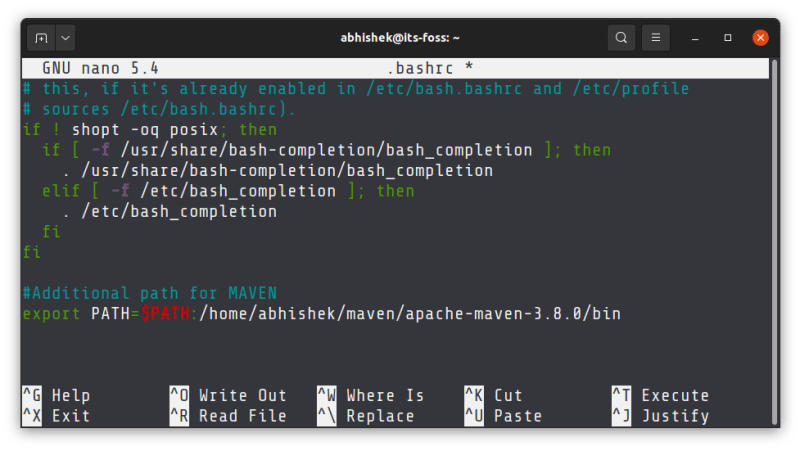
Make permanent changes to PATH

If you want the modified PATH variable to be applied to the user on a Linux system, you can add these changes to the /etc/profile. This will work when you are a sysadmin and have a system configured with a custom path.

Preferred directories in PATH

There are several directories in the PATH variable. When you run an executable, your system looks for directories in the order in which they appear in the PATH variable.

If /usr/local/sbin precedes /usr/bin, the executable is searched first in /usr/local/sbin. If the executable is found, the search ends and the file is executed.

This is why you’ll see some commands where extra directories are prepended to anything in the PATH variable:

export PATH=your_directory:$PATH

If you think your extra directory should be searched before other directories, you should add it before $PATH, otherwise add it after $PATH.

So that’s it then. Also, if you forgot your Linux password on WSL, it’s possible read this post.

The article achieved: 5/5 – (100 votes)

Tags: AdddirectoriesLinuxpathvariable
Previous Post

Lesson 242: Trendlines in Excel

Next Post

How to remove Watermark from photos and Videos with iMyFone MarkGo

AnonyViet

AnonyViet

Related Posts

Instructions for detecting network vulnerabilities: How to check the system for data leaks (IP/DNS)
Network

Instructions for detecting network vulnerabilities: How to check the system for data leaks (IP/DNS)

October 9, 2026
Is Renting a Cheap VPS to Run Docker Really Effective?
Network

Is Renting a Cheap VPS to Run Docker Really Effective?

July 2, 2026
How to get a free domain for 1 year from Gravatar
Network

How to get a free domain for 1 year from Gravatar

June 23, 2026
Cloud Infrastructure Resilience: Mitigating Advanced Layer 7 Vulnerabilities and Securing High-Throughput Database Handshakes
Network

Cloud Infrastructure Resilience: Mitigating Advanced Layer 7 Vulnerabilities and Securing High-Throughput Database Handshakes

June 20, 2026
Save image as Type contains malicious code: Remove immediately before losing money unfairly!
Network

Save image as Type contains malicious code: Remove immediately before losing money unfairly!

March 19, 2026
Instructions on how to register a .co.uk domain name for free for 1 year
Network

Instructions on how to register a .co.uk domain name for free for 1 year

March 12, 2026
Next Post
How to remove Watermark from photos and Videos with iMyFone MarkGo

How to remove Watermark from photos and Videos with iMyFone MarkGo

0 0 votes
Article Rating
Subscribe
Login
Notify of
guest

guest

0 Comments
Oldest
Newest Most Voted

Recent News

How to report a fraudulent website on Weebly

How to report a fraudulent website on Weebly

October 19, 2026
How to view Facebook stories without others knowing

How to view Facebook stories without others knowing

October 18, 2026
Instructions for registering a .tech domain name for free for 1 year

Instructions for registering a .tech domain name for free for 1 year

October 18, 2026
Instructions on how to enter promotional codes on the App Store most accurately

Instructions on how to enter promotional codes on the App Store most accurately

October 18, 2026
How to report a fraudulent website on Weebly

How to report a fraudulent website on Weebly

October 19, 2026
How to view Facebook stories without others knowing

How to view Facebook stories without others knowing

October 18, 2026
Instructions for registering a .tech domain name for free for 1 year

Instructions for registering a .tech domain name for free for 1 year

October 18, 2026
AnonyViet - English Version

AnonyViet

AnonyViet is a website share knowledge that you have never learned in school!

We are ready to welcome your comments, as well as your articles sent to AnonyViet.

Follow Us

Contact:

Email: anonyviet.com[@]gmail.com

Main Website: https://anonyviet.com

Recent News

How to report a fraudulent website on Weebly

How to report a fraudulent website on Weebly

October 19, 2026
How to view Facebook stories without others knowing

How to view Facebook stories without others knowing

October 18, 2026
  • Home
  • Home 2
  • Home 3
  • Home 4
  • Home 5
  • Home 6
  • Next Dest Page
  • Sample Page

say88 tỷ lệ kèo nhà cái kèo nhà cái 5 febet

No Result
View All Result
  • Home
  • News
  • Software
  • Knowledge
  • MMO
  • Tips
  • Security
  • Network
  • Office

say88 tỷ lệ kèo nhà cái kèo nhà cái 5 febet

wpDiscuz
0
0
Would love your thoughts, please comment.x
()
x
| Reply