• Home
  • News
  • Software
  • Knowledge
  • MMO
  • Tips
  • Security
  • Network
  • Office
AnonyViet - English Version
  • Home
  • News
  • Software
  • Knowledge
  • MMO
  • Tips
  • Security
  • Network
  • Office
No Result
View All Result
  • Home
  • News
  • Software
  • Knowledge
  • MMO
  • Tips
  • Security
  • Network
  • Office
No Result
View All Result
AnonyViet - English Version
No Result
View All Result

Get $100 package on Rocket for Vide Coding – Create Website with AI

AnonyViet by AnonyViet
March 14, 2026
in Knowledge
0

In recent times, platforms AI creates websites automatically is becoming a new trend to help users save a lot of programming time. One of the prominent tools is Rocket AI – a platform that allows creating websites or applications using only text descriptions.

📢 Join the channel Telegram belong to AnonyViet


👉 Go to Telegram AnonyViet

Update new articles, cool tools and IT tips fastest

In particular, users can now apply How to get $100 Booster package on Rocket to unlock all premium features along 22 million tokens per month. This helps you test the powerful AI builder without any initial costs.

Quick Answer: You can receive Booster package worth $100 on Rocket AI by registering an account at rocket.new, upgrading to the Booster package and entering the promotional code X7K2M9P4R1NQ. After applying the code, the total payment will be displayed $0 and you receive 22M tokens to use AI to build websites or applications.

What is Rocket AI?

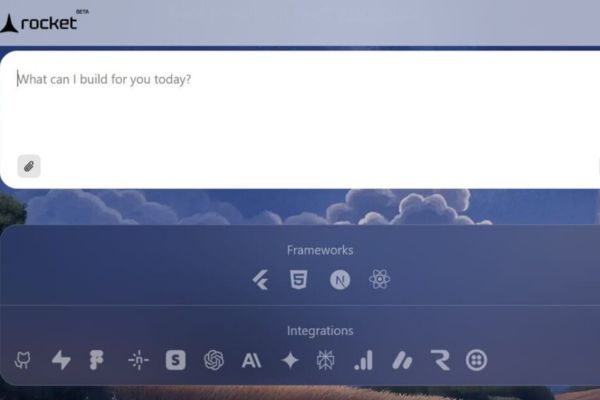
Rocket AI (rocket.new) is a platform that uses artificial intelligence to Create websites and mobile applications with just prompts. You can enter a product description or download the Figma design file, the system will automatically generate the complete source code.

Rocket AI’s strengths are its ability to:

  • Create a website using only text descriptions
  • Import designs from Figma
  • Export full source code
  • Deploy quickly with your own domain
  • AI support for automatic code editing

If you are interested in AI tools that support programming, you can refer to: Pixel Agents AI for VSCode
Get 0 package on Rocket for Vide Coding – Create Website with AI
A few words about Rocket AI

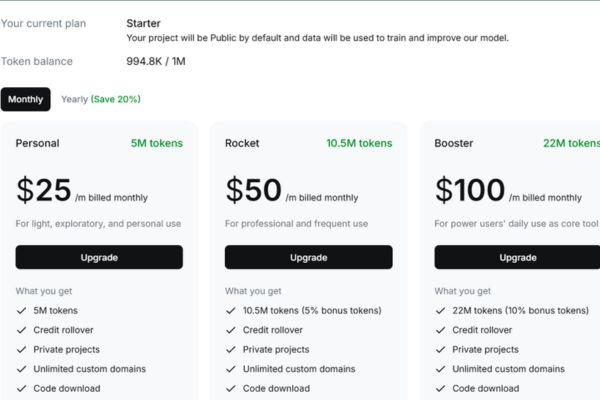
Comparison table of service packages on Rocket

Features Personal Rocket Booster
Monthly tokens 5M 10.5M 22M
Private project Have Have Have
Custom domain name Have Have Have
Download source code Have Have Have
Comparison table of service packages on Rocket

How to get Booster package worth $100 on Rocket

To receive a $100 Booster package on Rocket with 22M Tokens, follow the detailed steps below:

Step 1: Visit the official homepage at address https://www.rocket.new

Step 2: Click the button Sign in/Sign up in the right corner of the screen to register an account. You should choose “Continue with Google” to make the process go faster.
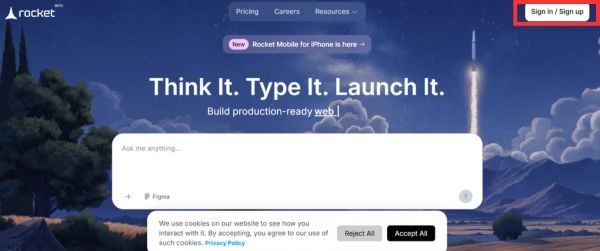
Click the Sign in/Sign up button

Step 3: After successfully logging in, at the main interface, click 4 square icon on the left side of the screen and select the item Upgrade.
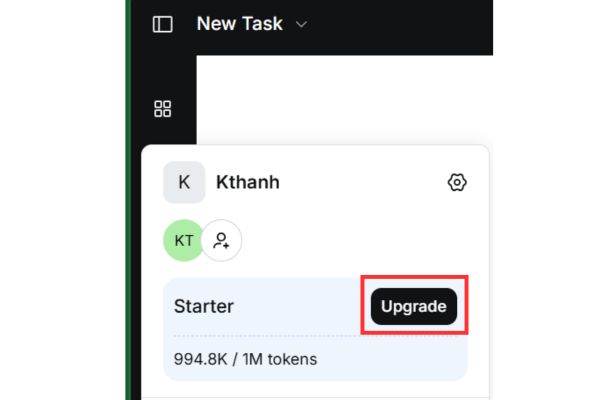
Select Upgrade
Select Upgrade

Step 4: Here, you choose the Booster package for $100/month and then click the button Upgrade to continue.
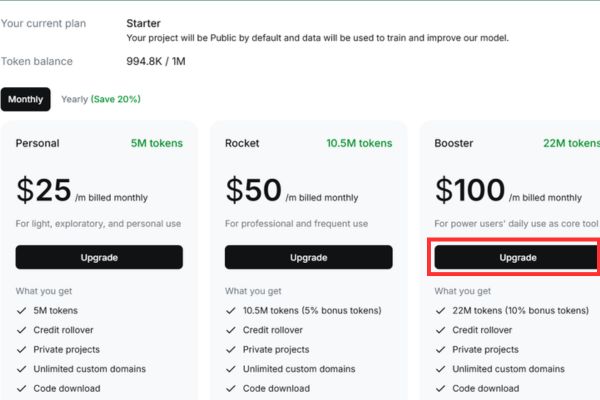
Choose the Booster package for $100/month

Step 5: At the checkout page, find and select the line Add promotion code.
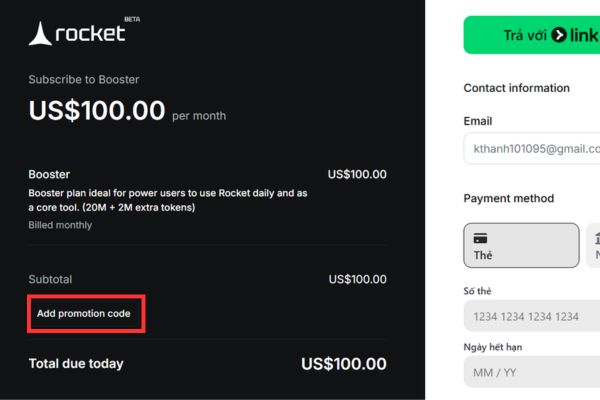
Select the Add promotion code line

Then you paste the code X7K2M9P4R1NQ in the empty box and click Apply.
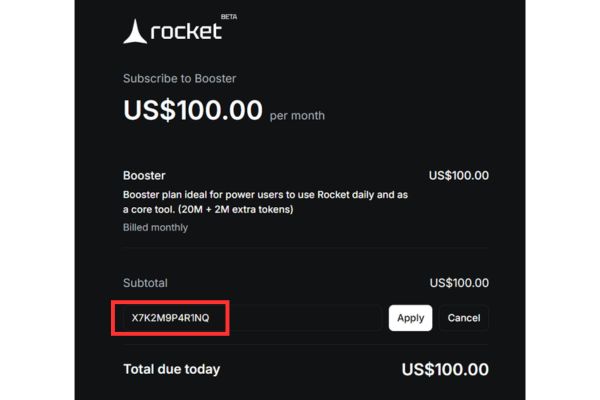
Paste the code X7K2M9P4R1NQ into the blank box

Step 6: Check that the total payment displayed is $0.00, then fill in the card information to authenticate and complete the upgrade process.
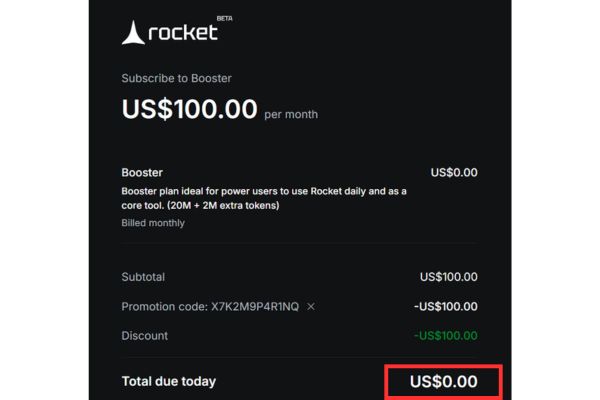
How to get Booster package worth $100 on Rocket

Conclusion

So, with just a few simple steps you can apply How to get $100 Booster package on Rocket to experience this extremely powerful web creation AI platform. With 22M tokens per monthyou can test multiple web and app projects and automate the development process without needing to know in-depth programming.

If you are looking for a tool AI builds websites quicklyRocket AI is definitely an option worth trying.

FAQ – Frequently asked questions

1. What’s special about the Rocket AI Booster package?

Booster package provides 22M tokens per month, private project support, custom domain, source code download and premium template access.

2. Why do I have to enter card information even if I pay $0?

The platform requires a card to verify the account and activate subscription according to the payment policy.

3. Will money be deducted after using a promotional code?

If you cancel your subscription before the next billing cycle, the system will not charge you.

4. Does Rocket AI need to know programming?

Are not. Rocket AI allows creating websites using prompts or Figma designs, suitable even for people who don’t know how to code.

5. What is Rocket AI Token used for?

Tokens are used when creating websites, editing code, deploying applications or using AI builder.

Action summary

  • Visit rocket.new
  • Register an account
  • Select Upgrade → Booster
  • Enter the code X7K2M9P4R1NQ
  • Payment confirmation $0
  • Get 22M tokens for free

Reference source

  • Rocket AI homepage
  • Official Rocket Documentation
  • AnonyViet
Tags: codingcreatepackageRocketVideWebsite
Previous Post

MacBook Air M2 review: 2026 price hits rock bottom, what else?

Next Post

How to convert normal music into 8D music with Audioalter

AnonyViet

AnonyViet

Related Posts

Top 6 websites for 2026 high school graduation mock test, close to real questions, standard with Ministry of Education
Knowledge

Top 6 websites for 2026 high school graduation mock test, close to real questions, standard with Ministry of Education

May 16, 2026
How to block pop-up ads on Safari without installing an app
Knowledge

How to block pop-up ads on Safari without installing an app

May 6, 2026
How to use Clean Up on iPhone to remove excess objects extremely quickly
Knowledge

How to use Clean Up on iPhone to remove excess objects extremely quickly

May 4, 2026
Tips for pinning the step counter to the iPhone screen to monitor your health
Knowledge

Tips for pinning the step counter to the iPhone screen to monitor your health

April 28, 2026
How to turn off password suggestions on iPhone: Prevent Safari from auto-filling passwords
Knowledge

How to turn off password suggestions on iPhone: Prevent Safari from auto-filling passwords

April 27, 2026
Tips to completely turn off CAPTCHA codes on iPhone and Mac are super simple
Knowledge

Tips to completely turn off CAPTCHA codes on iPhone and Mac are super simple

April 25, 2026
Next Post
How to convert normal music into 8D music with Audioalter

How to convert normal music into 8D music with Audioalter

0 0 votes
Article Rating
Subscribe
Login
Notify of
guest

guest

0 Comments
Oldest
Newest Most Voted
Inline Feedbacks
View all comments

Recent News

Don’t rush to buy a new MacBook if you don’t know these differences

Don’t rush to buy a new MacBook if you don’t know these differences

May 20, 2026
Create images of guardian mascots using AI according to year of birth

Create images of guardian mascots using AI according to year of birth

May 20, 2026
Try the Shopee Profit Calculator now, avoid the risk of selling at a loss

Try the Shopee Profit Calculator now, avoid the risk of selling at a loss

May 19, 2026
LibreOffice: Office suite to replace Microsoft Office

LibreOffice: Office suite to replace Microsoft Office

May 18, 2026
Don’t rush to buy a new MacBook if you don’t know these differences

Don’t rush to buy a new MacBook if you don’t know these differences

May 20, 2026
Create images of guardian mascots using AI according to year of birth

Create images of guardian mascots using AI according to year of birth

May 20, 2026
Try the Shopee Profit Calculator now, avoid the risk of selling at a loss

Try the Shopee Profit Calculator now, avoid the risk of selling at a loss

May 19, 2026
AnonyViet - English Version

AnonyViet

AnonyViet is a website share knowledge that you have never learned in school!

We are ready to welcome your comments, as well as your articles sent to AnonyViet.

Follow Us

Contact:

Email: anonyviet.com[@]gmail.com

Main Website: https://anonyviet.com

Recent News

Don’t rush to buy a new MacBook if you don’t know these differences

Don’t rush to buy a new MacBook if you don’t know these differences

May 20, 2026
Create images of guardian mascots using AI according to year of birth

Create images of guardian mascots using AI according to year of birth

May 20, 2026
No Result
View All Result
  • Home
  • News
  • Software
  • Knowledge
  • MMO
  • Tips
  • Security
  • Network
  • Office

wpDiscuz
0
0
Would love your thoughts, please comment.x
()
x
| Reply