

Veo 3 Google is exciting the community to create content with the ability to create videos with superior AI, integrated vivid images and smooth synchronous sound. From turning the text idea into a professional short film to create a true conversation, this is not just a tool, but a breakthrough in the creative industry.
| Join the channel Telegram belong to Anonyviet 👉 Link 👈 |
What is Google 3?
Veo 3 is the most advanced AI model from Google DeepMind, launched at the Google I/O 2025 event. This tool allows users to convert text or images into high quality videos, accompanied by original sound such as environmental effects, background music and character lines.
Compared to its predecessor version Veo 2Veo 3 significantly improves the sharpness of the image, smooth movement and sound synchronization, bringing experience close to professional cinematic products.
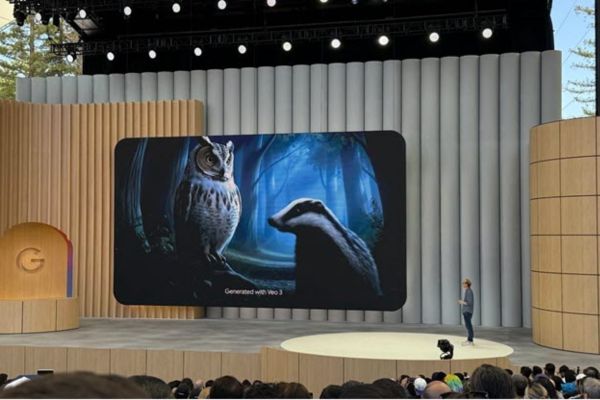
The highlight of Veo 3 is the ability to handle detailed prompts, allowing users to describe the character, context, action, and even specify a specific tone.
For example, you can use Prompt as follows: “A gray -haired old man, wearing a brown jacket, sitting on the autumn park bench. Gold leaves fall slowly around. He smiled and said:“ Listen to the presentation?
The breakthrough of Veo 3 in creating videos with AI
Veo 3 does not stop at creating images but also has a natural sound integration, making a difference compared to other AI tools. This tool can recreate true physical effects, such as the movement of the waves or the reflective light on the metal surface. The conversations are accurate synchronized with facial expressions, feeling like a film filmed by professional director.
A remarkable feature is the ability to control the angle of rotation. Users can use commands like “zoom in“,”Pan Right” or “slow motion“To shape the video style. For example, you can ask:” Slow scene: a bird flying through the sunflower field under the sunset. “
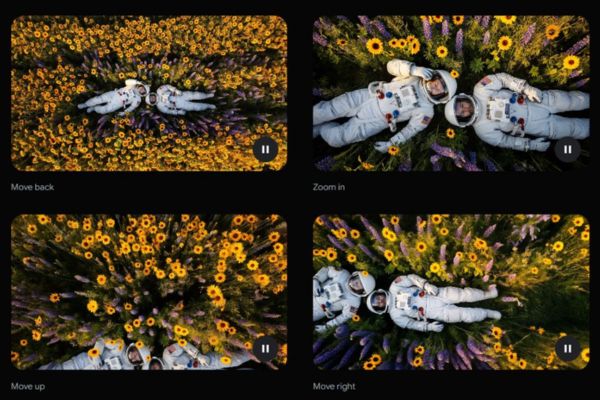
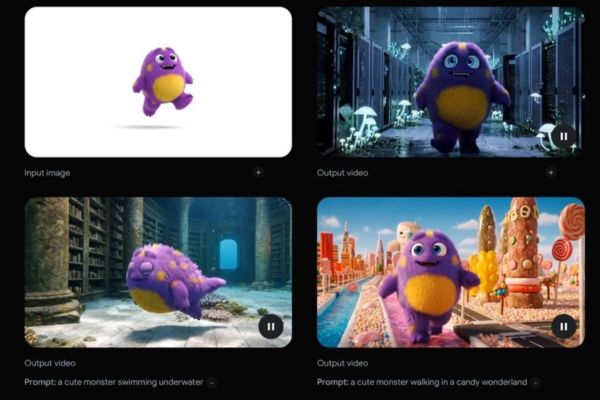
In addition, Veo 3 supports the use of reference images to maintain the consistency of characters or styles through many scenes. This is especially useful for filmmakers who want to create a seamless story or brands that need to keep the homogeneous image in advertising.
Is 3 free?
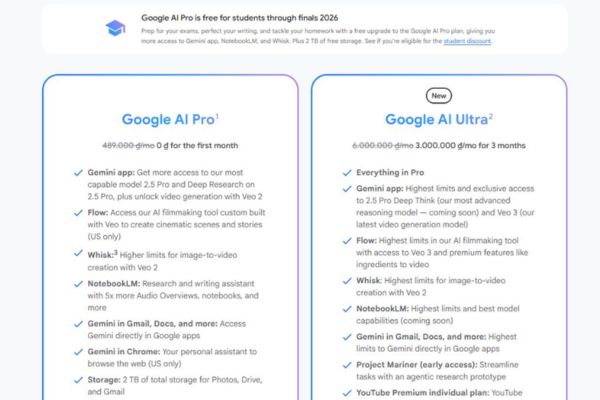
I have a guide Create Gemini Pro exemption Fee, you can refer and follow. Currently, Veo 3 is only available in the US Ultra registration package Google, with the cost of about 6.5 million per month. This package is aimed at professional content creators, film studios or businesses that want to maximize the potential of the tool. However, Google also offers free options for other AI tools, such as Veo 2, via Google Cloud Credits or test programs.
For more details about the price and how to register, you can access https: //gemini.google-overView/video-generation
Potential and challenges of VEO 3
Veo 3 opens countless opportunities for the creative industry. From the production of short films, advertising, animation to educational videos, this tool helps users save time and cost compared to traditional production processes. The ability to combine audio and images also helps to be the ideal choice for projects that need high professionalism.
However, Veo 3 also raises some challenges. Google Deepmind does not disclose details about training data, but it is likely that this model uses content from YouTube, leading to concerns about intellectual property rights. In addition, with the ability to create true videos, the risk of abuse to create Deepfake or false information is noticeable. To solve this problem, Google has integrated Technology Synthid Watermarkinginsert the invisible identification mark into each frame to determine the video created by AI.

Tips to use 3 effectively
To make the most of the 3, note the following tips:
- Detailed description: Provide clear description of the context, character and action. For example: “A blonde girl wears a white skirt running through the grass field, behind the snowy mountain range, saying ‘I feel free’ with a happy voice.”
- Use of cinema language: Add terms such as “close -up”, “panoramic” or “slow rotation” to control the rotation and the rhythm of the video.
- Take advantage of whose creativity: Sometimes, for those who are free to add unexpected details can bring unique results.
- Sound combination: Requires background music or audio effects to increase the depth of the video, like “the sound of the waves when the sun sets on the beach.”
- Use Flow tools: Combining many short videos to form a seamless story, suitable for long -term projects.
Conclude
Veo 3 Google is not only a video creation tool with AI, but also a turning point in the way we produce digital content. With the ability to combine images and sound perfectly, Veo 3 opens the infinite potential for creators, from short films to advertising. However, users need to use this tool in a responsible way to avoid copyright issues.






![[Godot RPG] #3: Attack & Object](https://anonyviet.com/wp-content/uploads/2020/08/08-08-2020-04-34-58.png "[Godot RPG] #3: Attack & Object")

