

Have you ever wanted to turn your handwriting into a font and use it on your computer? I guess many of you have thought about this, but don’t know how to do it. So, in this article, I will guide you how to convert your handwriting into your own font on your computer. You can use this particular font to copy finely, but this way you just need to pay a little careful attention and you will detect it right away, be careful.
| Join the channel Telegram belong to AnonyViet 👉 Link 👈 |
It would be meaningful to use your own handwritten font to write greeting cards for birthdays, teachers, parents or any other special occasion. But those of you who have very bad handwriting should try to straighten your handwriting to make it a little nicer.
How to turn your handwriting into your own Font
Here are quick steps to turn your handwriting into a font for free.
- Visit the website MyScriptFont.com
- Register an account
- Download the printable form
- Print the form on paper
- Fill in that sample letter
- Scan or take a photo of the completed sample to your computer
- Upload a photo, name the font and choose a format
- Download your font
- Install fonts on your computer
- That’s it, now use your own handwritten font!
Free handwriting fonts and templates website
First, go to the website MyScriptFont.com create account. Click Start App to start creating Fonts with your own writing.
Friend Download the Font character filling form Printable as PDF or PNG. To select Vietnamese, go to Menu Languages Scroll down to select Vietnamese, That press Download Templates.

Once you have selected the template, print it out on paper. But if you don’t have a printer, you can download it to your phone or tablet, then use a stylus or your finger to draw your own font. It’s a bit scribbled, but it’s literally handwriting.
If you use a printer, I recommend that you print about a dozen samples to try over and over again until you are satisfied.
Fill out the printable form
Note, you need to use a black marker pen. Which type of squid has a slightly larger head?
I only have this type of double-headed whiteboard marker, so I will write 2 copies. One copy has a large tip and the other uses the small tip of the brush pen.
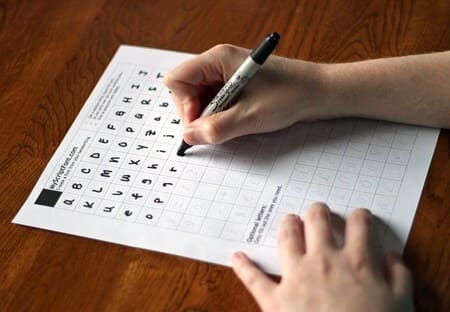
Any ink stains outside the specified squares will be cut off during the font processing step. To be honest, I wrote 4 versions, and it was quite tiring to produce the final result. It was very tiring.
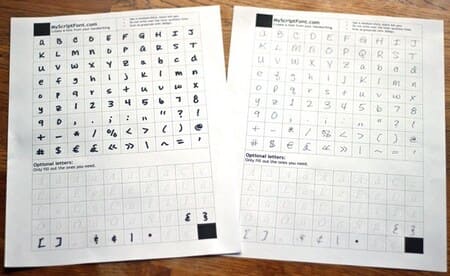
Scan or take a photo of the completed letter form onto the computer
Once you have completed your form, scan it to your computer and use your phone to take a quick photo
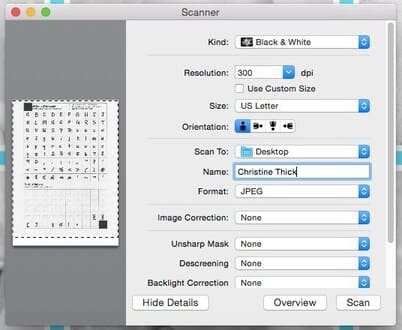
If you have a scanner at home, just put the sample straight into the scanner. As for the parameters, you can adjust them as shown in the image below.
- Black & White
- 300 DPI
- US Letter
- Name your own font
- JPEG format
Upload an image, name the font, and convert to your own font
After you have an image of each character of your own font, you need to return to MyScriptFont.com and go to Menu My Fonts -> Upload Template to upload your font image file and name the font you like.

Upload each photo that you have handwritten on.

Then press “Upload Teamplate“.
Your handwriting has turned into a font
A moment later, a new screen will display a preview of your handwritten font.
Easy, right?
If you are satisfied, select the Build Font Menu

Name your Font, I will name it AnonyViet.

Now you will see a preview of your font, it looks like your font is not too bad. If it looks okay, click on the Font name and download it to your computer.
You can use the Preview pull bar to zoom in to see.

Install fonts on your computer
After the font is downloaded, you need to install it on your computer to use it.
If you use Windows, just right-click on the font and click “Install”, or double click on the selected Font Install.

If you use a Mac, double click on the font and press the “Install Font” button to install.
That’s done, now you can open software like Word to try out the font you just created.

NOTE: If you currently have a program open when you install the font, you may need to close that program until the font has finished installing so the program can reload the new fonts.
In the free version, you can only use 75 characters. If you want to use the full Vietnamese alphabet, you need to upgrade to the Pro version.
Frequently asked questions
Do I need any specialized software to create handwritten fonts?
No need! You just need to use the website MyScriptFont.com and follow the instructions in the article.
What kind of pen should I use to write my letters?
You should use a black marker pen with a large ink tip so the letters are clear and easy to scan.
What if I don’t have a scanner?
You can use your phone to take a photo of the written sample. Make sure the photo is of good quality, high resolution (300 DPI) and taken in black and white mode.









