• Home
  • News
  • Software
  • Knowledge
  • MMO
  • Tips
  • Security
  • Network
  • Office
AnonyViet - English Version
  • Home
  • News
  • Software
  • Knowledge
  • MMO
  • Tips
  • Security
  • Network
  • Office
No Result
View All Result
  • Home
  • News
  • Software
  • Knowledge
  • MMO
  • Tips
  • Security
  • Network
  • Office
No Result
View All Result
AnonyViet - English Version
No Result
View All Result

AI tool creates song playlists: 3 Spotify alternatives you must try now

AnonyViet by AnonyViet
November 6, 2025
in Software
0

AI creates song playlists is a trend, but Spotify’s tool has not really satisfied many music lovers. If you are also looking for a more personalized and intelligent experience, don’t be discouraged. This article will introduce 3 powerful AI “assistants”, helping you create unique and “standard” music playlists like never before.

Join the channel Telegram belong to AnonyViet 👉 Link 👈

3 AI tools to create song playlists to replace Spotify

Experience creating playlists by Spotify AI can make you feel limited. Luckily, the tech world has excellent alternatives that offer deep customization and more impressive results.

3 AI tools to create song playlists to replace Spotify

Let’s take a look at the following three AI tools:

1. PlaylistAI

PlaylistAI is the ideal choice for those who love creativity and want to turn even the most abstract ideas into a concrete playlist.

You just need to give a text command like “indie pop music for a rainy afternoon” or “Daft Punk hits”, the AI ​​​​will immediately analyze and create a suitable playlist. You can completely remove unsatisfactory songs to get the perfect final result.
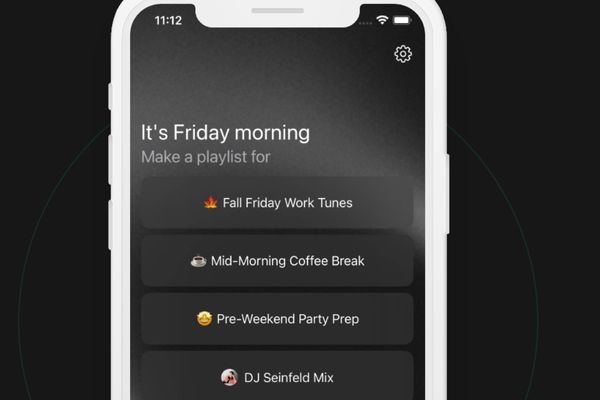
AI creates song playlists

An extremely interesting feature is the ability “scan” the poster of a music festival. Just upload a photo, PlaylistAI will automatically identify artists and create a playlist of their songs.

Feature “Rewind” allows you to create playlists from songs you listened to during a certain time in the past, a great way to get nostalgic. You can use PlaylistAI on the web, built in ChatGPT or via the exclusive app for iOS HERE.
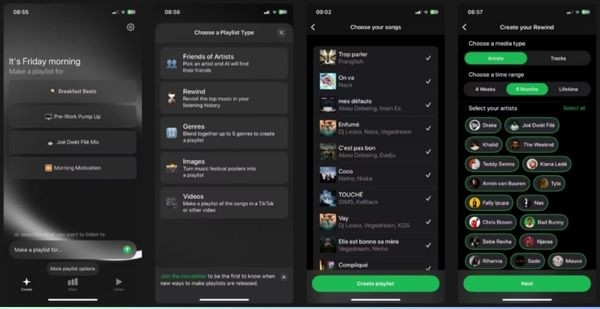
PlaylistAI
PlaylistAI

2. Playlistable

If you need a tool that is quick, easy to use but still ensures intelligence, Playlistable is the answer. Right from the start, Playlistable welcomes you with two options: use the Hint button is available by mood, genre to create quick playlists, or use input frame freedom to make more complex requests.

The highlight of this tool is the ability to fine-tune playlists right from the command. You can “tag” artists with the character @ or request a specific song with the character #, helping the AI ​​better understand your wishes. Once created, you can open the playlist directly on Spotify with just one click, providing a seamless and convenient experience.

Note: Playlistable currently only has a web version and is limited to creating 2 free playlists.
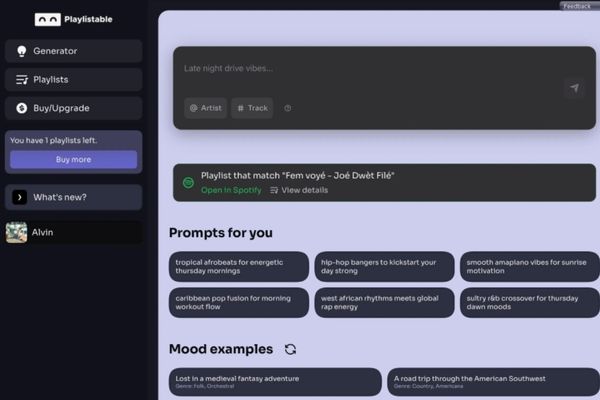
Playlistable currently only has a web version

3. Soundiiz

Famous for its ability to “move” playlists between platforms, Soundiiz also contains an extremely powerful and flexible AI playlist creation tool. Soundiiz provides two playlist creation modes: “ ModeCard” (Tags) allows you to combine tags of genre, mood, decade. Meanwhile, “ modeQuery” (Query) allows you to describe in detail the playlist you want.

Soundiiz’s big difference is deeper control. You can limit the number of songs, and especially, every playlist created defaults to private mode, protecting your privacy. The sync feature (paid required) automatically updates your playlist every day, ensuring it’s always fresh.

In addition to Spotify, Soundiiz is compatible with Apple Music, YouTube Music, Tidal, and many other services, making it a true music management hub.
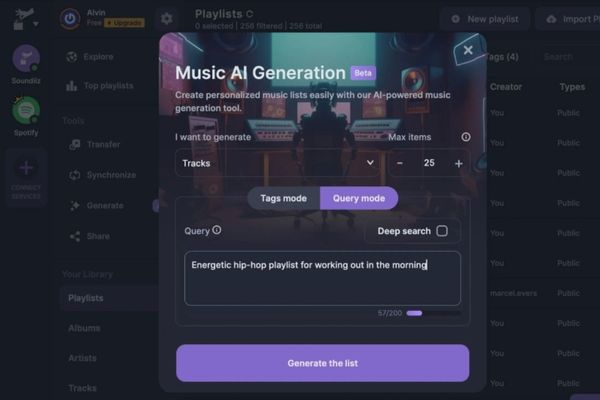
Soundiiz provides two playlist creation modes

Conclusion

Just because Spotify AI can’t meet all expectations doesn’t mean you have to give up on an intelligent music experience. With PlaylistAI, Playlistable and Soundiiz, the user journey AI creates song playlists Yours will become much more enjoyable and effective. Try these tools now!
Tags: AlternativescreatesplaylistsSONGSpotifytool
Previous Post

Create your own Font using your Handwriting

Next Post

Ways hackers use to hack your Facebook and how to fix it

AnonyViet

AnonyViet

Related Posts

Tool to get transcript of entire YouTube channel extremely fast and free
Software

Tool to get transcript of entire YouTube channel extremely fast and free

November 10, 2026
How to create an Android App using Google AI Studio without code
Software

How to create an Android App using Google AI Studio without code

November 9, 2026
Holding OPPO Find X10 to watch movies all night: Real experience
Software

Holding OPPO Find X10 to watch movies all night: Real experience

November 9, 2026
The truth about Galaxy A18: Is it just a cheap phone with a price increase?
Software

The truth about Galaxy A18: Is it just a cheap phone with a price increase?

November 9, 2026
How to install Liquid Glass on Linux to get a frosted glass interface
Software

How to install Liquid Glass on Linux to get a frosted glass interface

November 8, 2026
HuiPai AI Pro Camera: App that automatically aligns photo angles for free on iPhone
Software

HuiPai AI Pro Camera: App that automatically aligns photo angles for free on iPhone

November 7, 2026
Next Post
Ways hackers use to hack your Facebook and how to fix it

Ways hackers use to hack your Facebook and how to fix it

0 0 votes
Article Rating
Subscribe
Login
Notify of
guest

guest

0 Comments
Oldest
Newest Most Voted

Recent News

What is eTax Mobile? How to install, log in and look up tax code on the phone

What is eTax Mobile? How to install, log in and look up tax code on the phone

November 13, 2026
Instructions on how to turn off the blue dot on the MacBook screen

Instructions on how to turn off the blue dot on the MacBook screen

November 13, 2026
Instructions to follow the trend to fill the room with ChatGPT

Instructions to follow the trend to fill the room with ChatGPT

November 12, 2026
What to eat for lunch today: Website suggested dishes for CS2-style office workers

What to eat for lunch today: Website suggested dishes for CS2-style office workers

November 11, 2026
What is eTax Mobile? How to install, log in and look up tax code on the phone

What is eTax Mobile? How to install, log in and look up tax code on the phone

November 13, 2026
Instructions on how to turn off the blue dot on the MacBook screen

Instructions on how to turn off the blue dot on the MacBook screen

November 13, 2026
Instructions to follow the trend to fill the room with ChatGPT

Instructions to follow the trend to fill the room with ChatGPT

November 12, 2026
AnonyViet - English Version

AnonyViet

AnonyViet is a website share knowledge that you have never learned in school!

We are ready to welcome your comments, as well as your articles sent to AnonyViet.

Follow Us

Contact:

Email: anonyviet.com[@]gmail.com

Main Website: https://anonyviet.com

Recent News

What is eTax Mobile? How to install, log in and look up tax code on the phone

What is eTax Mobile? How to install, log in and look up tax code on the phone

November 13, 2026
Instructions on how to turn off the blue dot on the MacBook screen

Instructions on how to turn off the blue dot on the MacBook screen

November 13, 2026
  • Home
  • Home 2
  • Home 3
  • Home 4
  • Home 5
  • Home 6
  • Next Dest Page
  • Sample Page

say88 tỷ lệ kèo nhà cái kèo nhà cái 5 febet

No Result
View All Result
  • Home
  • News
  • Software
  • Knowledge
  • MMO
  • Tips
  • Security
  • Network
  • Office

say88 tỷ lệ kèo nhà cái kèo nhà cái 5 febet

wpDiscuz
0
0
Would love your thoughts, please comment.x
()
x
| Reply