• Home
  • News
  • Software
  • Knowledge
  • MMO
  • Tips
  • Security
  • Network
  • Office
AnonyViet - English Version
  • Home
  • News
  • Software
  • Knowledge
  • MMO
  • Tips
  • Security
  • Network
  • Office
No Result
View All Result
  • Home
  • News
  • Software
  • Knowledge
  • MMO
  • Tips
  • Security
  • Network
  • Office
No Result
View All Result
AnonyViet - English Version
No Result
View All Result

Chapter 1: Getting to know Python – Python basics

AnonyViet by AnonyViet
January 24, 2023
in Tips
0

What is Python?

  • Python is a high-level, interpreted, object-oriented, and general-purpose programming language.
  • Design philosophy: easy-to-read, easy-to-write code, concise syntax, clear structure, suitable for building different types of applications of different sizes.
  • Features: easy to read code, easy to learn; intuitive layout, easy to understand; object-oriented programming, functional programming, procedural (multiple programming); Few keywords, simple structure; extensive standard library, compatible and integrated with UNIX, Windows and Macintosh; interpreted language, easy debugging; support GUI programming, open source, can integrate with other programming languages.

Below are some basic programming exercises on data import and export, basic calculations to help you get acquainted and better understand Python programming operations. Any questions, please comment below.

Join the channel Telegram of the AnonyViet 👉 Link 👈

Note: The purpose of the article is to introduce and support teaching students or beginners who want to familiarize themselves with and learn the Python programming language, so the commands and content are simple and easy to understand. read.

References:

  • Textbook “Self-learning basic Python programming” (2019); Vu Hai Quan, Cao Xuan Nam, Hoang Trung Hieu, Nguyen Hai Trieu, Vong Chi Tai; Artificial Intelligence Laboratory (AILab), University of Natural Sciences (VNU-HCM); Publishing House of the National University of Ho Chi Minh City. Ho Chi Minh.
  • Learning material “Python Programming Basics” (2017); Informatics Center, University of Natural Sciences, Ho Chi Minh City.

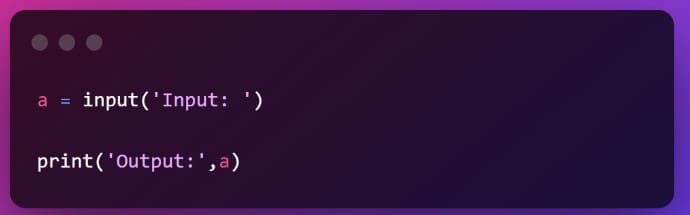
Lesson 1. Write a program to record the input from the keyboard and output it to the screen for memorization.
Chapter 1: Getting Started with Python - Python Basics 5

Note:

– Input command: used to enter data.

– Print command: print out the desired content on the screen.

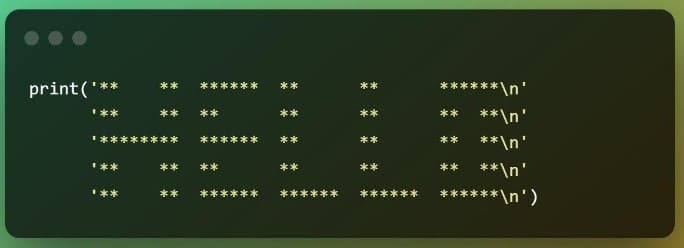
Lesson 2. Write a program to output HELLO to the screen.
Chapter 1: Getting Started with Python - Python Basics 6

Note:

– Sign \n: cursor line.

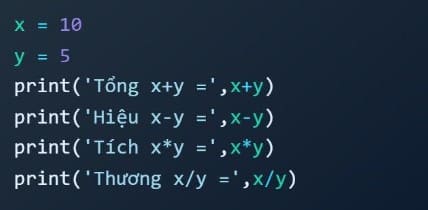
Lesson 3. Write a simple calculation program.
Chapter 1: Getting Started with Python - Python Basics 7

Material compiled by youLe Tuan Thuan.

The article achieved: 5/5 – (100 votes)

Tags: BasicsChapterPython
Previous Post

How to Use the Bash Printf Command on Linux

Next Post

There are details about iPhone 14 Pro

AnonyViet

AnonyViet

Related Posts

Suggested AI command to create a rustic and charming image of a Ban Lien girl
Tips

Suggested AI command to create a rustic and charming image of a Ban Lien girl

November 16, 2025
Windows 10 will have a new, simpler interface
Tips

Windows 10 will have a new, simpler interface

November 16, 2025
How to check what data Facebook is controlling about you
Tips

How to check what data Facebook is controlling about you

November 15, 2025
How to record Chromebook screen – ChromeOS
Tips

How to record Chromebook screen – ChromeOS

November 14, 2025
How to create photos under the snow extremely quickly in just a few minutes
Tips

How to create photos under the snow extremely quickly in just a few minutes

November 13, 2025
How to Create a QR code to connect to Wifi without giving the guest a Password
Tips

How to Create a QR code to connect to Wifi without giving the guest a Password

November 13, 2025
Next Post
There are details about iPhone 14 Pro

There are details about iPhone 14 Pro

0 0 votes
Article Rating
Subscribe
Login
Notify of
guest

guest

0 Comments
Oldest
Newest Most Voted
Inline Feedbacks
View all comments

Recent News

Suggested AI command to create a rustic and charming image of a Ban Lien girl

Suggested AI command to create a rustic and charming image of a Ban Lien girl

November 16, 2025
Windows 10 will have a new, simpler interface

Windows 10 will have a new, simpler interface

November 16, 2025
Share Key Active Visual Studio 2026

Share Key Active Visual Studio 2026

November 15, 2025
Instructions for using the online number-to-word conversion tool for accountants and offices

Instructions for using the online number-to-word conversion tool for accountants and offices

November 15, 2025
Suggested AI command to create a rustic and charming image of a Ban Lien girl

Suggested AI command to create a rustic and charming image of a Ban Lien girl

November 16, 2025
Windows 10 will have a new, simpler interface

Windows 10 will have a new, simpler interface

November 16, 2025
Share Key Active Visual Studio 2026

Share Key Active Visual Studio 2026

November 15, 2025
AnonyViet - English Version

AnonyViet

AnonyViet is a website share knowledge that you have never learned in school!

We are ready to welcome your comments, as well as your articles sent to AnonyViet.

Follow Us

Contact:

Email: anonyviet.com[@]gmail.com

Main Website: https://anonyviet.com

Recent News

Suggested AI command to create a rustic and charming image of a Ban Lien girl

Suggested AI command to create a rustic and charming image of a Ban Lien girl

November 16, 2025
Windows 10 will have a new, simpler interface

Windows 10 will have a new, simpler interface

November 16, 2025
  • Home
  • Home 2
  • Home 3
  • Home 4
  • Home 5
  • Home 6
  • Next Dest Page
  • Sample Page

new88 trang chủ shbet trang chủ f168 trang chủ qq88 nhà cái 78win

No Result
View All Result
  • Home
  • News
  • Software
  • Knowledge
  • MMO
  • Tips
  • Security
  • Network
  • Office

new88 trang chủ shbet trang chủ f168 trang chủ qq88 nhà cái 78win

wpDiscuz
0
0
Would love your thoughts, please comment.x
()
x
| Reply