Are you struggling to name the game for cool? Write Bio Tiktok forever and still feel “lack of salt”? Or simply want your Story to have a higher accent than my best friend? So it is time for you to need a beautiful font – a secret “weapon” to help all the words become outstanding, personality and bold nature.
Let’s find out the top beautiful and quality fonts like distilled water to make a separate impression – from Facebook, Tiktok to website design, poster.
Beautiful fonts are specially designed fonts to look impressive, unique, or more artistic than conventional default fonts. For example:
- Bold / Italian print
- Stylized with strange characters (𝓵𝓸𝓿𝓮, ⓑⓤⓑⓑⓛⓔ, 𝕯𝖆𝖗𝖐𝖓𝖊𝖘𝖘)
- The word is about, upside down, writing a hacker
- The word combination icon or emoji
You can come across beautiful fonts at:
- The character’s name in the game such as Free Fire, Coalition, PUBG, …
- Bio Tiktok, Story Facebook, Caption Instagram
- On Viral YouTube Shorts, Reels, …
Instructions for creating beautiful online fonts online
You do not need to install the app troubled or know anything. Just a few very simple steps with the beautiful Kituhay font creation tool, there is a beautiful font to “transform” the game name, social network status or personal biography.
Kituhay As a special character creation tool, beautiful font and many utilities for writing online completely free. The interface is simple, easy to use, no need to register for an account, anyone can quickly create names, status lines or bold, unique printing with just a few clicks.
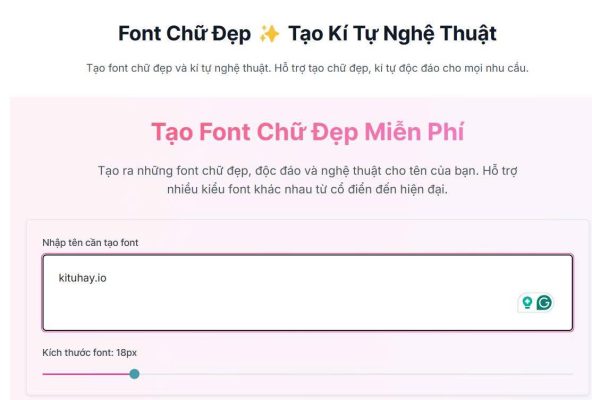
How to create beautiful letters for a few seconds without designing:
Redg the online font transfer tool at the address https://kituhay.io/font-chu-dep. This tool is compatible with all devices, from computers to phones, from Android to iOS. Type name, quote, or status into the white box and then customize the font size by dragging the toolbar the tool tool will automatically display dozens of beautiful, unique and personality font styles. You just need to choose your favorite font. Click Copy on the type of font you like → paste on Tiktok, Facebook, Lien Quan, Zalo, … are supported.
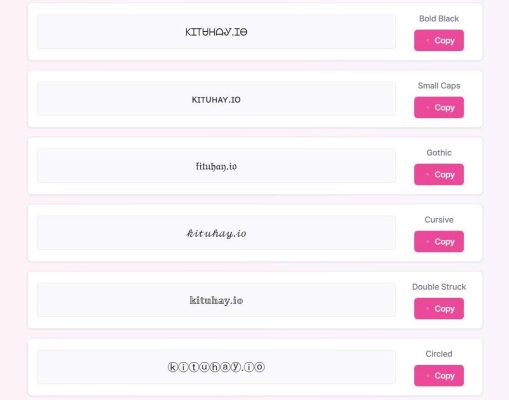
Kituhay.io supports many font types such as: italic, bold printing, horizontal bricks, bubbles, handwriting, programming, classic, Emoji combination, … help you easily make an impression on all platforms.
Some of the most popular beautiful fonts today
Currently, the demand for beautiful fonts is increasingly popular, especially in areas such as design, communication, social networks and in naming game and personal profile. Here are some of the most popular font types:
- Bold font (𝐁𝐨𝐥𝐝)
Demonstrate strong, outstanding. Suitable for clicking the title, account name, or an impressive short message.
- Ial font (𝑰𝒕𝒂𝒍𝒊𝒄 𝑰𝒕𝒂𝒍𝒊𝒄)
Create a soft, soaring and “turmeric” feeling. Suitable for Instagram biography, comment or personality caption.
- Handwritten font (𝓦𝓻𝓲𝓽𝓲𝓷𝓰 𝓦𝓻𝓲𝓽𝓲𝓷𝓰)
With a gentle, cute style, often chosen by women to show the tenderness and individuality.
- Bubble font (ⓑⓤⓑⓑⓛⓔ)
Lovely and extremely cute, very suitable for the game name, nickname or Bio Tiktok, Zalo.
- Programming font (𝙁𝙤𝙣𝙩 𝙢𝙤𝙣𝙤𝙨𝙥𝙖𝙘𝙚)
Often used to create a “cool” style, suitable for those who like technology or need to highlight their own personality.
- Classic font (𝔉𝔯𝔞𝔨𝔱𝔲𝔯)
Suitable for those who like mystery, classic, or create a “magical” feeling on social networking platforms.
- Horizontal font (̶GG ̶G ̶NH ̶N.N.N.NO
Often used to show a little “satirical” or funny, very suitable for fun troll statuses.
Tips choose beautiful font suitable for use purposes
Not every “fancy” font will be effective. Choosing the font suitable for each context, the purpose will help you convey the right emotions and create sympathy with the viewer. Here are some tips to choose a beautiful font that “hit”:
Choose the font that matches the platform
On Facebook, it is advisable to use simple, easy -to -read fonts to avoid disturbance when displayed on many devices. On Tiktok or Instagram, you can test style fonts like bubbles, handwritten or classic to create personal accents.
Choose font for the purpose
Parts such as titles, names, or affirmations will easily impress if using bold fonts.
If you are sharing your confidences, light caps or lyrical quote, choose a handwritten or italic font to increase emotions and close.
You can use fancy fonts, such as programming, bubbles, dashes to create a specific substance for the game nickname, personal biography or group of friends.
Do not abuse too many fonts in the same paragraph
Use too many different fonts that are easy to disturb and reduce professionalism. The advice is to choose 1-2 fonts as a highlight.
If you do not know which font to choose, you can try Kituhay.io, the tool to help you create and copy super fast, super -diverse typefaces in just a few clicks.
Beautiful fonts not only help your content stand out, but also express your personality and “taste” separately. From writing the caption, naming the game to present the learning content or work, choosing the right font will help you make a strong impression on the reader.
Try it today to make your article, bio or store “genuine” more immediately.