In this article, I will show you how to create your own HTML-based Github Website very easily. The best part of this article is that you just need to use your browser. Thanks to a new feature on Github called Github Pageswhich we can do.
| Join the channel Telegram of the AnonyViet 👉 Link 👈 |
Your website will not be built on pre-existing platforms or templates. I’ll use HTML to build anything from printing your name, to responding to animations and making a flying cat using all the tricks on the internet. Your creativity has no limits.

This tutorial assumes that you do not have any knowledge about the website. But I hope this will be the start of your web development journey.
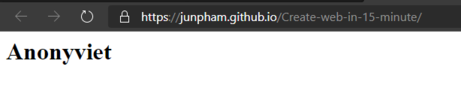
Just 15 minutes and you will have a website like this. I know it is very simple but you can customize your website in the future.
Create Website with Github
First go to Github and create an account. Once created, click “new repository” in Github and create a new project. I call this new repo create website in 15 minutes.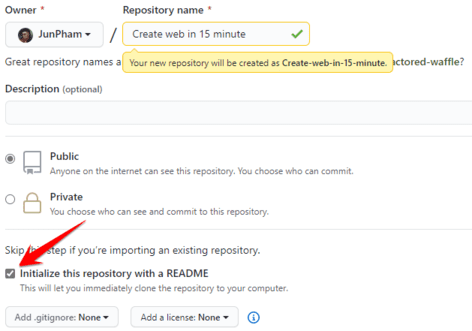
When you create the repo, be sure to check the box “initialize this repository with a README”. If you don’t, you will have to manually initialize the project on your computer and then push the code on the machine to github. If you don’t know how to use Github, you should Download a free course on how to use Git & Github on AnonyViet to check it out
Create file index.html
To create the index file as well as the website structure, you need to have basic knowledge of HTML. AnonyViet also shared HTML course for you to study at home.
Our entire file will have only one HTML file. It is important that our file be named index.html. This is because Github looks for a file called index.html to use for our site. So we will create this file right away, just click on the word “Create new file” is to be.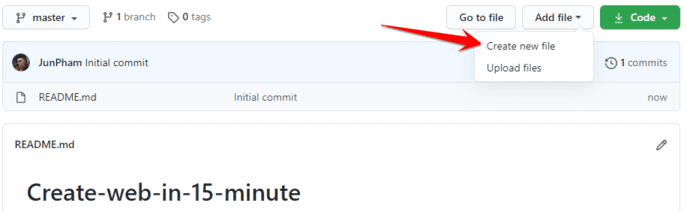 It’s very simple, next name the new file index.html and enter the code below. Funny things enclosed in <> are called HTML tags. The html tag will usually have opening <> and closing tags like this. And everything between the two tags is called the content of the tag.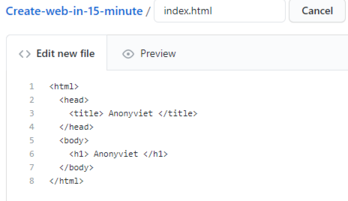
Observing the code, we see that there are two words Anonyviet. The first one in the head, in the tag <title> and the second one is in the body, in the tag <h1>. <h1> is the title tag 1, usually used to make the title for the article, while the tag <title> is the title of the website, displayed as the title of the tab in the browser.
After typing the above code, you need to save this file. In Github, we have to press the “commit” button to save the file. Commit helps you keep track of versions on your files, which is quite handy because you can manage files much more easily. So you can enter the commit’s information to explain the changes you made to your file and then press “Commit new file”. 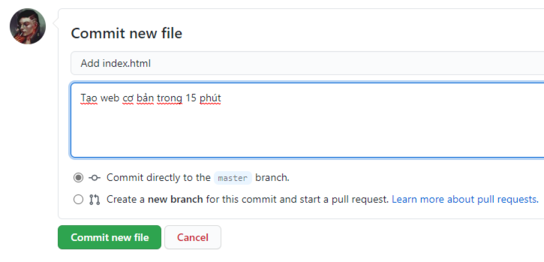
Enable Github Pages
The next thing to do is turn on Github Pages and your site will be on the internet in no time. To enable Github Pages, first go to the tab “Settings” in your repo and scroll down to the Github Pages. Select “master branch” in section Source.
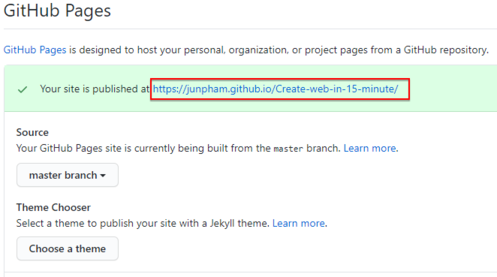
After doing that, Github will create a link for your website. And your website is already on the internet.
More decoration
After successfully running the web, we will decorate it a little to make it more eye-catching. With some basic CSS lines, you can make the word Anonyviet stand out more.
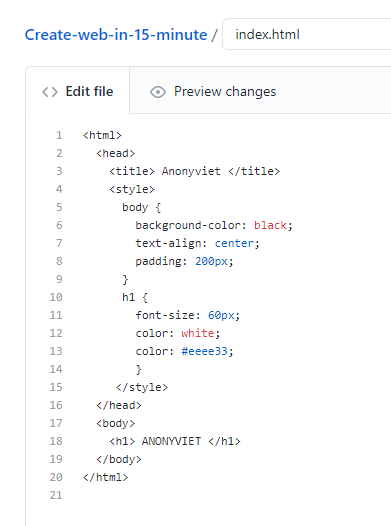
We just changed the background to black, made the text Anonyviet bigger and turned the name yellow (#eeee33 this is called color code). You can choose your favorite color HEX code by typing “css color picker” into google search.
To edit the file, simply click on the index.html file and then click on the pencil icon on the right hand side to edit. Finally press “Commit changes” to save files.
That’s it, I just showed you how to create a personal website using github in 15 minutes. This will be the start of your web development journey. In the next post, I will publicize the front-end web code to create a matrix effect for you to use and play. In the meantime, you can also use Website code to introduce yourself AboutMe2 Please.
In the end, who is learning the web but is the back-end, my advice is not to abuse these ways to create a fast website. It is best to learn from scratch to know how to create a website, the steps, what to learn, understand how the web and servers work.