Music makes videos more engaging and emotional. If you want to know how to create music videos, read this article because I will share 5 best video editing software to create professional music videos. I will also talk about the pros and cons of all the tools so you can choose the most suitable video editing software for you.
| Join the channel Telegram of the AnonyViet 👉 Link 👈 |
Top best music video editing software
1. Filme
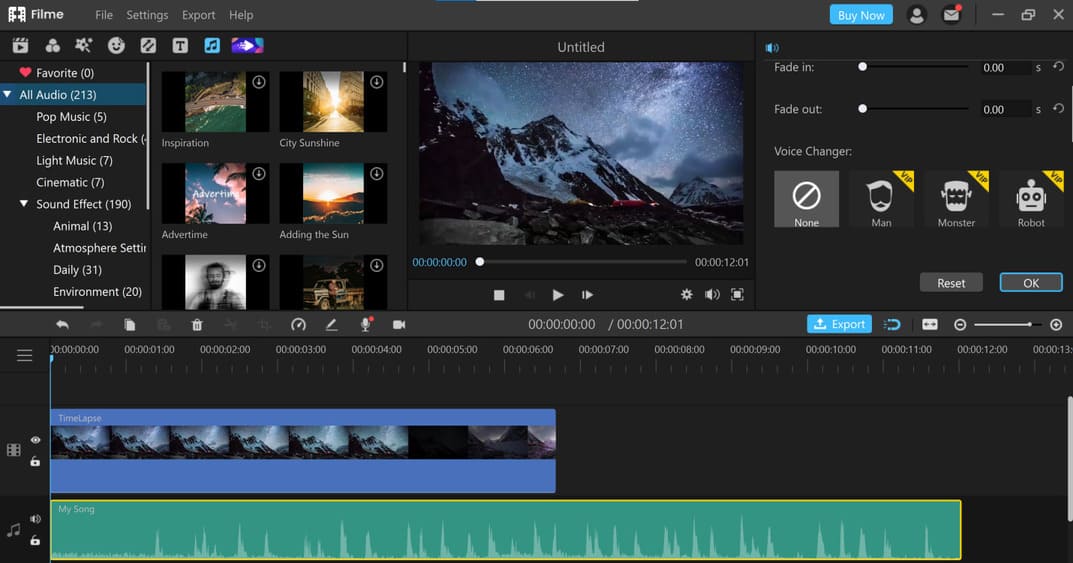
Filme is an all-in-one professional video editor. You can edit your videos perfectly and without any trouble. The most important thing about Filme is its versatility. It is not only a simple video editor but also an audio editor, voice changer, screen recorder, video converter and can also compress videos.
You can create music videos on Filme like a pro. Filme has a very good and accurate timeline for editing any audio clip. In particular, Filme has its own music library to choose royalty-free music. Furthermore, Filme has slideshow maker can help you create music slideshows with just a few clicks. This slideshows maker also comes with templates and you just need to choose an image.
Advantage:
- Filme is a user-friendly video editor that doesn’t require any expertise or experience. You can easily edit your videos even if you are a beginner.
- The user interface is simple and it saves you a lot of time. You can edit your videos within a few clicks.
- Filme’s versatile nature makes it a perfect video editor. You can make almost any change to your video and edit it for the best.
- You can change the voice to female, child or funny and scary voice. There are different voices available in Filme.
- Filme can help you with audio editing. You can trim, adjust duration, change speed, adjust volume, and make other changes right within Filme.
Defect:
- You need to buy premium package to remove watermark.
2. iMovie
iMovie is one of the best choices for Mac users to Create stunning music videos with many editing features. It is also a very popular video editor for creating music videos.
iMovie allows you to select different audio tracks n_campaign=AMFMhau as the background music of the video and mix different tracks to create a mashup. This video editing software also provides many sound effects to enhance the audio quality of the video.
Advantage:
- iMovie is beginner-friendly video editing software.
- iMovie provides effects and transitions to enhance video quality.
- This software is very easy to use.
- It has a clean and simple interface.
- You can share your content easily through share buttons.
- iMovie can correct shaky clips.
Defect:
- iMovie is only for MAC and iOS users.
- It does not support MP4 files.
- iMovie requires quite a lot of storage.
- Color grading features are limited.
3. Adobe Premiere Pro
Adobe Premiere Pro is considered the most professional video editing software. It is a very useful and advanced software for editing various videos along with creating music videos. It allows to merge audio and video clips or apply different audio and visual effects to enhance video quality.
Anyone can easily extract the original audio of a video and add any background music you want in Adobe Premiere Pro. Moreover, it can also be used to record voiceovers and do voiceovers. You can easily enjoy the features fade-in and fade-out audio, trim audio, split audio, and mix audio in Adobe Premiere Pro.
Advantage:
- Users can use many built-in audio and video effects.
- Adobe Premiere Pro is a professional video editing software.
- You can easily customize your layout.
- Adobe Premiere Pro has the ability to import files with different formats and styles.
- You can use a single track to edit multiple videos.
- Adobe Premiere Pro offers many graphic templates.
Defect:
- Take time to learn Adobe Premiere Pro.
- Is an expensive video editor.
- The interface is quite difficult to get used to for newbies.
- Requires a highly configurable system for the most efficient and smooth experience.
4. Vegas Movie Studio
Vegas Movie Studio is a great choice for newbies and is suitable for simple video editing. Users can easily create music videos using a pack of useful tools and features on this video editing software. With the ability to use various plugins, Vegas Movie Studio allows users to mix, set and customize different audio tracks and types of music. It is user-friendly video editing software for mixing video and audio clips.
Advantage:
- Vegas Movie Studio has a highly customizable interface.
- Allows the use of different plugins.
- You have a lot transitionseffects and templates.
- Allows users to experience an intuitive and smooth workflow.
- There are fewer crashes or glitches compared to other video editing software.
Defect:
- Slow video output.
- There is no LUT support.
- It is paid software.
- Not as powerful as other video editing software.
5. VideoPad
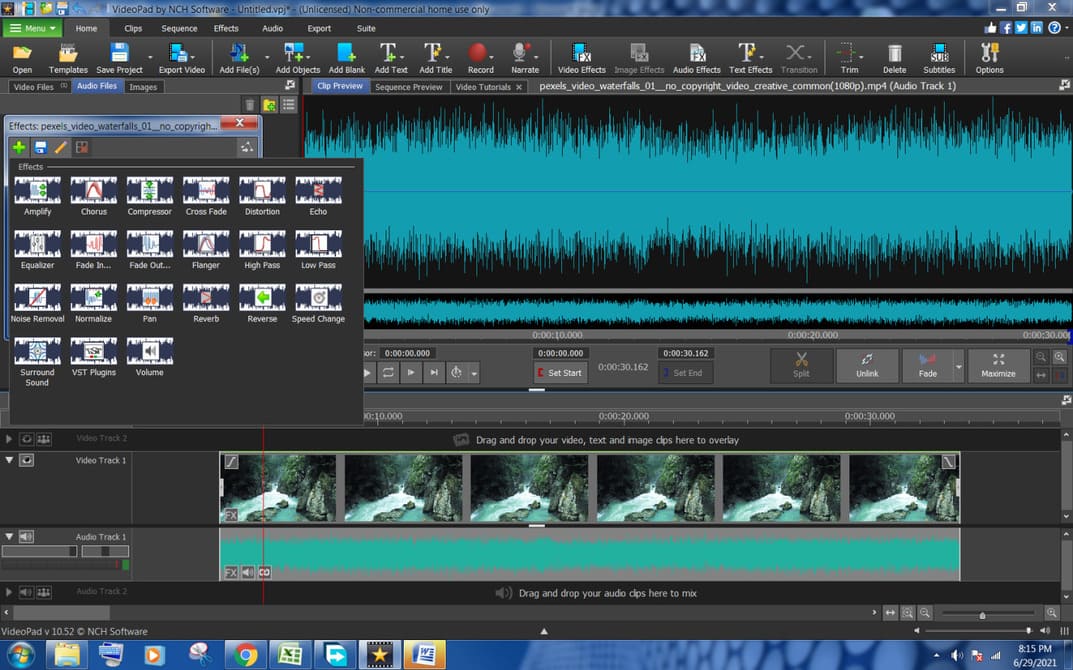
VideoPad is the last video editing software on this list but it is a very useful and easy software to edit videos with advanced features. It makes videos more engaging and engaging with the ability to add music. This video editing software allows anyone to add, mix, set and customize audio and video clips together. It provides two separate timelines, one for video and the other for audio editing. You can easily use different features on video and audio separately.
Advantage:
- Is a great choice for beginners because it is very simple and easy to use.
- Supports a lot of video formats.
- There is a free version with the necessary tools and features.
- There are many sound effects to build quality content.
- Allows users to use 360 editing.
- VideoPad supports HD resolutions.
- The ability to share videos on social networks is very diverse.
Defect:
- Sometimes, the text-to-speech feature crashes.
- Works a bit slow.
- There are limited text effects.
- No support animation videos.
- Paid subscription is required to use premium features.
Conclusion
Visual video content will be loved by everyone. Therefore, video creators always try to choose the best option to show their abilities and skills. I have listed 5 best video editing software to edit videos and create great music videos. You can use any of the video editing software on the list to create stunning videos. But I recommend Filme because it is an advanced and user-friendly tool. You can create music videos without any problems.