• Home
  • News
  • Software
  • Knowledge
  • MMO
  • Tips
  • Security
  • Network
  • Office
AnonyViet - English Version
  • Home
  • News
  • Software
  • Knowledge
  • MMO
  • Tips
  • Security
  • Network
  • Office
No Result
View All Result
  • Home
  • News
  • Software
  • Knowledge
  • MMO
  • Tips
  • Security
  • Network
  • Office
No Result
View All Result
AnonyViet - English Version
No Result
View All Result

How to view and delete activity history on Windows 10/Windows 11

AnonyViet by AnonyViet
January 26, 2023
in Tips
0

Windows 10 collects and saves a history of your computer and cloud activity, from browsing history to location information. Fortunately, Microsoft also makes it easy to view all of your stored data and allows you to delete activity history on your computer.How to view and delete activity history on Windows 10/Windows 11

Join the channel Telegram of the AnonyViet 👉 Link 👈

What data does Windows 10 track?

The data that Windows collects includes:

  • Browsing history
  • Bing search history
  • Location data (if location is enabled)
  • Voice when giving commands Cortana
  • Timeline feature

If you use a Microsoft HealthVault device or a Microsoft Band, all your activity will be collected through that service and it will also be stored. Microsoft says it collects this data to provide you with more relevant results and useful content for your search needs.

How to delete activity history on Windows 10

You can see what data Microsoft stores and how to delete it. There are two ways you can delete your recent activity on Windows 10:

  • From Settings
  • From a Microsoft cloud account.

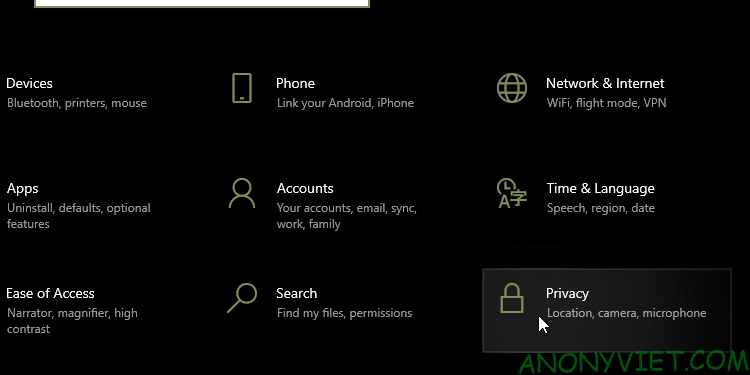
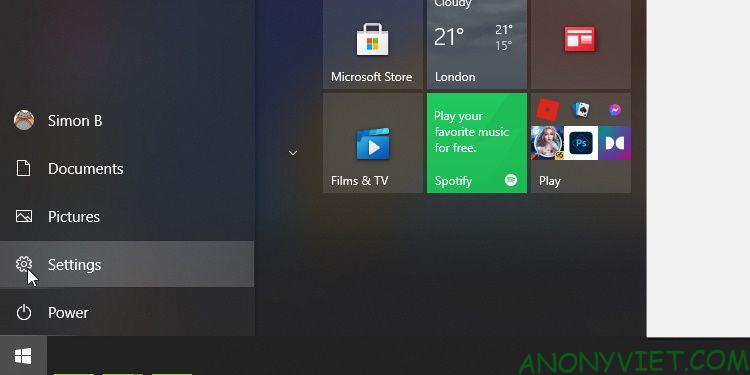
To do it on your computer, click the . button Settings on the Start menu.How to view and delete activity history on Windows 10/Windows 11 8
Then press Privacy.

How to view and delete activity history on Windows 10/Windows 11 9

In the menu on the left, select Activity History.
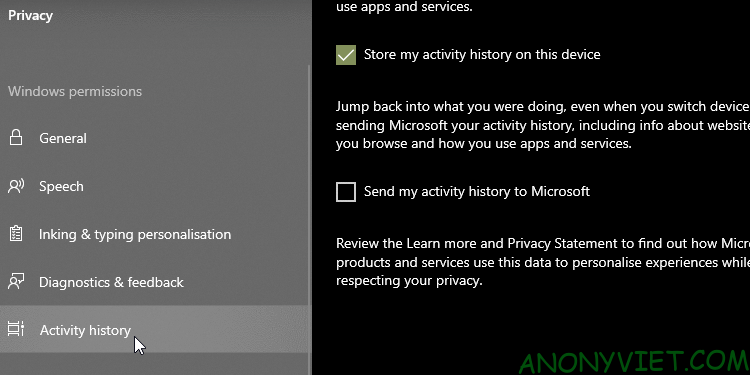
How to view and delete activity history on Windows 10/Windows 11 10

This will completely delete the activity history of the currently used account.

How to turn off activity tracking in Windows 10 timeline

Back in 2018, Microsoft added the feature Timeline track all your recent activities on Windows 10. You can view Timeline by pressing the key combination ALT + WindowS. You’ll see all currently open windows, as well as all the files you’ve opened so far.

To disable this feature, visit the page Activity History as you did above. From here, uncheck Store my activity history on this device. This prevents Windows from remembering what you’ve accessed, done on Timeline mine.

Then uncheck Send my activity history to Microsoft to prevent your data from being sent to Microsoft servers. Now that both settings are unchecked, your activities will not be tracked in the future.
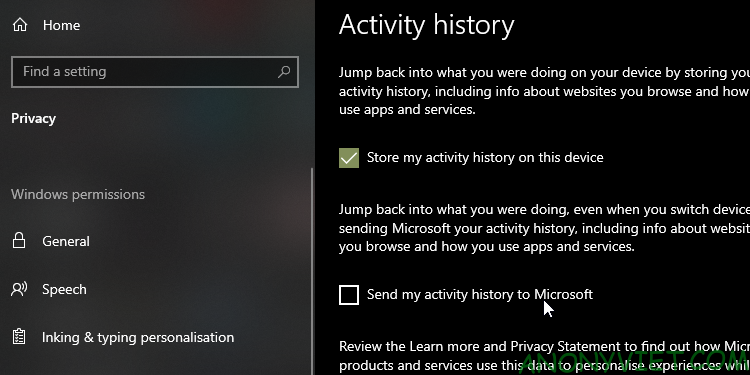
How to view and delete activity history on Windows 10/Windows 11 11

How to see all activity history on Windows 10

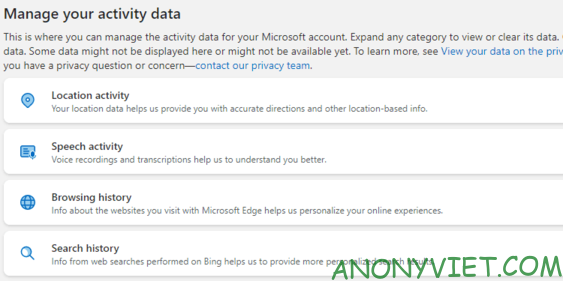
If you want to see all activity history on Windows 10, you can do it on Microsoft account security site. When you visit the site and log in, you’ll see a bunch of categories. Each category will take you to a page that shows all the information Microsoft has stored about you.

There’s a lot to learn on this page, but here’s a brief summary of the categories you should check out.

Activity history categories on Windows 10
How to view and delete activity history on Windows 10/Windows 11 12

Browsing history process the data you have stored through Microsoft’s Edge browser. As such, if you only use Edge to download Firefox or Chrome, there probably won’t be much data there. If Edge is your primary browser, see what data is stored here.

Search History only useful if you use Bing. When you use a search engine like Google, they tend to “Remember” what you searched for to improve your experience. Microsoft uses your search data to better tailor search results, and improves Cortana for future search results and suggestions.

Location Activity including times you’ve allowed your Windows device to access your location. You should double check this to see if Windows is storing your location.

Speech Activity should come first if you’ve used Cortana before. Here you’ll find audio files saved when you voice search with Cortana, which is used by Microsoft for better speech recognition.

Media Activity is where Microsoft keeps track of what you like to see to add to your recommendations. If you’re getting weird recommendations because of something other people have seen, you should check back.

Apps and services including how you use Microsoft products. This list is divided into two parts; Activity for the actions you have taken and performance for system log.

You can also click the tab Activity History to see a complete list of all data such as: voice, search, browsing history and location information. Microsoft also makes it easy to filter by category by clicking on it.

Keep your data safe in Windows 10/11

Windows 10 won’t protect your privacy by default, but you can monitor your data and adjust your privacy settings to suit your needs.

Now that your data in Windows 10 is secure, it’s time to ensure that all programs and settings on your PC are equally stable. There are many things you can do to improve the security of your computer, such as uninstalling Flash and creating a restore point.


The article achieved: 5/5 – (100 votes)

Tags: 10WindowsactivitydeletehistoryviewWindows
Previous Post

R MobileTrader: Multi-Platform Online Trading App

Next Post

Hacker attacks to take over your account

AnonyViet

AnonyViet

Related Posts

Quét lỗ hổng bảo mật cho Vide Coding bằng Security Audit Skill
Tips

Quét lỗ hổng bảo mật cho Vide Coding bằng Security Audit Skill

October 27, 2026
Instructions for registering for OxionAI Pro for 1 year with many powerful AI models
Tips

Instructions for registering for OxionAI Pro for 1 year with many powerful AI models

October 24, 2026
How are Windows 11 Pro and Windows 10 Pro different?
Tips

How are Windows 11 Pro and Windows 10 Pro different?

October 23, 2026
Instructions for using CleanYourTV: Remove ads on Android TV, Google TV
Tips

Instructions for using CleanYourTV: Remove ads on Android TV, Google TV

October 23, 2026
How to use Messenger without a Facebook account
Tips

How to use Messenger without a Facebook account

October 22, 2026
The website helps you draw beautifully like TikToker Viet My
Tips

The website helps you draw beautifully like TikToker Viet My

October 21, 2026
Next Post
Hacker attacks to take over your account

Hacker attacks to take over your account

0 0 votes
Article Rating
Subscribe
Login
Notify of
guest

guest

0 Comments
Oldest
Newest Most Voted

Recent News

How to play the mosquito swatter game, calling students’ names and asking them to return their homework

How to play the mosquito swatter game, calling students’ names and asking them to return their homework

October 28, 2026
Quét lỗ hổng bảo mật cho Vide Coding bằng Security Audit Skill

Quét lỗ hổng bảo mật cho Vide Coding bằng Security Audit Skill

October 27, 2026
Postpaid for new employees: Should you start using it?

Postpaid for new employees: Should you start using it?

October 26, 2026
How to create a UFO Game that calls students to return their homework

How to create a UFO Game that calls students to return their homework

October 26, 2026
How to play the mosquito swatter game, calling students’ names and asking them to return their homework

How to play the mosquito swatter game, calling students’ names and asking them to return their homework

October 28, 2026
Quét lỗ hổng bảo mật cho Vide Coding bằng Security Audit Skill

Quét lỗ hổng bảo mật cho Vide Coding bằng Security Audit Skill

October 27, 2026
Postpaid for new employees: Should you start using it?

Postpaid for new employees: Should you start using it?

October 26, 2026
AnonyViet - English Version

AnonyViet

AnonyViet is a website share knowledge that you have never learned in school!

We are ready to welcome your comments, as well as your articles sent to AnonyViet.

Follow Us

Contact:

Email: anonyviet.com[@]gmail.com

Main Website: https://anonyviet.com

Recent News

How to play the mosquito swatter game, calling students’ names and asking them to return their homework

How to play the mosquito swatter game, calling students’ names and asking them to return their homework

October 28, 2026
Quét lỗ hổng bảo mật cho Vide Coding bằng Security Audit Skill

Quét lỗ hổng bảo mật cho Vide Coding bằng Security Audit Skill

October 27, 2026
  • Home
  • Home 2
  • Home 3
  • Home 4
  • Home 5
  • Home 6
  • Next Dest Page
  • Sample Page

say88 tỷ lệ kèo nhà cái kèo nhà cái 5 febet

No Result
View All Result
  • Home
  • News
  • Software
  • Knowledge
  • MMO
  • Tips
  • Security
  • Network
  • Office

say88 tỷ lệ kèo nhà cái kèo nhà cái 5 febet

wpDiscuz
0
0
Would love your thoughts, please comment.x
()
x
| Reply