App to fix printer errors This automation was created for people who are lazy to remember complex command lines. With just a few mouse clicks, all client server connection problems are resolved. Let’s go together AnonyViet See how magical this tool works.
📢 Join the channel Telegram belong to AnonyViet
Update new articles, cool tools and IT tips fastest
Obsession when sharing printers
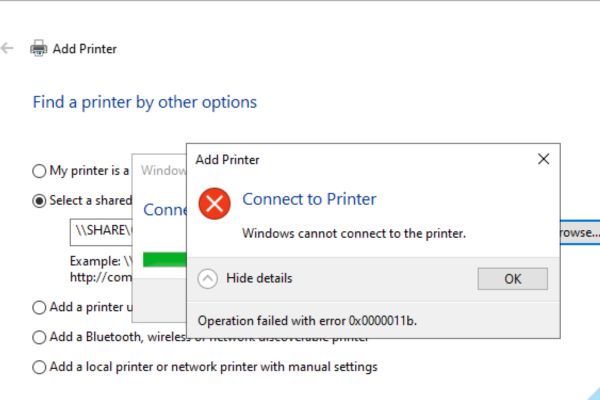
Working in IT office support is the hardest part, especially dealing with LAN printers. Every once in a while, Microsoft releases new security updates for Windows 10 Windows 11 It was like the next morning the whole company was in chaos. Some people say they can’t print, others report a red error 0x0000011b on the screen. At times like that, sitting around typing each CMD command line or fumbling around in the Registry Editor is really a waste of time. There are even times when after finishing work on one machine, another machine fails.
Instead, I started searching technical forums to find a good app to fix printer errors. Luckily I got hold of your tool Bao Tin Computer. This software collects all the most common error scenarios into one interface. Thanks to that, every time someone calls to install a printer, I just need to pull out the tool and click a few times and the job is done. Customers look at me and see that I work quickly, quickly, and professionally.
Basic information about the printer error repair app
The beauty of this tool is that it is completely free. Author Bao Tin Computer wrote it mainly to give it to the community for convenience. The software interface is completely in Vietnamese so it is extremely easy to understand.
If you look at the left column you will immediately see the list 8 errors classic that office workers often encounter. From the error of not being able to connect to a shared printer to confusing error codes like 0x00000709 are all present. Therefore, you do not need to go online to look up what this error code means anymore. Whenever you see an error message, select the correct line on the software.
To the right of the interface is a frame operation log. This frame is very useful because it shows in detail what the software process is doing. It will tell you if the server can be pinged or if SMB port 445 is open.
Instructions on how to use the app to fix printer errors
For the software to operate smoothly and deeply intervene in the system, you need to grant it the highest administrative rights. Below are the most standard operating steps that I often do.
Step 1: Download the software file to your computer HERE. Remember to download it to your computer, which means the computer needs to connect to that printer.
Step 2: Right click on the downloaded file and select Run as Administrator. If you forget this step, there is also a purple button on the software interface that says Restart with Admin rights. You can also click on it.
Step 3: Look at the Select error column to correct on the left. Whatever condition your computer is in, check that box. For example, if the machine reports error 0x0000011b, select item number 2.
Step 4: Click the button Check connection blue. At this time, this printer error repair app automatically does all the network testing steps. It will try to ping the server to see if the network is available.
Step 5: Read the message in the right log pane. If you see the software reporting a red X, it means it has detected a corresponding error. Now you just need to press the button AUTOMATIC FIX Green on the left is done.
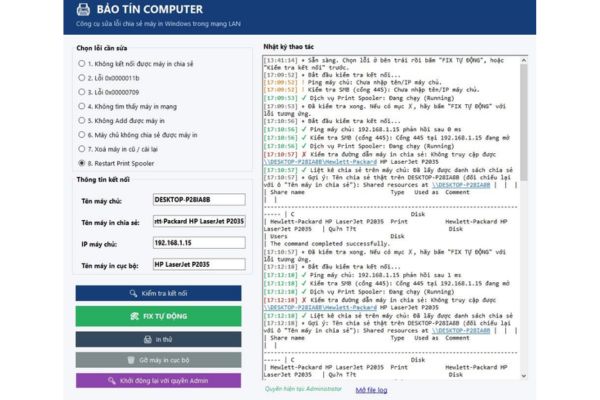
There is an extremely important note that people often confuse. For most errors from items 1 to 5 and items 7 and 8, we run the tool on the client computer. But only the one item number 6 If the server cannot share a printer, you must copy this software over server to run. The server here is the computer that is plugging the USB cable directly into the printer.
Conclusion
Thanks to the author for creating one app to fix printer errors Extremely practical and completely free. Office workers or technicians can boldly download and use it whenever the LAN network is bad. Make sure everyone’s printing work will always go smoothly.
Frequently Asked Questions (Q&A)
1. Can this software be used for Windows 7?
This tool is designed and best optimized to fix errors on Windows 10 and Windows 11 operating systems.
2. Should the software be run on a server or a client?
For most errors, you will run the tool on the client computer. As for item number 6, the error message is that it cannot be shared, so you must copy it to run on the server.
3. How to fix error 0x006 or print job jam with this tool?
Please clear all the stuck print jobs first. Then open the app, select item number 8 (Restart Print Spooler) and click “AUTO FIX” to let the software restart the printing service and you’re done.