

How to avoid Adblock detection on Youtube will help you completely resolve the situation where videos cannot be played due to ad blocking errors. Instead of having to pay for expensive subscription packages, we can use browser tricks to overcome this barrier. Let’s find out each method in detail with AnonyViet in the article below.
📢 Join the channel Telegram belong to AnonyViet
Update new articles, cool tools and IT tips fastest
4 ways to avoid Adblock detection on Youtube
Method 1: Do not use random ad blocking utilities
The market today is flooded with extensions, but not all tools are safe and capable of bypassing Google’s continuous scanning system. Indiscriminate installation not only makes you fail to find ways to avoid Adblock detection on Youtube, but also puts you at risk of unauthorized personal data collection.
To choose the correct tool, follow these instructions:
Step 1: You go to your browser’s add-on store and look for tools with the highest star ratings.
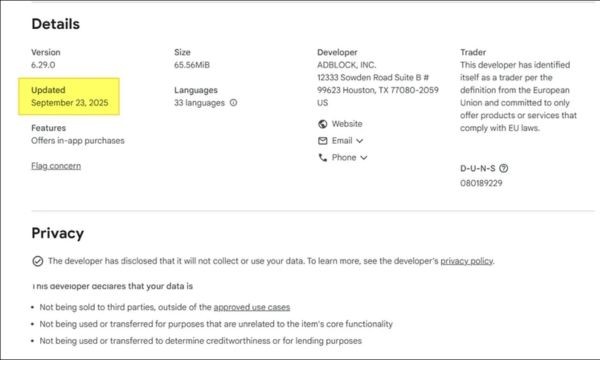
Step 2: Carefully check the last update time of that utility.
Step 3: Immediately remove tools that have not been updated within the past 2 weeks, because Google patches bugs very quickly so old versions will no longer be effective.
Step 4: You should skim through the privacy terms to make sure the utility does not collect user data before clicking install.
Method 2: Disable JavaScript
JavaScript is the programming language that brings websites to life, but it’s also the tool YouTube uses to detect whether you’re using ad blocking software. Turning off JavaScript is a temporary but very effective way to avoid Adblock detection on Youtube.
You can install utilities that quickly enable/disable JavaScript, or do it manually on Chrome as follows:
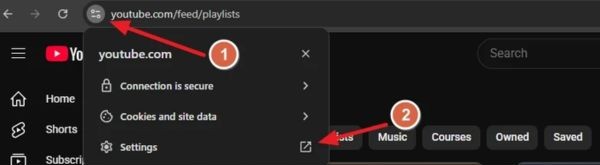
Step 1: You open the page YouTube Go up and click on the padlock icon located next to the web address bar.
Step 2: You click on the item Setting (Settings) to open the permissions panel.
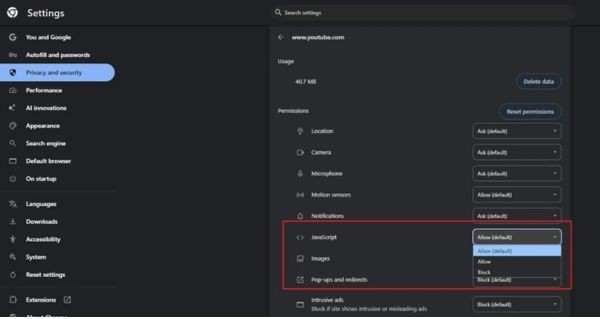
Step 3: Scroll your mouse to find the text JavaScript located in the Permissions section.
Step 4: You click on the drop-down menu and switch the status to Block (Block) to complete.
Method 3: Change DNS address
If you don’t want to rely on extensions, changing DNS is a great alternative. Servers DNS Security services like Mullvad DNS, NextDNS or Bancuh DNS have the ability to filter out domain names containing advertising right from the network level. This is a very safe and stable way to avoid Adblock detection on Youtube.
How to set up on Chromium core browsers (Chrome, Edge, Brave):
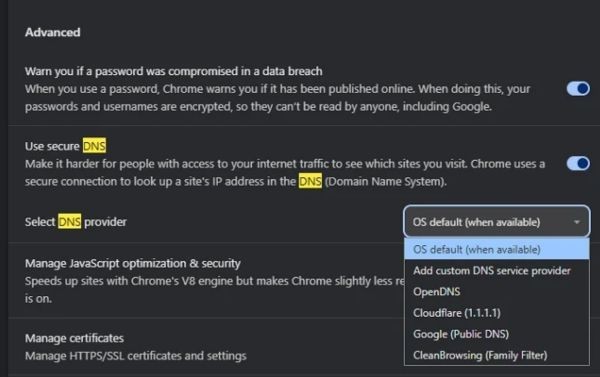
Step 1: You open the section Setting browser and type “DNS” into the search box.
Step 2: Click the tab Security is highlighted on the screen.
Step 3: You find the item Select DNS providerthen select the box Add custom DNS service provider.
Step 4: You paste the link https://all.dns.mullvad.net/dns-query in the blank box (here we use Mullvad DNS as an example).
How to set up on Firefox browser:
Step 1: Visit Setting and select item Privacy & Security.
Step 2: You scroll down and select a level Max Protection at section Enable secure DNS using.
Step 3: Click menu Choose provider and click on the letter Custom.
Step 4: You paste the link https://all.dns.mullvad.net/dns-query into the frame and press Enter.
Method 4: Use a VPN with built-in ad blocking
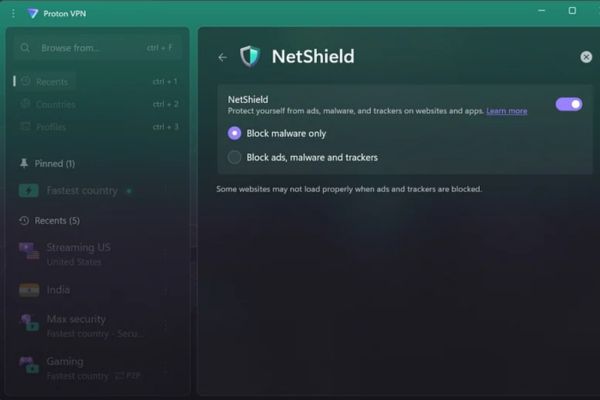
Top paid virtual private network (VPN) providers such as ExpressVPNProtonVPN, NordVPN or Surfshark not only help you stay anonymous but also come with extremely powerful ad filters. If you already own a premium VPN account, this is the easiest way to avoid Adblock detection on Youtube.
Step 1: Open the VPN application installed on your computer or phone.
Step 2: Go to the app’s settings and search for the ad blocking feature (Adblocker/Threat Protection).
Step 3: Flip the switch to activate this feature.
Step 4: Connect to any server and comfortably watch videos without needing to install any other add-ons on your browser.
Compare 4 ways to avoid Adblock detection on Youtube
Below is an overview of ways to avoid Adblock detection on Youtube that we will learn, ensuring it does not damage your browser.
| Method of application | Outstanding advantages | Disadvantages to note |
| Use reputable utilities | Easy to install and use for everyone. | Regular version updates are required. |
| Disable JavaScript | Immediately block tracking codes. | Some interactive web features may be lost. |
| Change DNS address | Block ads from deep within the network. | Needs manual setup on the browser. |
| Use a premium VPN | Absolute data security and good ad blocking. | It costs money to maintain quality VPN service packages. |
Conclusion
In short, applying ways to avoid Adblock detection on Youtube will help you regain a seamless entertainment experience like before. However, if possible, you should still consider signing up for an official service package to support content creators. Wishing you success and wonderful moments of relaxation.
Frequently Asked Questions (Q&A)
1. Do ad blockers make YouTube load slower?
Yes, sometimes this will happen. As the extension works to block ad streams, the video you select may take a little longer to load in the first few seconds, or briefly appear on a black screen before playing.
2. Is using ad blocking software illegal?
Absolutely not. However, ads are the main source of income to keep the site running and pay content creators, so blocking them reduces their incentive to produce quality videos.
3. How to completely stop being detected by YouTube blocking ads?
The race between YouTube and ad blocker developers is a continuous cycle. To permanently end the warning without having to constantly update tips, the only and most official way is to sign up for the YouTube Premium package.









