Each added application silently consumes memory, runs background processes and creates small frictions that you only notice when your computer starts to slow down for no apparent reason. Notifications pile up, updates are constant, and then you have a “busy” system even when you’re doing nothing.
📢 Join the channel Telegram belong to AnonyViet
Update new articles, cool tools and IT tips fastest
Meanwhile, your browser has already done most of this work. It just doesn’t promote it.
Modern browsers like Google Chrome and Microsoft Edge have become an almost complete working environment. If used correctly, you can replace a significant number of individual apps without losing functionality — even faster and simpler.

Here are 5 practical ways to do it.
Turn your website into a real desktop application
Many people install apps for services they already use on the web, such as messaging, music, dashboards, or notes. What’s interesting is that most of these applications are just “covers” for the web interface itself.
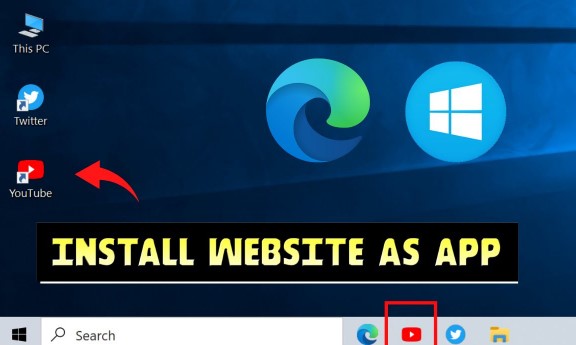
Currently, browsers allow you to install websites as Progressive Web App (PWA). This means you can open a web page in a separate window, no tabs, no bookmarks, no familiar browser clutter. It works like a native app, has its own icon and runs independently.
The effect is subtle but very clear. You can separate contexts. Messaging tools no longer sit among dozens of tabs. The music player doesn’t get lost among the research pages. Everything becomes more intentional.
You also avoid installing many heavy applications that essentially have the same functions. With everyday tools, the experience is almost no different from the real app — just lighter and faster.
This change alone can help you uninstall several applications immediately.
Replace the note taking app with an in-browser system
Most note-taking apps promise better organization, synchronization, and ease of access. But in reality, they’re usually just text editors with cloud storage.
You don’t need a separate app for that.
With browser-based tools like Notion or Google Docs, you can build a lightweight system that functions almost like installed software. Combined with pin tabs and a simple bookmark system, you have a very efficient workflow.
The benefit is not just RAM savings, but cascading reduction. No separate login environment, no synchronization errors between devices, no version differences. You open your browser — everything is ready.
Searching is also better. You can leverage browser search, history, or even URL structure to find faster than searching within the app.
In most workflows like writing, planning, or saving ideas, this method completely replaces the traditional note-taking app without any significant loss. It’s even more convenient because it’s not device dependent.

Remove screenshot and annotation apps
Screen capture software is a prime example of unnecessary installation. Many people install a whole program just to take a photo, crop it, add a few arrows and send it.
Browsers have done this very well through extensions.
You can capture the entire page (including scrolling), edit it instantly, and export the file in seconds. No need to open another app, no need to wait for loading, no additional cumbersome interface.
This is especially useful if you frequently share information, report bugs, or document your workflow. Everything happens right in the same environment.
You also eliminate background processes that are always running just “in case” you need to take a screenshot. Functions appear only when you need them — and disappear when not in use.
A small change, but greatly reduces friction.
Review your use of a password manager
Password manager is one of the most popular “must have” applications. And in some cases, especially high security, they are completely justified.
But modern browsers have caught up quite a bit.
Chrome and Edge both have built-in password management systems that handle storage, autofill, and syncing between devices. For many people, that’s all the functionality they actually use every day.
The advantage here is neatness. Fewer tools handling sensitive data, faster logins, and one less app running in the background.
Of course, this is not the solution for everyone. If you need shared vaults, advanced encryption controls, or enterprise-level security, specialized tools are still necessary.
But for personal use, many people are complicating their systems unnecessarily. The browser already has a simple and sufficient solution.
Sometimes, the smart choice is not to add, but to subtract.

Turn your browser into a work management environment
Task management apps are everywhere — from minimalist to complex, even AI. But most add complexity instead of clarity.
A simpler way: use the browser itself as the working environment.
With group tabs, pin tabs, and a little discipline, you can organize your work in an intuitive way. A tab group is a project. A pinned tab is an anchor — something important and always present.
You can also use lightweight services like Trello directly on the web, no installation required. What matters is not the tools, but reducing the friction between thinking and doing.
This works because it’s instant. You don’t have to switch contexts between apps. Work, reference and action are all in the same space.
Not perfect. Can become messy if not controlled. But if kept simple, it’s faster than most specialized systems because it eliminates intermediate steps.
And that’s where productivity is often lost.
The real problem is accumulation
Most people don’t lack tools. They have too many.
Each new app promises efficiency, but at the same time brings with it maintenance, updates, background activity, and perceived pressure. Over time, it all adds up to a heavy system.
Browsers offer a different approach. Do not add ingredients, but combine. It becomes a central layer where the majority of operations can take place without constant switching.
That doesn’t mean you have to delete every app. Some tools really need native performance or deep system access. But many do not. And those are the things that are slowing you down.
When you start replacing apps with browser-based solutions, something interesting happens. Lighter system. Workflow is more direct. And you spend less time managing tools, more time using them.
For example, even if you need to process content quickly, a tool like a video editing tool Clideo Can run directly in the browser without installation, helping you save significant resources and time. You can also find many similar utilities above App Store If you want to expand your capabilities while still keeping your workflow compact.
It’s not just about saving RAM or money, it’s about eliminating unnecessary complexity in the way you work.