• Home
  • News
  • Software
  • Knowledge
  • MMO
  • Tips
  • Security
  • Network
  • Office
AnonyViet - English Version
  • Home
  • News
  • Software
  • Knowledge
  • MMO
  • Tips
  • Security
  • Network
  • Office
No Result
View All Result
  • Home
  • News
  • Software
  • Knowledge
  • MMO
  • Tips
  • Security
  • Network
  • Office
No Result
View All Result
AnonyViet - English Version
No Result
View All Result

How to mute AirPods when charging so as not to disturb others

AnonyViet by AnonyViet
March 15, 2026
in Knowledge
0

How to mute AirPods when charging is the perfect solution if you find the “ting” sound every time you connect the charging cable to be too noisy. Although this feature helps identify the device that has received power, many users still prefer traditional silence like older generations. Please refer to the detailed operating instructions below.

📢 Join the channel Telegram belong to AnonyViet


👉 Go to Telegram AnonyViet

Update new articles, cool tools and IT tips fastest

Which AirPods models have external speakers?

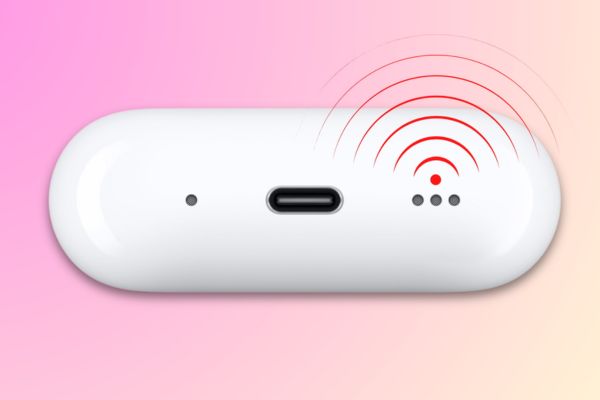
The pcs AirPods The new generation not only upgrades the sound quality, but their charging box is also equipped with an external speaker. This equipment helps users easily find devices or recognize charging status. However, this noise sometimes causes annoyance for some users.

Before going into settings, it is necessary to determine whether your device supports this feature or not. Only the following charging case models have built-in speakers:

  • AirPods 4 (Version with Active Noise Cancellation – ANC).
  • AirPods Pro 2 (Both Lightning and USB-C port versions).
  • AirPods Pro 3.

In contrast, the regular AirPods 1, 2, 3, AirPods 4 and original AirPods Pro do not have speakers on the charging case, so they are inherently silent.
How to mute AirPods when charging so as not to disturb others
Which AirPods models have external speakers?

When does the charging box make sound?

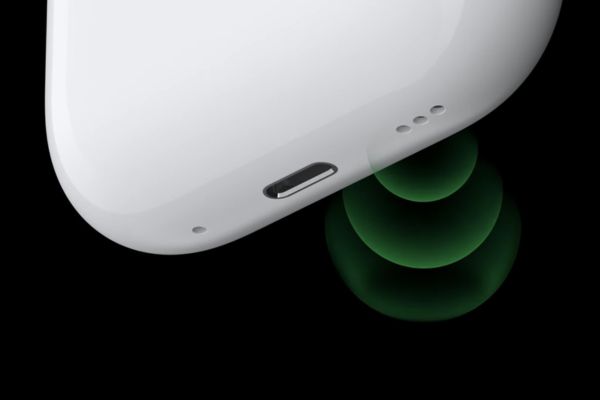
The charging box will beep in the following specific cases:

  • When you start charging (wired or wireless).
  • When the battery of the charging box reaches a very low level.
  • When activating the Find My feature to locate.
  • During reset or initial setup.

Special note: Sometimes the charging box makes a small ringing sound randomly. Apple Confirm this is a microphone and speaker testing feature for hearing health functions, ensuring the device is working properly.
When does the charging box make sound?

Instructions on how to mute AirPods when charging

If you find it annoying, you can completely turn off the charging and low battery notification sounds. To do this, users only need to follow a few simple steps right on the connected device.

Note: Turning off this sound will apply both when plugged in and when the battery is low, but the sound from the “Find My” feature will still work normally to ensure safety.

Step 1: Connect AirPods to your iPhone, iPad, or Mac.

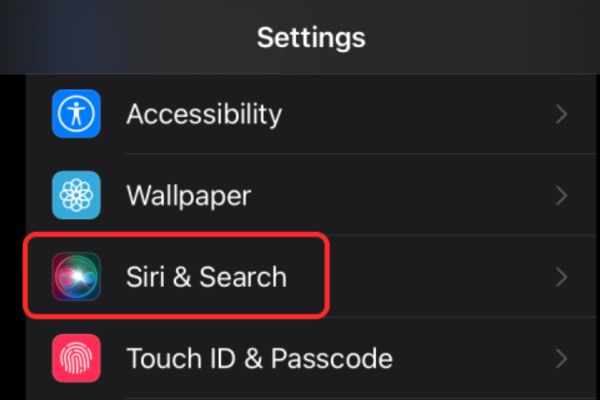
Step 2: Open the app Settings on iOS or System Settings on macOS.

Step 3: Tap your AirPods name near the top of the settings menu.

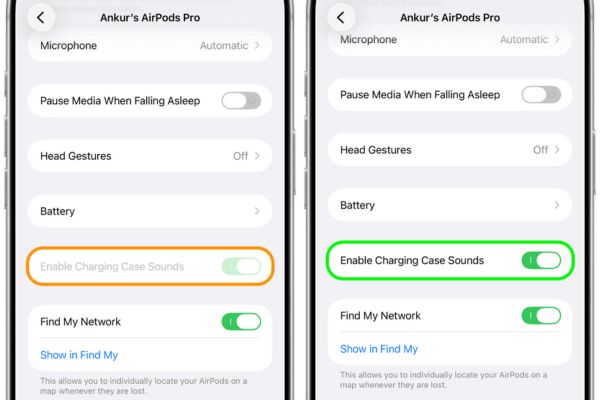
Step 4: Find item Enable Charging Case Sounds and turn the switch to Off.

Once turned off, the charging case will be silent when you plug in the charging cord, providing a more discreet experience.
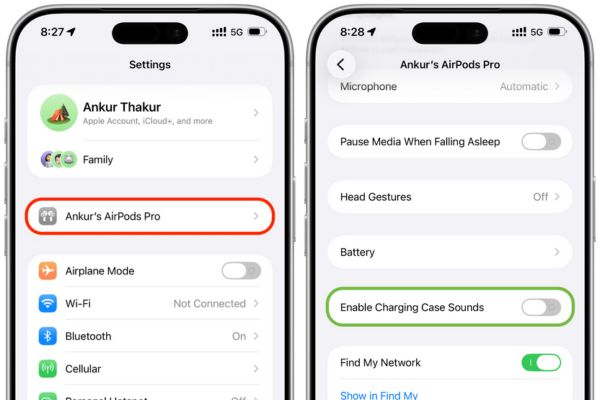
Instructions on how to mute AirPods when charging

Fix blurry options issue

In some cases, you will see the Enable Charging Case Sounds section grayed out and inoperable. To solve this problem, you can apply a few tips below:

  • Exit the application completely Settings and reopen.
  • Put the headphones in the box, close the lid and wait approx 15 seconds then try again.
  • Disconnect and re-pair AirPods with your phone.
  • Restart your iPhone.
Fix blurry options issue

What to do if it’s turned off but you still hear the sound?

If you have properly muted the AirPods when charging and the charging box still makes noise, the device may be experiencing a software or hardware error.

  • Please check and make sure the headset has been updated to the latest version.
  • Reset AirPods and reinstall from the beginning. Note: After resetting, the sound will automatically turn back on, you need to manually turn it off again.
  • If all of the above doesn’t work, bring your device to an Apple Store or service center for a thorough inspection.

What to do if it's turned off but you still hear the sound?
What to do if it’s turned off but you still hear the sound?

Conclusion

With How to mute AirPods when charging just shared, the alarm will now no longer disturb your sleep or concentration. This is a small but very subtle feature that Apple provides to users. Wishing you a successful application!


Tags: AirPodschargingdisturbmute
Previous Post

How to convert normal music into 8D music with Audioalter

Next Post

How to install Siri to read application notifications on iPhone 17 is extremely simple

AnonyViet

AnonyViet

Related Posts

What is eTax Mobile? How to install, log in and look up tax code on the phone
Knowledge

What is eTax Mobile? How to install, log in and look up tax code on the phone

November 13, 2026
What to eat for lunch today: Website suggested dishes for CS2-style office workers
Knowledge

What to eat for lunch today: Website suggested dishes for CS2-style office workers

November 11, 2026
How to get $250 in Docker credits to run AI Agent for free
Knowledge

How to get $250 in Docker credits to run AI Agent for free

November 3, 2026
Postpaid for new employees: Should you start using it?
Knowledge

Postpaid for new employees: Should you start using it?

October 26, 2026
How to create a UFO Game that calls students to return their homework
Knowledge

How to create a UFO Game that calls students to return their homework

October 26, 2026
Instructions on how to exit iOS 27 Beta and update to the official version
Knowledge

Instructions on how to exit iOS 27 Beta and update to the official version

October 22, 2026
Next Post
How to install Siri to read application notifications on iPhone 17 is extremely simple

How to install Siri to read application notifications on iPhone 17 is extremely simple

0 0 votes
Article Rating
Subscribe
Login
Notify of
guest

guest

0 Comments
Oldest
Newest Most Voted

Recent News

How to cancel Facebook Plus package to avoid automatic renewal

How to cancel Facebook Plus package to avoid automatic renewal

November 23, 2026
SSHWATCH: Dashboard to see realtime VPS attacks using Honeypot

SSHWATCH: Dashboard to see realtime VPS attacks using Honeypot

November 23, 2026
Detailed review of realme C01: Breaking the stereotype of cheap smartphones with 6,500 mAh battery and 120Hz screen

Detailed review of realme C01: Breaking the stereotype of cheap smartphones with 6,500 mAh battery and 120Hz screen

November 23, 2026
Purple Team: How to verify that the monitoring system can actually detect attacks

Purple Team: How to verify that the monitoring system can actually detect attacks

November 23, 2026
How to cancel Facebook Plus package to avoid automatic renewal

How to cancel Facebook Plus package to avoid automatic renewal

November 23, 2026
SSHWATCH: Dashboard to see realtime VPS attacks using Honeypot

SSHWATCH: Dashboard to see realtime VPS attacks using Honeypot

November 23, 2026
Detailed review of realme C01: Breaking the stereotype of cheap smartphones with 6,500 mAh battery and 120Hz screen

Detailed review of realme C01: Breaking the stereotype of cheap smartphones with 6,500 mAh battery and 120Hz screen

November 23, 2026
AnonyViet - English Version

AnonyViet

AnonyViet is a website share knowledge that you have never learned in school!

We are ready to welcome your comments, as well as your articles sent to AnonyViet.

Follow Us

Contact:

Email: anonyviet.com[@]gmail.com

Main Website: https://anonyviet.com

Recent News

How to cancel Facebook Plus package to avoid automatic renewal

How to cancel Facebook Plus package to avoid automatic renewal

November 23, 2026
SSHWATCH: Dashboard to see realtime VPS attacks using Honeypot

SSHWATCH: Dashboard to see realtime VPS attacks using Honeypot

November 23, 2026
  • Home
  • Home 2
  • Home 3
  • Home 4
  • Home 5
  • Home 6
  • Next Dest Page
  • Sample Page

say88 tỷ lệ kèo nhà cái kèo nhà cái 5 febet

No Result
View All Result
  • Home
  • News
  • Software
  • Knowledge
  • MMO
  • Tips
  • Security
  • Network
  • Office

say88 tỷ lệ kèo nhà cái kèo nhà cái 5 febet

wpDiscuz
0
0
Would love your thoughts, please comment.x
()
x
| Reply